TradeLocker Review: The Platform, Pro Pricing, Prop Firm Use and Our Verdict
TradeLocker is a free web, desktop and mobile trading platform for forex and CFDs that brokers and prop firms license instead of MetaTrader. It has built-in TradingView charts, one-click risk tools and a practice account. An optional Pro plan ($17.50 a month) adds analytics and more alerts. It cannot run MetaTrader EAs or custom TradingView indicators. Rating: 4.0/5.
TradeLocker became the platform a lot of forex prop traders meet first, mostly because firms needed something other than MetaTrader. Is it a stopgap or a better tool? I went through the platform, its Pro plan, its help centre and the list of firms that use it on 11 November 2026. This review covers what it costs, what it does well, what it cannot do, and who should pick it.
What is TradeLocker?
TradeLocker is a trading platform, not a broker. It is built by TradeLocker Limited, a company registered in Ireland (number 729047, registered office in Dublin), and third-party trackers date its launch to 2023. Brokers and prop firms license it and give it to their clients the way they used to give out MetaTrader 4 or 5. You never pay TradeLocker to trade; you open an account with a firm that offers it and log in with the details that firm sends you.
The platform runs in a browser, as a desktop app and on iOS and Android. The trading screen is built around TradingView's charting library, so the drawing tools, timeframes and indicator menu will feel familiar if you chart on TradingView. Orders, positions and a risk calculator sit next to the chart rather than in a separate terminal window.
Its rise is tied to the prop firm industry. When MetaQuotes started withdrawing MetaTrader licences from some prop firm providers in 2024, firms needed a replacement quickly, and many chose TradeLocker, DXtrade or Match-Trader. That is why TradeLocker shows up in so many prop firm checkouts today, and why US traders at forex prop firms often have no other choice.
How much does TradeLocker cost?
The platform itself is free. Your costs come from the broker (spreads and commissions) or the prop firm (the challenge fee). TradeLocker earns its money from the firms that license it.
What is new is TradeLocker Pro, a paid add-on for traders. It sits on top of a free TradeLocker Profile that links all your accounts, from any firm, in one place.
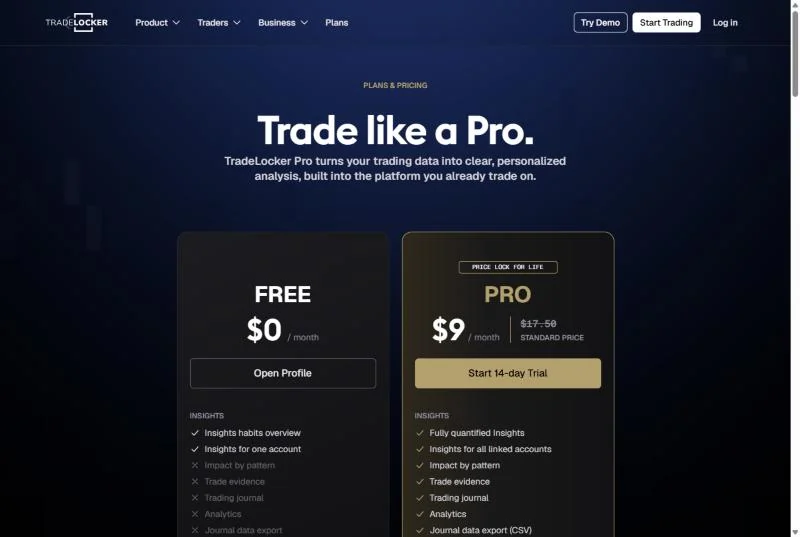
| Feature | Free ($0) | Pro ($17.50 a month) |
|---|---|---|
| Trading, risk calculator, stop loss and take profit | Included | Included |
| Linked accounts and practice account | Unlimited | Unlimited |
| Studio: strategy builder, local bots, desktop backtesting | Included | Included |
| Charts per tab / active price alerts | 4 / 10 | 8 / 100 |
| Market Scanner timeframes | Daily | Daily, 1h and 15m |
| Insights, trading journal, analytics, CSV export | Overview, one account | Full, all linked accounts |
Pro's standard price is $17.50 a month with a 14-day trial. In November 2026 TradeLocker ran a launch offer: start the trial with a card by 17 November and keep $9 a month for as long as you stay subscribed. Both plans keep the things that matter for trading itself (order entry, the risk calculator, stops and targets, full trade history, Studio and the practice account), so Pro is a nice-to-have, not a requirement.
Is it worth it? If you keep a separate trading journal already, probably not. If you run several prop accounts and want one view of your habits across them, the Insights and journal features are the reason to pay.
What does the TradeLocker platform look like?
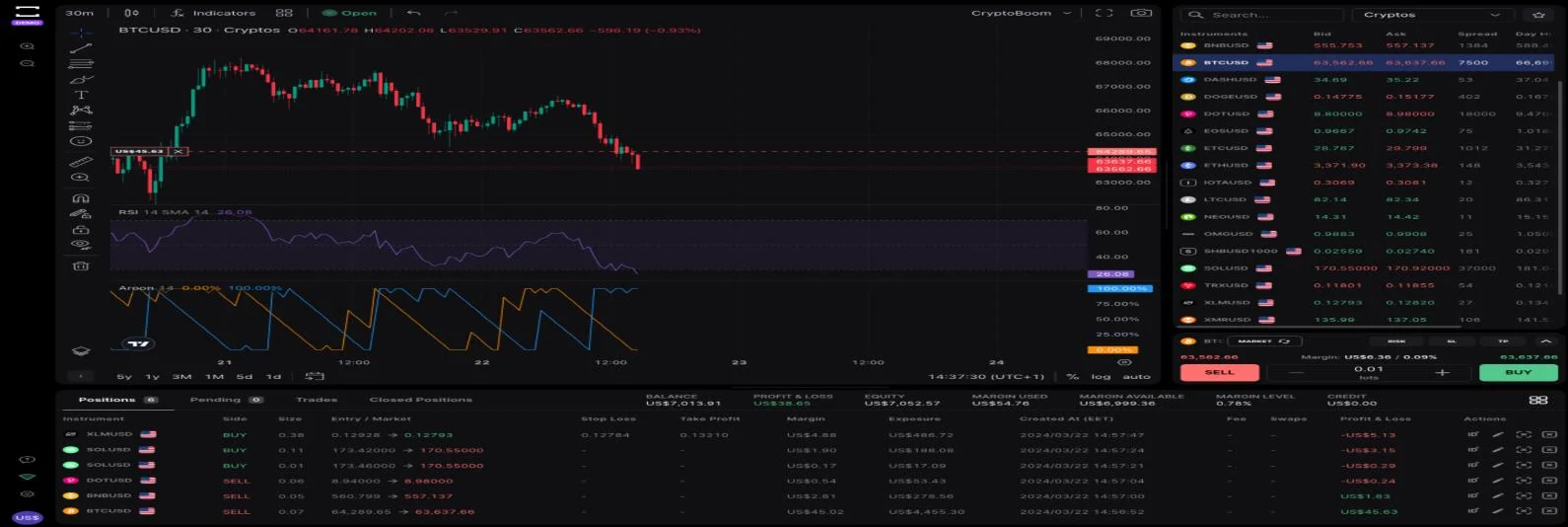
The layout has four parts: a chart area with TradingView tools on the left, an instrument list with bid, ask and spread on the right, an order ticket under the instrument list, and a positions panel along the bottom. The positions panel shows balance, equity, margin used and margin level, which is the line a prop trader should watch.
Three things stand out in daily use:
- Risk-first order ticket. You can enter size as lots or as a cash risk, set the stop and target on the chart by dragging, and see the money at risk before you click. That alone prevents a lot of position sizing mistakes.
- Several charts per tab. The free plan allows four charts per tab and ten active price alerts; Pro raises that to eight charts and a hundred alerts.
- One login for several accounts. The Profile links accounts from different firms, which helps if you run more than one challenge at once.
It is less suited to heavy order-flow work. There is no depth-of-market ladder like the ones in order flow platforms, and the chart indicators are limited to the built-in TradingView set.
Indicators that prove themselves in public.
One engine, four precision tools — the Gold (XAU) Scalper, the institutional Gravity Zone, the Zeno momentum Oscillator, and Zeno Stocks for equities.
Which prop firms and brokers use TradeLocker?
TradeLocker's own hub listed about 28 prop firms when I checked. Among the firms I have reviewed separately, these offer it:
- E8 Markets: TradeLocker and Match-Trader are the only platforms open to US clients.
- Blue Guardian: US residents can trade forex and CFD accounts on TradeLocker or Match-Trader, not MT5.
- Alpha Capital Group: TradeLocker alongside MT5, cTrader and DXtrade.
- FTUK, FunderPro, Top One Trader, Aqua Funded, OFP Funding and Funding Traders, among others on the hub.
Two practical points. First, the platform is chosen at checkout and usually cannot be switched after the first trade, so decide before you pay. Second, the same platform does not mean the same trading conditions: spreads, commissions and execution come from the firm's liquidity provider, not from TradeLocker. Compare the firm, then the platform. Our lists of prop firms for US traders and the cheapest prop firms are the faster way to shortlist.
How does TradeLocker compare with MT5, cTrader and Match-Trader?
These are the four platforms you will most often be offered at a forex or CFD prop firm. The table compares what changes your day, not every feature.
| TradeLocker | MetaTrader 5 | cTrader | Match-Trader | |
|---|---|---|---|---|
| Charts | TradingView library | MetaQuotes charts | cTrader charts | Own charts |
| Custom indicators | No (built-in set only) | Yes, MQL5 | Yes, C# | Limited |
| Automation | Studio builder, local bots | Expert Advisors (MQL5) | cBots (C#) | Limited |
| Runs in a browser | Yes | Yes (web terminal) | Yes | Yes |
| Open to US prop traders | Yes, at many firms | No | Rarely | Yes, at many firms |
| Best for | Manual traders who like TradingView | EA users | Algo traders who code in C# | Simple manual trading |
If you rely on Expert Advisors, TradeLocker is the wrong choice: MQL code does not run on it, and our guide to prop firms that use MetaTrader lists where EAs are still allowed. If you chart on TradingView and trade by hand, TradeLocker is the closest experience among the four. For firms where you trade directly from TradingView itself, see prop firms that use TradingView.
Can you use TradingView indicators on TradeLocker?
Only the built-in ones. TradeLocker's help centre states that you cannot import custom TradingView indicators, and that there is no timeline for adding it. So the indicators you added to your TradingView account, including the free Quantum Algo indicators, will not appear inside TradeLocker.
The workable setup is two screens: analyse on TradingView with your own scripts and alerts, then execute on TradeLocker. Keep the symbol and timeframe the same, and remember that your firm's price feed may differ slightly from the TradingView symbol you chart. Check the spread on the TradeLocker instrument list before you place a stop a few pips from a level.
If you want your scripted levels and your orders on the same chart, the alternatives are a broker that connects to TradingView directly or a platform with its own scripting language. Our Pine Script alternatives guide covers the second route.
Daily loss buffer calculator for TradeLocker prop accounts
Most TradeLocker accounts you will meet are prop firm challenges with a daily loss limit. Enter your account, the firm's daily limit and how much you risk per trade. The calculator shows how many full losses in a row you can take before the limit is hit, and the lot size for your stop on EURUSD or gold.
The calculator uses $10 per pip per standard lot on EURUSD and $10 per $0.10 move per 100-ounce lot on gold. Your firm's contract size can differ, so check one trade's value in the TradeLocker ticket first. For other pairs, use our pip value calculator and the lot size calculator.
Can you automate trading on TradeLocker?
Yes, but not with MetaTrader code. Every plan, free included, gets Studio: a strategy builder, local bots that run on your own computer, and unlimited backtesting in the desktop app. TradeLocker lists cloud bots as a planned add-on, so a bot only runs while your computer is on.
Before you automate a prop account, read the firm's rules. Many forex firms ban or restrict bots, copy trading between accounts and "tick scalping", and some require approval for any automated strategy. The platform allowing a bot does not mean the firm does. Our guides to what a trading bot is and whether trading bots work are worth reading before you switch one on.
Third-party trade copiers and webhook services can also connect to TradeLocker, which is how some traders route TradingView alerts to it. Treat these as an extra point of failure and test on the practice account first.
What are the pros and cons of TradeLocker?
| Strengths | Weaknesses |
|---|---|
| Free, and available at many prop firms that accept US traders | No MetaTrader EAs and no custom TradingView indicators |
| TradingView charting library and on-chart order handling | No depth-of-market ladder for order-flow work |
| Risk calculator and cash-risk sizing in the order ticket | Bots run locally only; cloud bots are still planned |
| Browser, desktop, iOS and Android, one Profile for all accounts | Execution quality depends on the firm, not the platform |
| Optional Pro plan with journal, analytics and a market scanner | Pro is another subscription on top of challenge fees |
Reference data
| Item | Value (checked November 2026) |
|---|---|
| Company | TradeLocker Limited, Ireland, company 729047 |
| Type | Trading platform licensed to brokers and prop firms |
| Markets | Forex, metals, indices, commodities, crypto CFDs (depends on the firm) |
| Price for traders | Free; Pro $17.50 a month with a 14-day trial |
| Free plan limits | 4 charts per tab, 10 price alerts, daily market scanner |
| Pro limits | 8 charts per tab, 100 price alerts, 1h and 15m scanner, journal, analytics |
| Charts | TradingView library; no custom TradingView indicators |
| Automation | Studio: strategy builder, local bots, desktop backtesting |
| Apps | Web, desktop, iOS, Android |
What should prop traders check before trading on TradeLocker?
- Set the daily limit as an alert. The positions panel shows equity live; set a price alert or a mental line where equity reaches your daily limit minus one trade.
- Check contract sizes. One lot of gold or an index can be a different size at different firms. Open the order ticket and read the money at risk before you trade a new symbol.
- Know the server time. Daily drawdown resets at the firm's server time, which the platform shows in the chart's time axis. Trading across the reset is a common way to break a rule without noticing.
- Keep stops server-side. Place the stop with the order rather than closing by hand later, so a dropped connection cannot turn a planned loss into a breach. Our guide to stop losses covers placement.
- Journal outside the platform too. Pro adds a journal, but a trading journal you own survives a firm closing your account.
Is TradeLocker safe and reliable?
TradeLocker never holds your money; the broker or prop firm does. The safety question is therefore about the firm, its regulation and its payout record, which is why each of our prop firm reviews covers those first. On the platform side, TradeLocker publishes a status page, offers two-factor login on the Profile, and claims its platform was shaped by more than two million traders.
Reliability complaints you will see online usually come from busy news releases, when slippage and rejected orders increase on any platform. That is a liquidity issue at the firm more than a software issue. Trading through releases on a challenge account is also one of the quickest ways to break a risk rule, so it is worth avoiding regardless of platform.
Who is TradeLocker for, and what is our verdict?
TradeLocker suits a discretionary forex or CFD trader who likes TradingView-style charts, trades by hand with fixed risk per trade, and is buying a prop challenge, especially from the US, where MetaTrader is no longer an option at prop firms. The order ticket makes disciplined sizing easy and the free tier is genuinely complete for manual trading.
It does not suit EA users, coders who want a full scripting language, or traders who need depth of market. Those traders are better served by MT5, cTrader or a futures platform.
My rating is 4.0 out of 5. It is a clean, modern platform with good risk tools at no cost, held back by the lack of custom indicators, local-only bots and the fact that execution quality is outside its control. Pick the firm first, then use TradeLocker if that firm offers it; pair it with your own TradingView analysis and a prop firm strategy that respects the daily limit.
TradeLocker is a free forex and CFD platform licensed by brokers and prop firms, with TradingView charts, a risk-based order ticket and a practice account. Pro costs $17.50 a month for analytics and more alerts. It cannot run MetaTrader EAs or import custom TradingView indicators, so keep your scripted analysis on TradingView and execute on TradeLocker.
◆ Interactive check
How well do you know TradeLocker?
Questions traders ask about TradeLocker
Yes. The platform is free with any broker or prop firm account that offers it. TradeLocker Pro is an optional $17.50-a-month add-on for analytics, a journal and more alerts.
No. TradeLocker Limited builds the software. Your money and your orders are handled by the broker or prop firm that gives you the login.
For manual traders who like TradingView charts and built-in risk sizing, often yes. For anyone using Expert Advisors or custom MQL indicators, no: those do not run on TradeLocker.
Only the built-in TradingView indicators. TradeLocker's help centre says custom TradingView indicators cannot be imported, so keep your own scripts on TradingView.
Yes. Many forex prop firms that accept US residents offer TradeLocker or Match-Trader because MetaTrader is not available to US prop traders.
E8 Markets, Blue Guardian, Alpha Capital Group, FTUK, FunderPro, Top One Trader and about two dozen others listed on TradeLocker's hub.
Yes, on iOS and Android, plus a browser version and a desktop app.
Yes, through Studio's strategy builder and local bots, which run on your own computer. Check your prop firm's rules on automation first.
References & Related Guides
Read next
- Prop Firms That Use TradingView
- E8 Markets Review
- Blue Guardian Review
- Alpha Capital Group Review
- What Is DXtrade?
- Prop Firms That Use MT4
- Prop Firms for US Traders
- Lot Size Calculator
- TradersPost Review
- Best Forex Brokers
- Best MetaTrader Alternatives