Pine Script Alternatives: Python, MQL5, NinjaScript, EasyLanguage and When Each One Is the Right Move
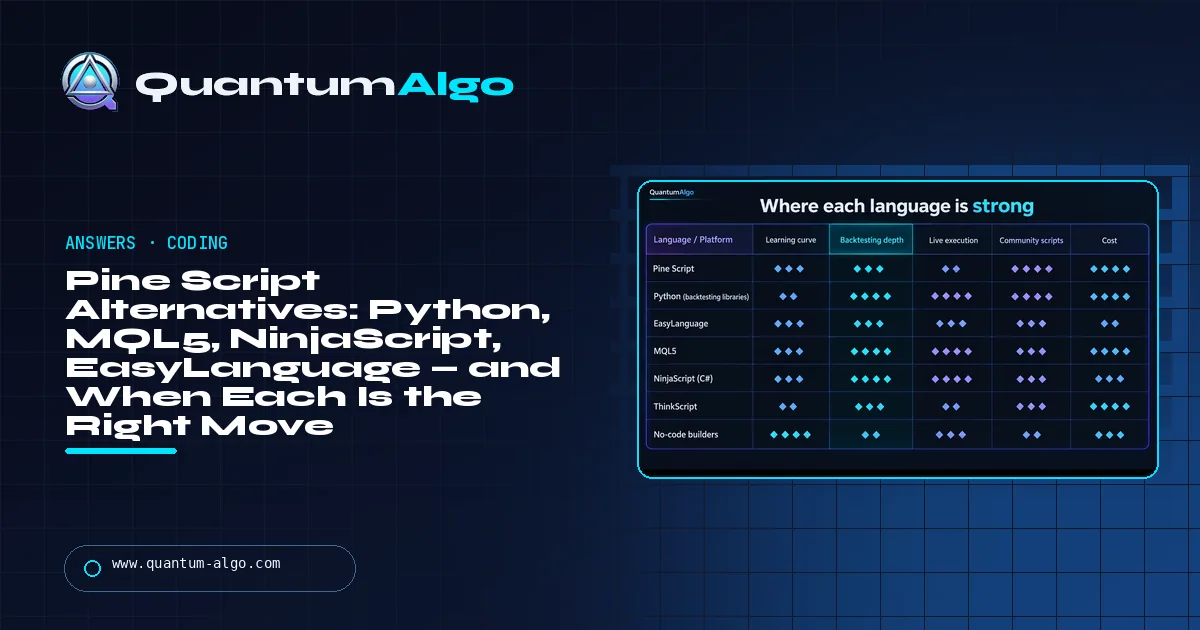
The Pine Script alternative depends on why Pine limits you. For research, statistics, machine learning or external data it is Python (backtesting.py, vectorbt, Backtrader; broker APIs for execution). For placing orders it is your platform's language: MQL5 on MetaTrader, NinjaScript on NinjaTrader, EasyLanguage on TradeStation and MultiCharts. For indicators elsewhere, thinkScript or AFL. Keep Pine for the idea and alerts.
Pine Script is the easiest trading language there is and the most limited, and sooner or later every serious TradingView coder hits one of its walls: no external data, no order execution, a thin backtester, one platform. This page lists what those walls are, compares the languages that remove each one — Python, MQL5, NinjaScript, EasyLanguage, thinkScript, AFL and the no-code builders — and ends with a tool that picks the right one from what you are building.
Indicators that prove themselves in public.
One engine, four precision tools — the Gold (XAU) Scalper, the institutional Gravity Zone, the Zeno momentum Oscillator, and Zeno Stocks for equities.
The short list
People search for Pine Script alternatives for four different reasons, and the right alternative depends on which one is yours. If Pine feels limiting because it cannot import a library, call an API or run a proper walk-forward test, the alternative is Python. If it is limiting because it cannot place orders, the alternative is the language of the platform that will — MQL5 on MetaTrader, NinjaScript on NinjaTrader, EasyLanguage on TradeStation and MultiCharts — or Python against a broker API. If you are on a different platform and just want an indicator, it is that platform's language — thinkScript on thinkorswim, AFL on AmiBroker. And if the problem is that you cannot code at all, the alternative is a no-code builder for the first version and Pine for the second, because Pine is still the easiest language on this page.
What no alternative gives you is TradingView itself: the chart, the alerts, the webhooks and the largest public script library in trading. That is why the honest answer for most traders is not "replace Pine" but "add Python for the part Pine cannot do". The rest of this page compares the options, shows what each one costs you, and gives you a tool that picks one from what you are building.
What can Pine Script not do?
Pine is a domain-specific language: it runs inside TradingView's sandbox, one script per chart, on the data TradingView serves. That design is why it is easy, and it sets hard limits that no version of Pine — v6 included — removes:
- No external data or libraries. No HTTP requests, no imports beyond Pine libraries, no order-flow feeds, no fundamentals beyond what TradingView exposes as built-ins.
- No order execution. A Pine strategy can fire an alert with a JSON payload to a webhook; something else has to place the trade.
- Thin backtesting statistics. The strategy tester fills at bar close by default, has no walk-forward or Monte Carlo, and limits history by plan. The TradingView backtesting guide covers what it can and cannot tell you.
- Execution limits. Script size, history references, security() calls and drawing objects are capped; heavy multi-symbol or machine-learning logic does not fit.
- Tied to one platform. Your code runs on TradingView and nowhere else. If you leave, it stays.
- Repainting traps for beginners. Not a limit of the language, but a reason people look elsewhere after being burnt; the non-repainting guide explains how to avoid it inside Pine.
If none of those bites you, you do not need an alternative. If one does, the next section says which language removes it.
How do the Pine Script alternatives compare?
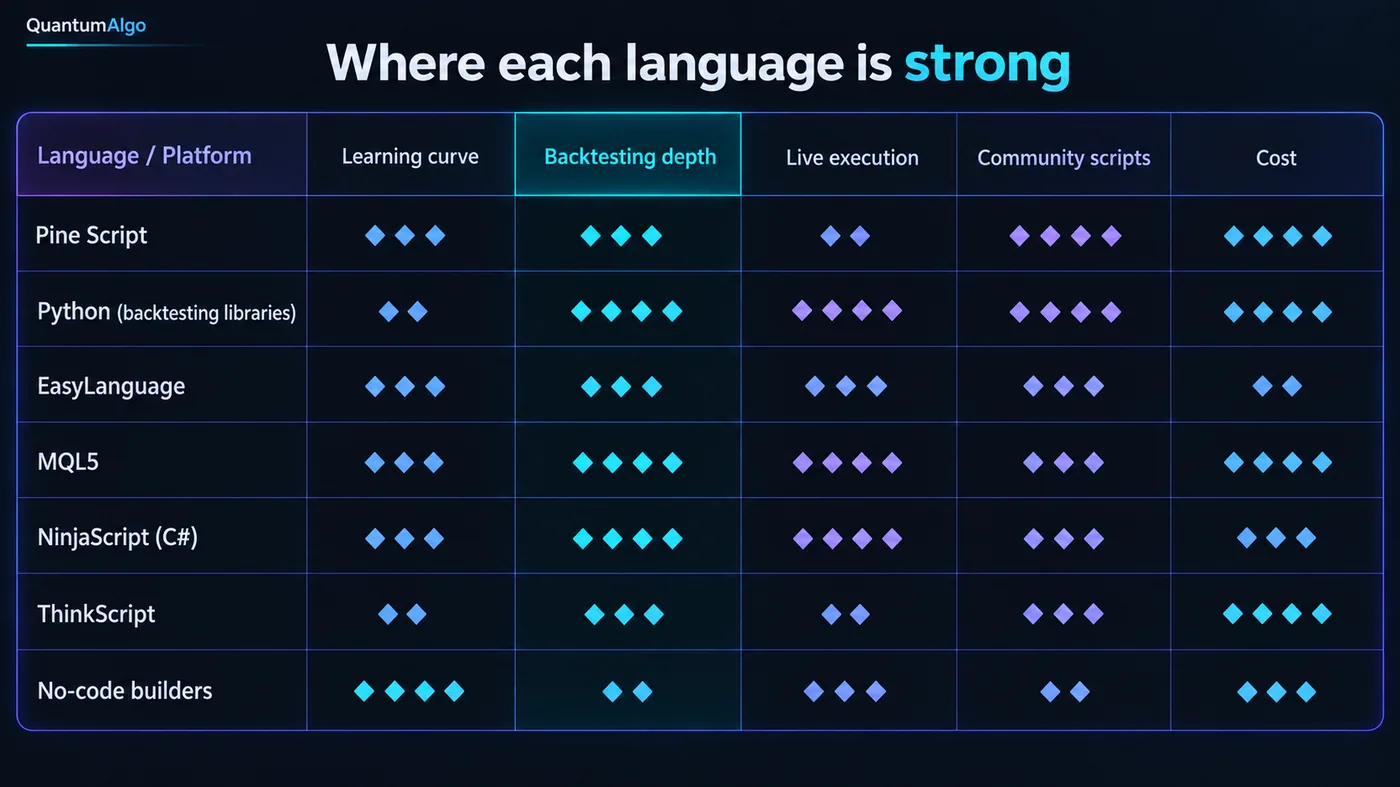
| Language / platform | Learning curve | Backtesting | Live execution | Community | Cost | Best for |
|---|---|---|---|---|---|---|
| Pine Script (TradingView) | Easiest here | Basic tester | Alerts and webhooks only | Largest — 100,000+ public scripts | Free; paid plans for more alerts and history | Indicators, alerts, quick strategy checks |
| Python (backtesting.py, vectorbt, Backtrader, ccxt, broker APIs) | Moderate; steep if you start from zero | The best available — walk-forward, Monte Carlo, custom fills | Any broker or exchange with an API | Enormous, not trading-specific | Free; you pay for data and a server | Research, statistics, ML, automation |
| MQL4 / MQL5 (MetaTrader) | C-like; harder than Pine | Good strategy tester with optimisation | Native — Expert Advisors | Large, forex-centred | Free with the terminal | Forex and CFD automation |
| EasyLanguage (TradeStation, MultiCharts) | Reads like English | Strong, decades of use | Native | Old but deep | Platform subscription or brokerage | Futures and stock systems on those platforms |
| NinjaScript (NinjaTrader, C#) | Real programming | Strong, with tick-level replay | Native, order-level control | Active, futures-centred | Free to chart; licence to trade live | Futures automation with DOM and order flow |
| thinkScript (thinkorswim) | Simple | Minimal | None | Moderate | Free with a Schwab account | Indicators and studies for Schwab traders |
| AFL (AmiBroker) | Moderate | Very fast portfolio backtests | Via broker plugins | Small, serious | One-time licence | Portfolio and stock system research |
| No-code builders | None | Varies; often shallow | Some, via connected brokers | Small | Subscription | First version of a simple rule set |
Read the "best for" column and the matrix collapses to three answers: Pine for the chart, Python for the research and anything external, and your execution platform's own language for live orders on that platform. The Pine Script v6 guide is the starting point if you have decided to stay; the sections below are for the three reasons to leave.

Automate your trades. Let Quantum Algo trade for you.
Every signal executed on your own account — on your account, with the plan you define.
When is Python the right Pine Script alternative?
Python is not a charting language; it is a general one with the best data and statistics libraries in existence, and that is exactly why it is the answer when Pine's sandbox is the problem. A typical stack: pandas for data, a backtesting library — backtesting.py for a first project, vectorbt for speed across thousands of parameter sets, Backtrader for event-driven realism — and, for execution, ccxt for crypto exchanges, the Interactive Brokers or Alpaca libraries for stocks, or the Tradovate and Rithmic APIs for futures. Machine learning is scikit-learn and whatever you like on top.
The cost is the pipeline. Pine is edit-and-see; Python is download data, clean it, build the test, chart the result somewhere else. The backtesting guide shows why that longer pipeline produces numbers you can trust — walk-forward tests, honest fill models, Monte Carlo on the equity curve — and the free algorithmic trading course walks a Pine user through the move. Most traders who make it end up with both: the idea drawn in Pine on the chart they watch, the statistics in Python.
Which languages place live orders where Pine cannot?
If the reason you are leaving Pine is that it cannot place orders, the alternative is decided by where you execute. MetaTrader traders write Expert Advisors in MQL5 (MQL4 on the older terminal): C-like, well documented, and supported by every forex broker with a MetaTrader server, so the EA runs on a VPS without a bridge. NinjaTrader traders write NinjaScript in C#, which is real programming but gives order-level control, tick replay and access to the DOM — the futures trader's reasons for being there. TradeStation and MultiCharts traders write EasyLanguage, the most readable of the three, with decades of published systems.
All three trade the same thing for the same reason: a steeper learning curve than Pine in exchange for orders that go straight from the code to the broker. The middle path — keep the logic in Pine, fire a webhook from a TradingView alert, and let a bridge execute — is how QuantumBot works and how most TradingView-based automation works; it costs a hop and a third party, and it lets you keep the chart. The trading bots guide compares the bridges; the prop firms that use MT4 page explains why the forex prop world still runs on MQL.
What does each route cost you from idea to chart?
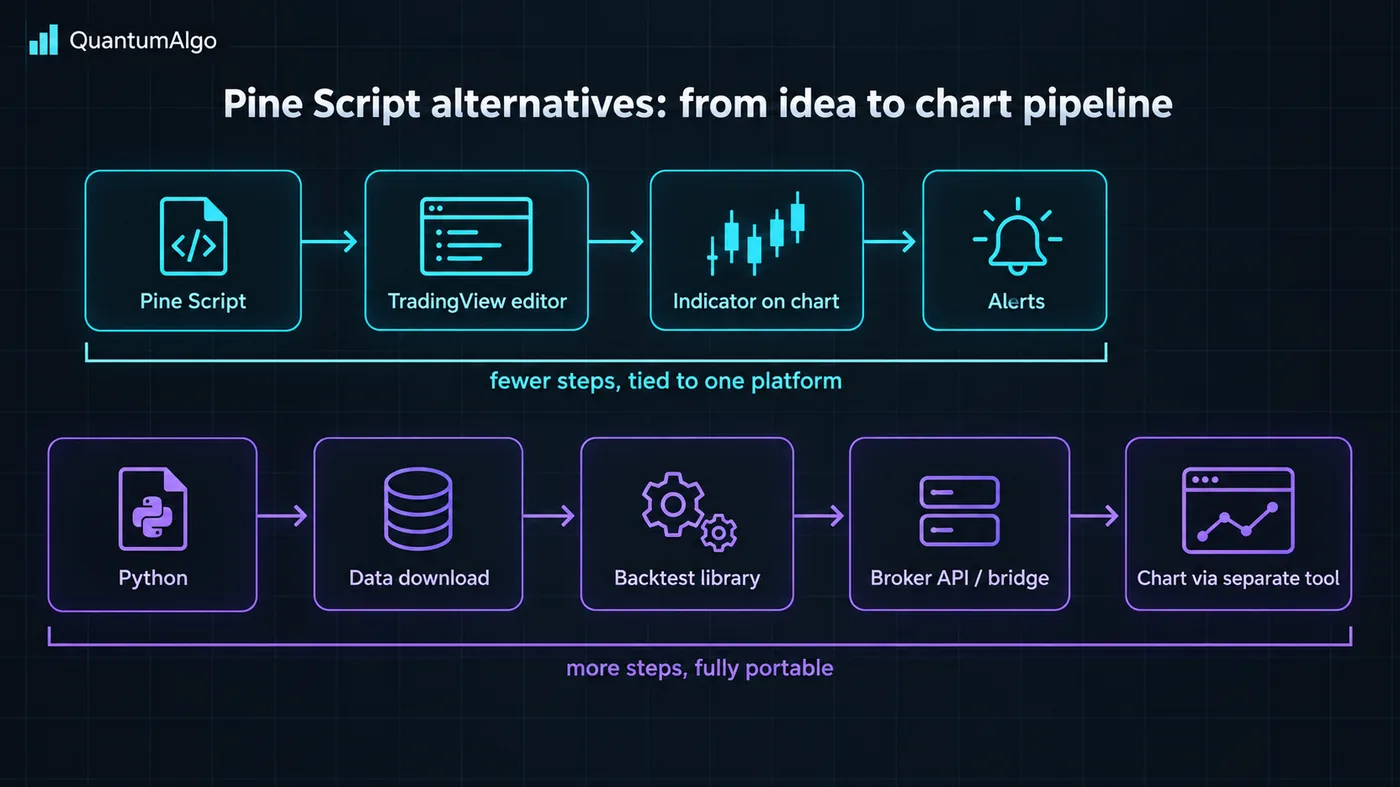
The picture is the argument. In Pine an idea becomes a chart signal in three steps and an alert in four, and every one of those steps happens inside the tab you already have open. In Python the same idea is five steps, two of which — getting clean data and charting the output — are chores Pine does for you, and the result is code that runs anywhere, tests properly and executes directly. Neither is better; they are priced differently. Pine charges you flexibility for speed; Python charges you time for ownership. The tool below prices it for what you are actually building.
Which language fits?
Pick what you are building, where you chart, how much code you write, the market and whether it has to run unattended. The tool names the language and platform that fit and tells you what you give up by choosing it.
Reference data
| Item | Value |
|---|---|
| Pine Script | TradingView's sandboxed language; current version v6; alerts and webhooks, no orders, no external data |
| Python backtesting libraries | backtesting.py (simple), vectorbt (fast, vectorised), Backtrader (event-driven), Zipline / QuantConnect Lean (institutional style) |
| Python execution libraries | ccxt (crypto exchanges), ib_insync / IBKR API, Alpaca, Tradovate and Rithmic APIs |
| MetaTrader | MQL4 (MT4), MQL5 (MT5) — Expert Advisors execute natively; strategy tester with optimisation |
| NinjaTrader | NinjaScript (C#) — indicators and strategies with order-level control; tick replay |
| TradeStation / MultiCharts | EasyLanguage — readable, mature, native execution |
| thinkorswim | thinkScript — indicators only, no execution |
| AmiBroker | AFL — very fast portfolio backtesting; execution via plugins |
| No-code | Rule builders inside platforms and third-party services; good for a first version, shallow for statistics |
| The usual end state | Pine on the chart for the idea and alerts; Python for research and statistics; the execution platform's language, or a webhook bridge, for orders |
Worked example: one strategy, three languages
The strategy: go long when a 15-minute candle sweeps the previous day's low and the next candle closes back above it with a body twice the 20-bar average; stop below the sweep; target the previous day's high.
In Pine the whole thing is thirty lines: request.security for the daily low and high, a body-size condition, strategy.entry and strategy.exit, and an alert() with a JSON message. It is on the chart in ten minutes, the tester gives a win rate and a profit factor, and an alert can fire to a webhook. What it cannot tell you is whether the edge survives a different six months or a realistic fill on the sweep candle.
In Python it is a hundred lines with backtesting.py: load 15-minute and daily bars, compute the conditions in pandas, define the fill as the next candle's open plus a spread, run it, then run it again on a period the rules never saw, then sweep the body multiplier from 1.5 to 3 and look at whether the result is a plateau or a spike. That is a day's work for someone who knows the stack and a fortnight for someone learning it, and it is the difference between a number and a conclusion.
In MQL5 it is an Expert Advisor of a hundred and fifty lines that does what the Pine version does and also places the orders on the broker's server at the moment the condition is true, with the stop and target attached — no webhook, no bridge, no laptop. The tester will optimise the multiplier for you, which is exactly the thing to be careful with. Three languages, one idea; each one is the right choice for a different question about it.
What mistakes do traders make when leaving Pine?
- Leaving for the wrong reason. Repainting and thin backtests are fixed by writing better Pine, not by changing language.
- Starting Python with the execution layer. Start with a backtest of something you already trade; execution comes last.
- Trusting a platform optimiser. MQL5's and NinjaTrader's optimisers will fit any parameter to any period; walk-forward or it is not a test.
- Rebuilding the chart. Python plots are for research; keep watching the market on TradingView with the idea drawn in Pine.
- Choosing a language before choosing a broker. Live execution is decided by where the account is, not by preference.
- Underestimating the pipeline. Clean data and a fill model are most of the work in Python and none of it in Pine.
- Buying a no-code builder's backtest as if it were a test. Shallow statistics with a nice interface are still shallow.
Where Zeno and the free indicators sit
Everything on this site that runs on a chart is written in Pine, on confirmed candles, because the chart is where a trader looks and TradingView is where most traders look at it. Zeno's structure, order block, fair value gap and sweep logic is exactly the kind of thing Pine is best at; the free indicators are the same idea open for you to read and learn from. The research behind them — the win rates on the track record, the parameter tests — is done the way this page recommends, outside the sandbox, and the execution — QuantumBot — runs on the webhook path from a Pine alert. Pine for the chart, Python for the proof, a bridge or a broker API for the orders: that is the answer to "Pine Script alternatives" for almost everyone who asks.
Pine is not replaced; it is supplemented. Keep it for what it does best — the idea drawn on the chart you watch, with alerts — and add Python for the statistics, the external data and the machine learning it cannot reach, and your execution platform's language or a webhook bridge for the orders. Leave Pine for the wrong reason — repainting, a thin backtest — and you will carry the problem to a harder language.
◆ Interactive check
Do you know which wall you are hitting?
Questions traders ask about Pine Script alternatives
It depends on the limit you have hit. Python is the best alternative for research, statistics, machine learning and external data; MQL5, NinjaScript and EasyLanguage are the alternatives for placing orders natively on MetaTrader, NinjaTrader and TradeStation or MultiCharts; thinkScript and AFL are the indicator languages of thinkorswim and AmiBroker. For most traders the answer is to keep Pine for the chart and add Python for what it cannot do.
For backtesting rigour, data access and automation, yes — walk-forward tests, custom fill models, any data source and any broker API. For getting an indicator onto a chart with alerts in ten minutes, no: Pine is faster, simpler and lives on the platform you already watch. They are not competitors; most serious TradingView coders end up using both.
Not directly. A Pine strategy can fire an alert with a JSON message to a webhook, and a bridge or bot then places the order at the broker. That is how QuantumBot and most TradingView automation work. For native execution you need the platform's own language — MQL5, NinjaScript, EasyLanguage — or Python against a broker or exchange API.
thinkScript if you are on thinkorswim, EasyLanguage if you are on TradeStation, and a no-code builder for a first version anywhere else. But Pine is easier than all of them, so if the reason you are looking is difficulty rather than a hard limit, the answer is usually to stay and learn Pine v6 properly.
Pine for indicators, alerts and quick strategy checks on TradingView; MQL5 for Expert Advisors that execute on a MetaTrader broker's server without a bridge. Forex and CFD traders who want unattended automation on a VPS choose MQL5; everyone else keeps Pine for the chart and, if they automate, uses a webhook bridge.
Not automatically in any reliable way — the built-ins, the bar-by-bar execution model and request.security have no direct equivalents. Rewriting a thirty-line Pine strategy in backtesting.py or vectorbt is a few hours for someone who knows both, and the rewrite is usually where the strategy's hidden lookahead is found.
backtesting.py for a first project (simple, readable), vectorbt for speed across large parameter sweeps, Backtrader for event-driven realism with broker integration, and QuantConnect Lean or Zipline for institutional-style research. For execution: ccxt for crypto exchanges, ib_insync for Interactive Brokers, Alpaca's library for US stocks, and the Tradovate or Rithmic APIs for futures.
v6 improved the language — dynamic requests, better types, performance — but the sandbox limits are by design: still no external data, no libraries beyond Pine libraries, no direct order execution, the same tester. If v5 could not do what you need, v6 cannot either.
No. Repainting is a property of how a script is written — using unconfirmed bars or lookahead in request.security — not of the language. Scripts written on confirmed candles do not repaint in Pine, and a badly written MQL5 or Python script repaints just as happily.
Pine Script, on confirmed candles, because the chart is where the trader looks. The research behind them is done outside the sandbox with proper walk-forward statistics, and QuantumBot executes from Pine alerts over a webhook — the same three-layer setup this page recommends.
References & Related Guides
Read next
- Pine Script v6 Getting Started
- TradingView Backtesting Guide
- Backtesting a Trading Strategy
- Free Algorithmic Trading Course
- Non-Repainting Indicators
- Best Trading Bots
- Do Trading Bots Work?
- Algorithmic Trading for Beginners
- Prop Firms That Use MT4
- Algorithmic SMC Trading (Academy)
- Free Indicators — open Pine scripts
- QuantumBot — execution from Pine alerts