What Is a Stop Loss? How It Works, Where to Put It, and the Order Type That Actually Protects You
A stop loss is an order that closes your position automatically at a preset price (sell stop below a long, buy stop above a short), fixing maximum loss, stop distance times size, before entry. Use a stop-market, since a stop-limit can fail in a gap; place it where the idea is wrong, beyond structure, not a round number, kept server-side.
The stop loss is the mechanism that turns trading from a bet into a defined-risk activity, and it fails in predictable ways: the wrong order type in a gap, the obvious level that gets swept, the "mental stop" that is never honoured. This page covers how the order works, stop-market versus stop-limit, four placement methods with the one that matches the trade's logic, platform-by-platform setup, and the mistakes. The Academy lesson on Smart Money placement picks up where it ends; the calculator below turns a stop distance into a position size.
Indicators that prove themselves in public.
One engine, four precision tools — the Gold (XAU) Scalper, the institutional Gravity Zone, the Zeno momentum Oscillator, and Zeno Stocks for equities.
What is a stop loss?
A stop loss is an order that closes your position automatically if the price reaches a level you chose in advance — a sell stop below your entry on a long, a buy stop above it on a short — so that the most you can lose on the trade is decided before you enter it, not after.
It is the single mechanism that turns trading from a bet into a defined-risk activity: the stop distance times the position size is your maximum loss, and every sizing rule in trading starts from that number. This page explains how the order works, the difference between a stop-market and a stop-limit (and why one of them can fail to protect you), the four ways to decide where the stop goes, how to set one on the common platforms, and the mistakes that turn a stop into a donation.
For the advanced version — placing stops around Smart Money structure so they sit beyond the liquidity rather than inside it — the Academy's stop-loss placement lesson picks up where this page ends; the trailing-stop guide covers the variant that follows price.
What does a stop loss look like on a chart?
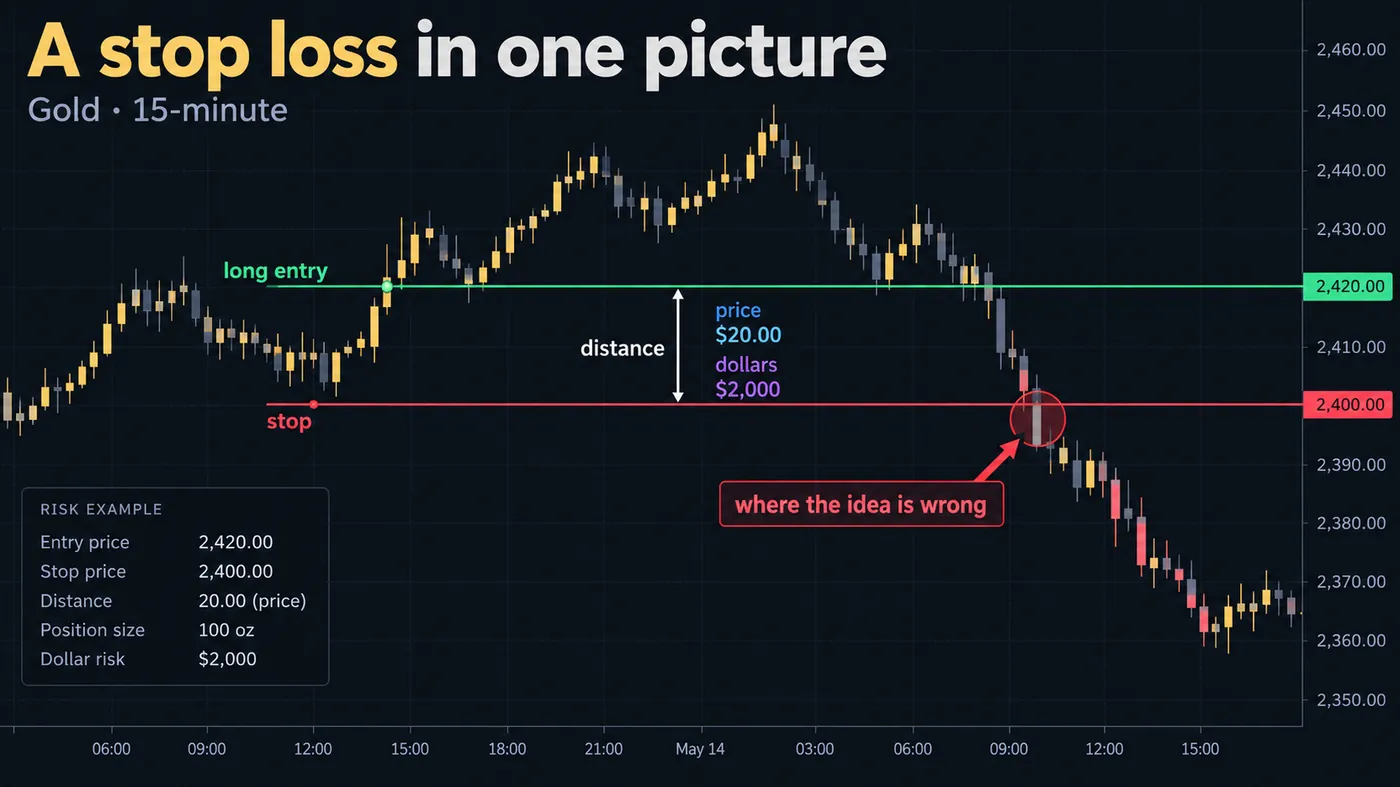
The chart illustration in this guide is a long on gold: entry at $2,420, stop at $2,400, distance $20, position 100 oz, dollar risk $2,000. The callout is the definition that matters — the stop goes where the idea is wrong. Not at a round number, not at a distance that "feels right", not where the position size happens to work out: at the price that, if reached, means the reason for the trade no longer holds. Everything else — size, leverage, target — is derived from that.
How does a stop-loss order work?
You place it with the broker or exchange as a resting order: a stop price, and an instruction for what happens when the market trades there. Until that price prints, nothing happens. When it does, the order activates and the position is closed. On most platforms the stop is attached to the position (a bracket) so it cancels automatically if you close the trade another way; on some it is a separate order you must cancel yourself.
Two details decide whether it protects you: the trigger price source and the order type it becomes when triggered. On crypto perpetuals, set the trigger on mark price, not last price, so a thin-book wick cannot fire it. On everything, know whether the stop becomes a market order or a limit order — the next section.
Stop-market or stop-limit: which one protects you?
The gap illustration in this guide is the difference that costs people accounts. A stop-market order becomes a market order when triggered: it fills at the best available price, whatever that is. A stop-limit order becomes a limit order at a price you set: it fills only at that price or better. In a normal market both fill near the stop. In a gap — an overnight move, a news candle, a thin session — the stop-market fills at the open, worse than the stop but out; the stop-limit does not fill at all, because the market opened past its limit, and the position rides the entire move.
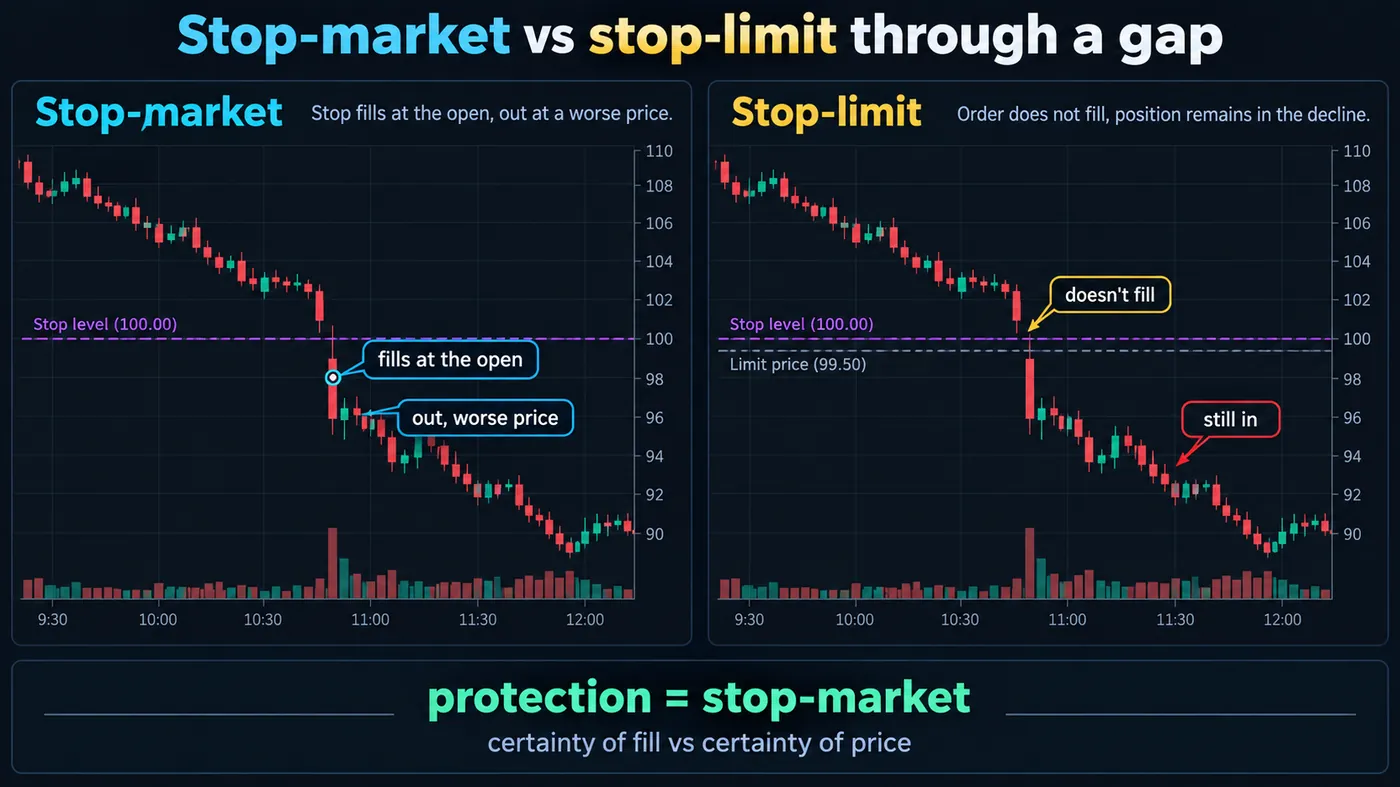
The rule, which the illustration prints as a callout: protection = stop-market. A stop-limit is an entry tool for breakouts, where a bad fill would ruin the trade's arithmetic; it is never the right order for a stop loss on a position you cannot afford to keep. Our order-types guide covers the rest of the family.
What are the four ways to place a stop?
The four-panel illustration in this guide shows the same trade with four stop methods, and highlights the one that matches the trade's logic:
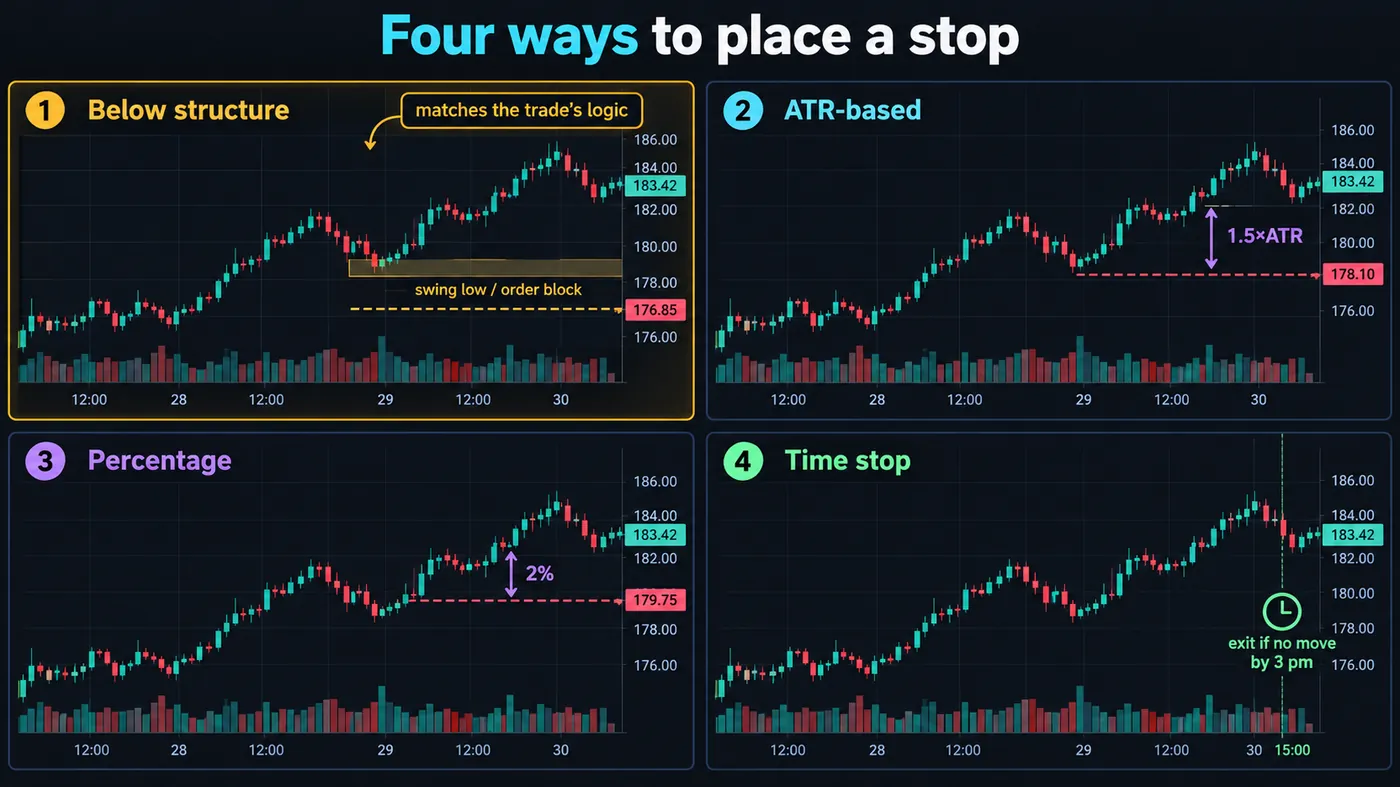
- Below the structure — under the swing low, the order block or the level the trade is built on. The stop is where the idea fails; if price gets there, the setup was wrong. This is the method to use on any trade that has a reason. It is highlighted in the illustration because the other three are approximations of it.
- ATR-based — a multiple of the average true range (1.5–2.5× on the trading timeframe) below entry. Adapts to volatility; useful when the structure is far away or unclear, and for trailing.
- Percentage — a fixed 1–3% of price. Simple, and blind to the chart: on a volatile stock it is inside the noise, on a quiet one it is far too wide.
- Time — exit if the trade has not moved by a set time (3 pm for an intraday setup, three days for a swing). Not a substitute for a price stop; a complement that frees capital from trades that are not working.
A trade should have a structure stop, sized from it, and often a time stop as well. The position-sizing guide turns the distance into a size.
Four stop-placement methods compared
| Method | Where the stop goes | Best use | Weakness |
|---|---|---|---|
| Structure | Beyond the swing low, order block or level | Any trade built on a level | Needs a clear level on the chart |
| ATR-based | 1.5–2.5× ATR from entry | Unclear structure; trailing | Ignores where the idea actually fails |
| Percentage | A fixed 1–3% of price | Simple rule of thumb | Blind to the chart and its volatility |
| Time | Exit if no move by a set time | Freeing capital from stalled trades | Complements a price stop, never replaces it |
◆Use a structure stop on every trade and add a time stop where it fits.
Where should a stop loss not go?
- At a round number ($2,400.00, 1.1000) — where every other stop is, and where sweeps are aimed.
- Exactly at the swing low — one tick beyond it is where the sweep ends; give it room (a few pips or a fraction of ATR) beyond the level.
- Inside the noise — tighter than the timeframe's normal wick; the position size is then too large for the stop that would actually hold.
- Where the position size works out — if a stop has to be tight to afford the size, the size is wrong, not the stop.
- In your head — a "mental stop" is a stop you will not honour on the day it matters.
How do you set a stop loss on common platforms?
- TradingView (with a broker): open the order ticket, fill Stop Loss as a price, pips/ticks or a percentage; on the chart, drag the red SL line to the level. Bracket orders send entry, stop and target together.
- MetaTrader 4/5: in the order window, enter the Stop Loss price (must be beyond the spread from the current price); or drag the position's line on the chart.
- cTrader: the order form has Stop Loss in pips or price; chart drag works; trailing stop is a checkbox.
- Bybit / Binance / OKX (perpetuals): set TP/SL on the order form before entry or on the position afterwards; choose mark price as the trigger; the stop rests on the exchange.
- Stock brokers (Fidelity, Schwab, IBKR and similar): choose order type "Stop" (stop-market) — not "Stop Limit" — enter the stop price and, if offered, "Good till cancelled"; attach it as a bracket where the platform allows.
- NinjaTrader and futures front ends: use ATM strategies or the chart trader to attach the stop and target to the entry; the stop rests server-side.
The one setting to verify everywhere: whether the stop is held on the broker's or exchange's server (fires when your computer is off) or on your platform (does not).
Which mistakes turn a stop into a donation?
- Moving it further away when price approaches — the loss just grows.
- Removing it "just this once" before news.
- Trailing it to breakeven before the trade has moved 1R, so ordinary noise closes a good trade.
- Using a stop-limit for protection.
- Setting the trigger on last price in crypto.
- Placing it at the same obvious level as everyone else and calling the sweep "manipulation".
How we use stops
Every Zeno signal prints the stop with the entry — below the order block on a long, above it on a short, beyond the sweep that created the setup — and the position size on our public calls is derived from that distance at a fixed risk percentage. QuantumBot places the same stop on the exchange as a resting order the moment the entry fills, and moves it to breakeven only after TP1. That sequence — structure stop, size from it, exchange-side, breakeven after the first target — is the whole discipline, and it is the same on gold, indices and crypto.
A stop loss defines the maximum loss before the trade exists. Place it where the idea is wrong — beyond the structure, not at the obvious level — use a stop-market held on the server, trigger on mark price in crypto, size the position from the distance, and never move it further away. The Academy's placement lesson refines the "where"; this page is the "what" and the "how".
◆ Interactive check
Do you know what your stop does?
Questions people ask about stop losses
No. A stop-market order guarantees the exit, not the price — in a gap it fills wherever the market reopens. Some brokers offer "guaranteed stop loss orders" for a premium; most do not, and no exchange does.
There is no universal number; the stop belongs where the trade's idea is wrong, which is a structure level, not a percentage. If you must use a percentage, derive it from the instrument's ATR rather than picking one.
Most long-term investors do not, because a stop turns a temporary drawdown into a realised loss on an asset they intend to hold for years. Stops are a trading tool; for investing, position size and diversification do the same job.
Both are resting orders that close the position; the stop loss caps the loss on the wrong side, the take profit locks the gain on the right side. A bracket order places both with the entry.
Your broker can see orders on its own book; the wider market sees only aggregate liquidity. Stops cluster at obvious levels because everyone reasons the same way, not because anyone reads your ticket — which is why placing them beyond the obvious level matters.
Zeno prints the stop with every signal; QuantumBot places it on the exchange as a resting order when the entry fills and moves it to breakeven after TP1. On a manual account, the signal's stop goes into the bracket order.
An instruction to your broker: if the price falls to X, sell me out. It caps the loss on a trade at a number you chose before entering, which is the whole difference between trading and betting.
As far as the level that proves the idea wrong — usually just beyond a swing low, order block or the sweep that created the setup — and no closer than the timeframe's normal wick (roughly 0.8× ATR). Then size the position from that distance, not the other way round.
If it is held on the broker's server, it triggers whenever the market trades — but in thin extended hours or a gap, a stop-market fills at the next available price, which can be far from the stop. It protects you from staying in, not from the gap.
A stop that becomes a limit order when triggered, filling only at your limit price or better. Useful for breakout entries; dangerous as protection, because a gap past the limit leaves the order unfilled and the position open.
References & Related Guides
Read next
- Stop Loss Placement in SMC (Academy)
- Trailing Stop Loss Explained
- Order Types Explained
- Position Sizing: The Complete Guide
- Lot Size Calculator for Forex and Gold
- ATR: Average True Range Guide
- Liquidity Sweep Trading
- Take-Profit Strategies (Academy)
Authoritative sources
- SEC Investor.gov: stop-loss order
- FINRA: order types
- TradingView: order types (stop loss in the Trading Panel)
- Bybit: setting take profit and stop loss (mark price trigger)
- CME Group: order types