TradersPost Review: How It Automates TradingView Alerts, What It Costs and Our Verdict
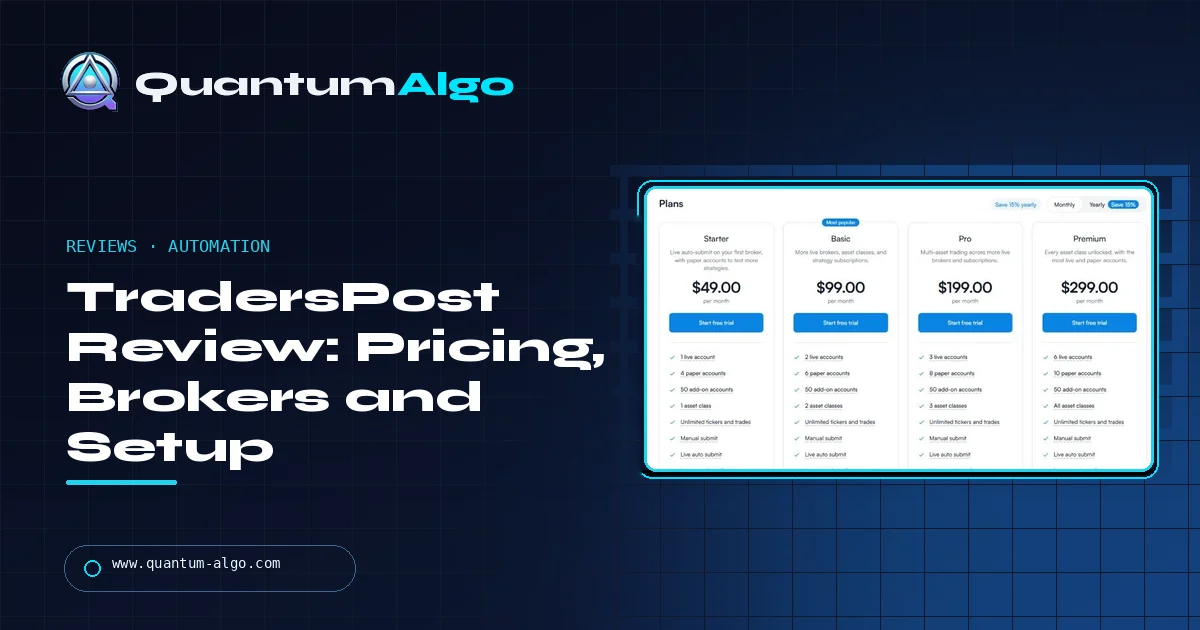
TradersPost is a US-based service that turns signals from TradingView, TrendSpider or any webhook into orders at your broker. It supports stocks, options, futures and crypto at brokers such as Interactive Brokers, Tradovate, TradeStation, Alpaca and tastytrade. Paid plans run from $49 to $299 a month after a 7-day trial. It executes your rules; it does not make a strategy profitable. Rating: 4.1/5.
Most traders who build a TradingView strategy hit the same wall: the alert fires, and then a human still has to place the order. TradersPost sells the bridge. I went through its plans, broker list, documentation and webhook format on 11 November 2026. This review explains how it works, what it costs per account, where automation goes wrong, and who should pay for it.
What is TradersPost?
TradersPost is an automation layer between a signal and a brokerage account. It is run by TradersPost, Inc., founded in 2021 by Jonathan Wage, and it says its users have executed more than 40 million trades. It is not a broker, it does not hold your money, and it does not sell strategies of its own: you bring the signal, and it handles the order.
The typical user writes or buys a strategy on TradingView, sets an alert with a webhook URL, and lets TradersPost turn each alert into a buy, sell or exit at the broker. The same signal can be sent to several accounts at once, which is why it is popular with traders running more than one funded account.
How does TradersPost work?
There are three building blocks, and understanding them saves most of the setup confusion.
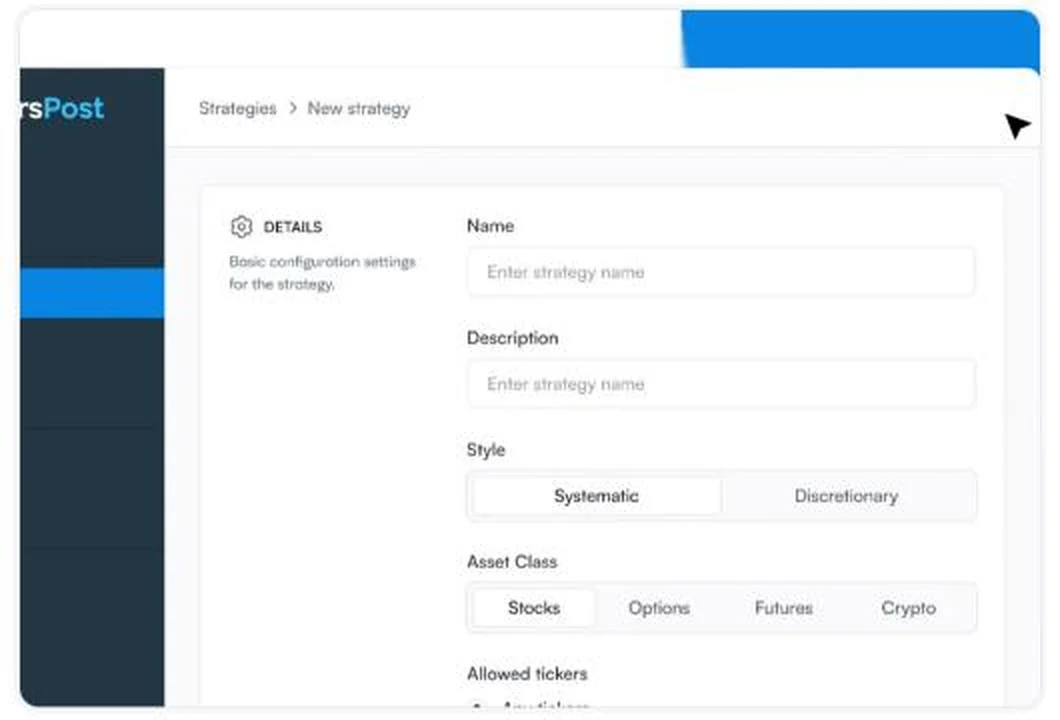
- Strategy. A container that receives signals. You give it a name, an asset class, allowed tickers and default order rules: order type, size, stop loss and take profit.
- Subscription. The link between a strategy and a broker account. One strategy can feed several subscriptions, each with its own size or overrides, so one alert can trade a cash account and three prop accounts at different sizes.
- Signal. A webhook message, usually a few lines of JSON, that says what to do: ticker and action at minimum, optionally price, quantity, sentiment, stop and target.
When a signal arrives, TradersPost checks it against the strategy and subscription settings, then sends the order through the broker's API. Fills, positions and P&L appear in its dashboard. You can also submit signals by hand from the dashboard, which is how the free trial works on live accounts.
How much does TradersPost cost?
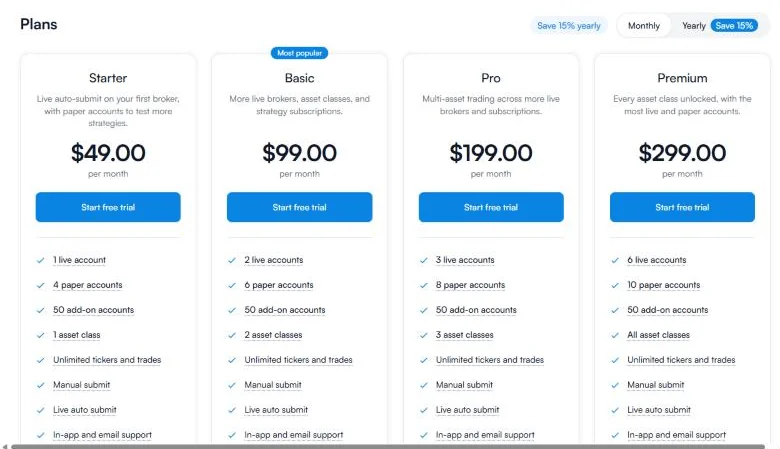
Plans differ mainly by how many live and paper accounts you can connect and how many asset classes you can trade. Tickers and trades are unlimited on every paid plan, subject to rate limits.
| Plan | Price a month | Live accounts | Paper accounts | Asset classes |
|---|---|---|---|---|
| Free trial | $0 for 7 days | Manual submit only | Auto submit | — |
| Starter | $49 | 1 | 4 | 1 |
| Basic | $99 | 2 | 6 | 2 |
| Pro | $199 | 3 | 8 | 3 |
| Premium | $299 | 6 | 10 | All |
Extra accounts cost $10 a month per live account and $5 a month per paper account, up to 50. Paying yearly saves 15%. The free tier is a 7-day trial: automated submission works on paper accounts, live accounts accept manual submission only.
Budget it like a fixed trading cost. At $99 a month, a strategy needs to clear roughly $1,200 a year after commissions before the automation pays for itself. Our how much money to start day trading guide shows how quickly fixed costs eat a small account.
Indicators that prove themselves in public.
One engine, four precision tools — the Gold (XAU) Scalper, the institutional Gravity Zone, the Zeno momentum Oscillator, and Zeno Stocks for equities.
Which brokers and prop firms does TradersPost support?
TradersPost listed 17 broker connections when I checked. The ones most traders ask about are below; the markets column describes what each broker offers, so confirm on TradersPost's connection page that your asset class is enabled for that broker.
| Broker | What traders usually automate there |
|---|---|
| Interactive Brokers | US and global stocks, options, futures |
| Tradovate | Futures, including many futures prop firm accounts |
| TradeStation | Stocks, options, futures |
| NinjaTrader | Futures |
| Alpaca | US stocks and crypto through an API-first broker |
| tastytrade | Stocks, options, futures |
| Robinhood, Webull | US stocks and options |
| Coinbase, Kraken, Binance, Bybit | Crypto |
| ProjectX, Topstep | Futures prop firm accounts |
Futures prop firms are the area where you must read the small print. TradersPost connects to Tradovate, NinjaTrader and ProjectX, the back ends many futures firms use, and lists Topstep. Whether a firm allows automated trading is a separate question: some allow it, some allow it only with approval, and some ban it. Check the firm's rules before you connect, and read our Tradovate review and Topstep review for how those platforms behave. If you trade forex at a prop firm on TradeLocker, note that forex is still listed as coming soon.
How do you connect TradingView alerts to TradersPost?
- Create the strategy in TradersPost and copy its webhook URL.
- Connect a broker (start with a paper account) and subscribe it to the strategy.
- On TradingView, create an alert on your strategy or indicator. In Notifications, tick Webhook URL and paste the address. Webhooks need a paid TradingView plan and two-factor authentication on your TradingView account.
- Paste the message. For a strategy alert, TradersPost's default JSON uses TradingView placeholders such as
{{ticker}},{{strategy.order.action}}and{{strategy.order.contracts}}, so the order mirrors what the strategy did. For an indicator alert you write the action yourself, for example"action": "buy". - Test on paper for at least a week, then compare TradersPost's fills with TradingView's strategy report before switching the subscription to live.
Two TradingView details cause most failed setups. Alerts must use "Once per bar close" unless you want orders on every tick, and indicators that repaint will send signals that later disappear from the chart. Our guide to non-repainting indicators explains how to check a script before you automate it.
TradersPost webhook message builder
Build the JSON for a TradingView alert. Pick the alert type, the action and your risk settings, then copy the result into the alert's message box. Field names follow TradersPost's documentation.
Leave take profit and stop loss at zero if the strategy already exits on its own; sending both can close a position twice. If you are new to bracket orders, our order types guide covers how stops and targets behave once they reach the broker.
Which risk settings matter most in TradersPost?
The settings live on the strategy and can be overridden per subscription. The ones that prevent expensive surprises:
- Position sizing. Fixed quantity, dollar amount or a percentage of the account. Use fixed size until the strategy has a few months of live history; our position sizing guide explains why.
- Allowed tickers. Restrict each strategy to the symbols it was built for, so a typo in an alert cannot trade the wrong market.
- Signal overrides and exits. Decide whether a new signal may flip a position, add to it or only close it. "Reverse" and "add" are powerful and easy to misuse.
- Trading hours. Ignore signals outside the session you tested. Thin pre-market and overnight books widen slippage.
Paper accounts are worth more than their price here: run the identical subscription on paper beside the live one for a month and you will see every place where the automation and the chart disagree.
How does TradersPost compare with the alternatives?
You do not always need a middle layer. The table shows when each route makes sense.
| Route | Best for | Trade-off |
|---|---|---|
| TradersPost | TradingView or TrendSpider signals to stocks, options, futures or crypto, several accounts at once | Monthly fee; another system between you and the broker |
| Trading directly from TradingView | Manual trading at a broker that TradingView connects to | No automation from alerts |
| Broker APIs or Python | Coders who want full control | You build and host everything, see quantitative trading |
| Platform-native bots (NinjaTrader, MT5, cTrader) | Strategies written in the platform's own language | Locked to one platform and broker |
| Crypto bot platforms | Grid and DCA bots on exchanges | Crypto only; see Bitsgap review |
If you are still choosing a strategy rather than an executor, start with the best trading bots and whether trading bots work, and backtest properly with our TradingView backtesting guide first.
What are the pros and cons of TradersPost?
| Strengths | Weaknesses |
|---|---|
| Works with TradingView strategies and indicators, no code needed | $49 to $299 a month, plus a paid TradingView plan for webhooks |
| 17 broker connections across stocks, options, futures and crypto | Forex and crypto futures still listed as coming soon |
| One signal can trade many accounts at different sizes | Adds latency and a second point of failure |
| Paper accounts on every plan for side-by-side testing | Prop firm automation rules vary and are your responsibility |
| Clear, documented JSON format | Does nothing to make a weak strategy profitable |
Reference data
| Item | Value (checked November 2026) |
|---|---|
| Company | TradersPost, Inc., United States, founded 2021 |
| What it does | Routes webhook signals to broker accounts as orders |
| Signal sources | TradingView, TrendSpider, QuantConnect, Zapier, custom webhooks |
| Asset classes | Stocks, options, futures, crypto; forex and crypto futures coming soon |
| Plans | Starter $49, Basic $99, Pro $199, Premium $299 a month; 15% off yearly |
| Free trial | 7 days, paper auto-submit, live manual only |
| Extra accounts | $10 a month live, $5 a month paper, up to 50 |
| Brokers | 17 connections incl. IBKR, Tradovate, TradeStation, Alpaca, tastytrade |
| Required JSON fields | ticker and action |
What are the most common TradersPost mistakes?
- Automating a repainting script. The backtest looks perfect because signals were redrawn after the fact. Live alerts fire on bars that later change.
- Alerting on every tick. "Once per bar" instead of "Once per bar close" can send several entries in one candle.
- Doubling exits. Strategy exits plus bracket stops and targets can close the same position twice or open an unintended reverse position.
- Ignoring costs in the backtest. Add commission and slippage in TradingView's strategy properties before you trust a result; our backtesting guide shows realistic settings.
- Breaking prop firm rules. Copying one signal across accounts at the same firm, or automating where it is banned, can void payouts.
Is TradersPost legit and safe?
TradersPost is an established US company with a named team and public documentation, and it has been operating since 2021. It does not take custody of funds: you connect brokers through their own login or API authorisation, and you can revoke that access from the broker side. It also publishes a Trustpilot profile and comparison pages against competitors, which are marketing, so read them as such.
The real risks are operational. An outage at TradingView, TradersPost or the broker can leave a position without its exit. Keep stops at the broker rather than relying on a future alert, set daily loss limits at the broker where possible, and check positions at least once a day. Automation reduces the work of placing orders; it does not remove the need for risk management.
Who is TradersPost for, and what is our verdict?
TradersPost suits a trader who already has a rules-based strategy on TradingView or TrendSpider with a real out-of-sample record, trades US stocks, options or futures, and wants the same signal executed reliably across one or more accounts without writing code.
It does not suit a beginner looking for a profitable bot, a forex trader (for now), or someone whose strategy only trades a few times a month, where the monthly fee outweighs the time saved.
My rating is 4.1 out of 5. The design is sensible, the broker list is broad and the webhook format is well documented. The price adds up for small accounts and the extra moving part demands testing. Start on paper, automate one strategy, and compare fills with the chart before scaling up.
TradersPost turns TradingView, TrendSpider and webhook signals into broker orders across stocks, options, futures and crypto. It costs $49 to $299 a month after a 7-day trial, connects to 17 brokers and can trade several accounts from one signal. It executes rules; test on paper, use non-repainting scripts and keep stops at the broker.
◆ Interactive check
Can you set up TradersPost correctly?
Questions traders ask about TradersPost
After a 7-day trial, Starter is $49, Basic $99, Pro $199 and Premium $299 a month, with 15% off yearly billing. Extra accounts are $10 a month live and $5 a month paper.
Yes. You paste a TradersPost webhook URL and a JSON message into a TradingView alert. Webhook alerts require a paid TradingView plan and two-factor authentication.
No. It holds no funds. It sends orders to the broker accounts you connect, and you can revoke that access at the broker.
Seventeen connections, including Interactive Brokers, Tradovate, TradeStation, NinjaTrader, Alpaca, tastytrade, Robinhood, Webull, Tradier, Coinbase, Kraken, Binance, Bybit and ProjectX.
Technically yes on Tradovate, NinjaTrader and ProjectX-based firms. Whether automation is allowed is set by each firm, so check its rules first.
Not yet. Forex and crypto futures were listed as coming soon in November 2026.
A 7-day free trial. Paper accounts can auto-submit; live accounts accept manual submission only.
A JSON object with ticker and action, for example {"ticker": "AAPL", "action": "buy"}. Price, quantity, stop loss and take profit are optional.
References & Related Guides
Read next
- TradeLocker Review
- Is Interactive Brokers Good for Day Trading?
- Tradovate Review
- TradeStation Review
- Best Trading Bots
- What Is a Trading Bot?
- Non-Repainting Indicators
- TradingView Backtesting
- Prop Firms That Use TradingView
- MyFundedFutures Review