Best Alternatives to MetaTrader 4 and 5: cTrader, TradingView, NinjaTrader and More Compared

The best MetaTrader alternative for most forex and CFD traders is cTrader: it is free through many brokers, runs on web, desktop and mobile, and supports C# trading bots. TradingView is the best choice if charting comes first and your broker connects to it. For futures, NinjaTrader is the standard. TradeLocker, Match-Trader and DXtrade are the platforms most prop firms switched to.
MetaTrader 4 and 5 still dominate retail forex, but they are no longer the only option, and for some traders no longer an option at all after MetaQuotes stopped licensing several prop firms and brokers. The good news is that the alternatives have caught up. I checked each platform's own site and app listings in November 2026. This guide compares the eight that matter by market, charting, automation, cost and who offers them.
Why look for an alternative to MetaTrader?
MetaTrader 4 was released in 2005 and MetaTrader 5 in 2010. Both are reliable and familiar, and MQL4/MQL5 has the largest library of expert advisors anywhere. Traders look elsewhere for four reasons.
- Availability. In 2024 MetaQuotes withdrew licences from several prop firms and brokers, especially those serving US clients. Many firms moved to other platforms, as our prop firms that use MT4 guide tracks.
- Charting. MetaTrader's charts look and feel dated next to TradingView or cTrader.
- Markets. MetaTrader is built for forex and CFDs. Futures traders need platforms that connect to exchanges and data feeds such as CQG or Rithmic.
- Development. Many developers prefer C#, Python or Pine Script to MQL.
MetaTrader alternatives compared
Each platform below is reachable through brokers or prop firms; most are free to the trader, with the broker paying the licence.
| Platform | Best for | Markets | Automation | Cost to trader |
|---|---|---|---|---|
| cTrader | Forex and CFD traders leaving MT4/MT5 | Forex, CFDs | cBots in C# | Free via broker |
| TradingView | Charting-first traders | Depends on broker: stocks, forex, futures, crypto | Pine Script alerts and strategies; no native order bots | Free plan; paid plans for more |
| NinjaTrader | Futures traders | Futures, some forex | NinjaScript (C#) | Free platform; paid licence or brokerage options |
| TradeLocker | Prop firm traders | Forex, CFDs | API, TradingView-based charts | Free via broker or firm |
| Match-Trader | Prop firm and broker clients | Forex, CFDs | Limited | Free via broker or firm |
| DXtrade | Prop firm traders | Forex, CFDs, some futures | API | Free via broker or firm |
| Sierra Chart | Advanced futures and order flow | Futures, stocks | ACSIL (C++) | Monthly subscription |
| Quantower | Multi-broker futures and crypto | Futures, crypto, forex, stocks | C# algo API | Free tier; paid licences |
"Free" means no platform fee when used through a broker or prop firm that offers it. Data and exchange fees for futures are separate.
Is cTrader the best MetaTrader alternative?
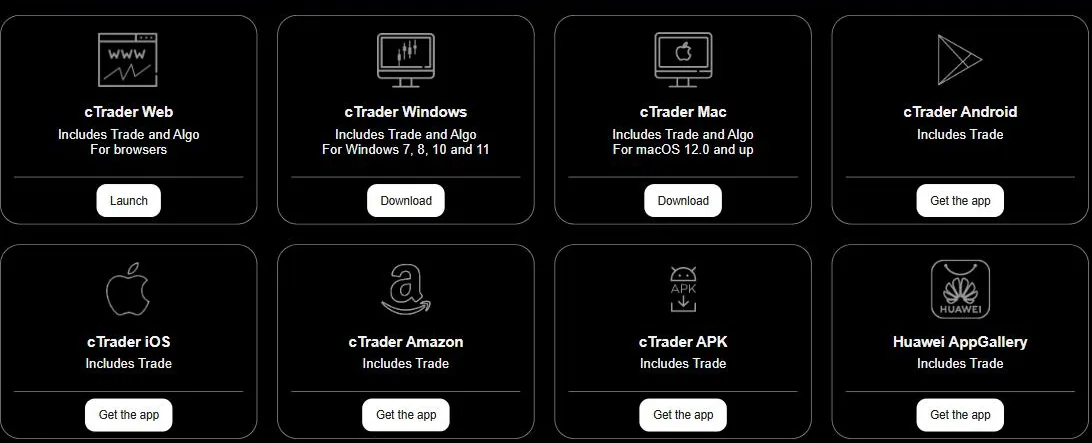
For forex and CFD traders, usually yes. cTrader, built by Spotware, runs in the browser, on Windows and Mac, and on iOS and Android, with one login across all of them. Charts are cleaner than MetaTrader's, depth of market and order types (including advanced stop and take-profit options) are built in, and brokers that offer it tend to be ECN-style with transparent pricing.
Automation uses cBots written in C#, with a built-in backtester and optimiser. The library of ready-made bots is far smaller than MetaTrader's, and EAs cannot be imported. cTrader also offers copy trading through cTrader Copy. Fewer brokers support it than MetaTrader, so check yours before planning a switch; our best forex brokers guide lists platforms by broker.
Indicators that prove themselves in public.
One engine, four precision tools — the Gold (XAU) Scalper, the institutional Gravity Zone, the Zeno momentum Oscillator, and Zeno Stocks for equities.
Can you use TradingView instead of MetaTrader?

Yes, if your broker connects to it. TradingView is first a charting and analysis platform, with the best charts, drawing tools, screeners and community scripts available. Through its broker integrations you can place, manage and close trades directly from the chart, and TradingView's own counter shows hundreds of millions of real-money trades placed this way.
The limitation is automation. Pine Script can generate alerts and backtest strategies, but it cannot send orders to a broker by itself; you need a bridge such as TradersPost or webhooks to the broker's API. For discretionary traders, that hardly matters. See our full TradingView guide, and if you want indicators built for it, try the free Quantum Algo indicators.
What is the best MetaTrader alternative for futures?
NinjaTrader. MetaTrader 5 can technically route futures through a few brokers, but futures traders mostly use platforms built for exchange markets. NinjaTrader combines charting, a DOM ladder (SuperDOM), order flow tools and NinjaScript, a C#-based language for indicators and strategies. Its brokerage arm offers low commissions, and many futures prop firms provide it.
Two other choices suit more advanced users: Sierra Chart, which is fast and deep but austere, and Quantower, which connects to many brokers and data feeds in one interface. Read our NinjaTrader review for pricing and plans, and Rithmic vs Tradovate for the data connections behind them.
Which platforms replaced MetaTrader at prop firms?
When MetaTrader licences became harder to get, prop firms moved mainly to three platforms, all licensed to firms and free to traders.
- TradeLocker uses TradingView's charting library inside a simple web and mobile platform. It is the closest experience to trading on TradingView itself. See our TradeLocker review.
- Match-Trader is a web, desktop and mobile platform with a built-in client office, popular with newer firms.
- DXtrade, by Devexperts, is a configurable web platform used by several large firms; our guide explains what DXtrade is.
cTrader is also common at prop firms. If you trade futures evaluations, the platform is usually set by the data feed (CQG or Rithmic), as at TradeDay.
How do you choose the right MetaTrader alternative?
Pick your market and how you trade to see which platform fits best.
- Start with the market. Forex and CFDs: cTrader, TradingView, TradeLocker. Futures: NinjaTrader, Sierra Chart, Quantower.
- Check your broker or firm. The best platform is useless if your broker does not offer it.
- Decide how you trade. Discretionary traders gain most from charting (TradingView, cTrader). Algorithmic traders need a real API or scripting language (cTrader, NinjaTrader, Quantower).
- Look at mobile and web. If you trade away from a desk, cTrader, TradingView and TradeLocker are strongest.
- Count the full cost. Platform licence, data fees, add-ons and commissions together.
- Test on demo first. Every platform here offers demo or paper trading; use it for a week before moving money.
Can you move MT4 or MT5 expert advisors to another platform?
Not directly. MQL4 and MQL5 code runs only in MetaTrader. To use the same logic elsewhere you must rewrite it: in C# for cTrader or NinjaTrader, in Pine Script for TradingView alerts, or in Python for broker APIs. Simple indicator-based EAs port in hours; complex ones with custom order management can take weeks.
Before porting, check the EA is worth it. Many commercial EAs hide a martingale or grid; a verified history on Myfxbook helps you judge. If you would rather not code, our trading bots guide covers no-code options.
How do you switch from MetaTrader without losing your setup?
- Export your history. Save your MetaTrader account statement and trade history before closing anything, or connect the account to a tracker so the record survives.
- List what you rely on. Indicators, templates, EAs, alerts and hotkeys. Find the equivalent on the new platform or a replacement for each.
- Rebuild your workspace on demo. Same symbols, timeframes and templates, so the first live day feels familiar.
- Check symbol specs. Contract sizes, pip values, commissions and trading hours can differ between brokers and platforms.
- Trade small for two weeks. Most costly mistakes after a switch are order-entry errors, not analysis errors.
Keep a trading journal across the switch so you can see whether the new platform changes your results.
Reference data
| Platform | Developer · scripting language |
|---|---|
| MetaTrader 4 / 5 | MetaQuotes · MQL4 / MQL5 |
| cTrader | Spotware · C# (cBots) |
| TradingView | TradingView · Pine Script |
| NinjaTrader | NinjaTrader · NinjaScript (C#) |
| TradeLocker | TradeLocker · API |
| Match-Trader | Match-Trade Technologies · limited |
| DXtrade | Devexperts · API |
| Sierra Chart | Sierra Chart · ACSIL (C++) |
| Quantower | Quantower · C# |
When is MetaTrader still the best choice?
MetaTrader remains the right tool if you rely on existing EAs, need the widest broker choice, or use custom indicators only available in MQL. It is still offered by most forex brokers outside the US, its strategy tester is mature, and the MQL5 marketplace is unmatched in size. There is no need to switch for the sake of it; a new platform takes time to learn and every switch risks execution mistakes in the first weeks.
Which features matter most when comparing trading platforms?
- Order types: bracket orders, trailing stops, partial closes and one-cancels-other.
- Execution transparency: visible depth of market and fill reports.
- Chart quality: timeframes, drawing tools and indicator library.
- Backtesting: tick-level testing and optimisation; our backtesting guide explains why it matters.
- Stability: how the platform behaves during news spikes and reconnections.
- Data: where prices come from and whether they match your broker's fills.
For CFD platforms specifically, see our comparison of the best CFD trading platforms for charting; for every platform type, see best trading platforms.
Which MetaTrader alternative should you pick?
Pick cTrader if you trade forex or CFDs and want the closest upgrade to MetaTrader. Pick TradingView if charting matters most and your broker connects to it. Pick NinjaTrader for futures, or Sierra Chart and Quantower if you need deeper order-flow tools. At prop firms, use whichever of TradeLocker, Match-Trader, DXtrade or cTrader the firm offers; they all handle the basics well.
cTrader is the best MetaTrader alternative for most forex and CFD traders, TradingView is best for charting through supported brokers, and NinjaTrader is the futures standard. TradeLocker, Match-Trader and DXtrade replaced MetaTrader at many prop firms. MT4/MT5 EAs cannot be imported anywhere else and must be rewritten. Choose by market and broker first, then test on demo.
◆ Interactive check
Can you match the platform to the trader?
Questions traders ask about MetaTrader alternatives
cTrader for most forex and CFD traders, TradingView if your broker supports it and charting matters most, and NinjaTrader if you trade futures.
cTrader has cleaner charts, built-in depth of market and C# automation. MetaTrader has more brokers, more EAs and a larger community. Neither is better for everyone.
Yes, through a broker integrated with TradingView. You place and manage orders directly on TradingView charts.
In 2024 MetaQuotes withdrew licences from several firms and brokers, particularly those with US clients, so many moved to TradeLocker, Match-Trader, DXtrade and cTrader.
No. MQL indicators and EAs must be rewritten in C# for cTrader or in another platform's language.
cTrader, TradeLocker, Match-Trader and DXtrade are free through brokers that offer them; TradingView has a free plan; NinjaTrader's platform is free for charting and simulation.
Mostly NinjaTrader, Tradovate, Rithmic-based platforms such as R|Trader Pro, Quantower and Sierra Chart, and TradingView through Tradovate.
MT5 adds more timeframes, order types, a multi-threaded strategy tester and access to exchange markets, but many EAs exist only for MT4.
References & Related Guides
Read next
- TradeLocker Review
- What Is DXtrade?
- NinjaTrader Review
- TradingView Platform Guide
- Prop Firms That Use MT4
- Best CFD Trading Platforms
- Quantower Review
- Sierra Chart Review
- Best Forex Brokers
- TradersPost Review