Order Types Explained: Market vs Limit vs Stop vs Bracket Orders (and Which to Use When)
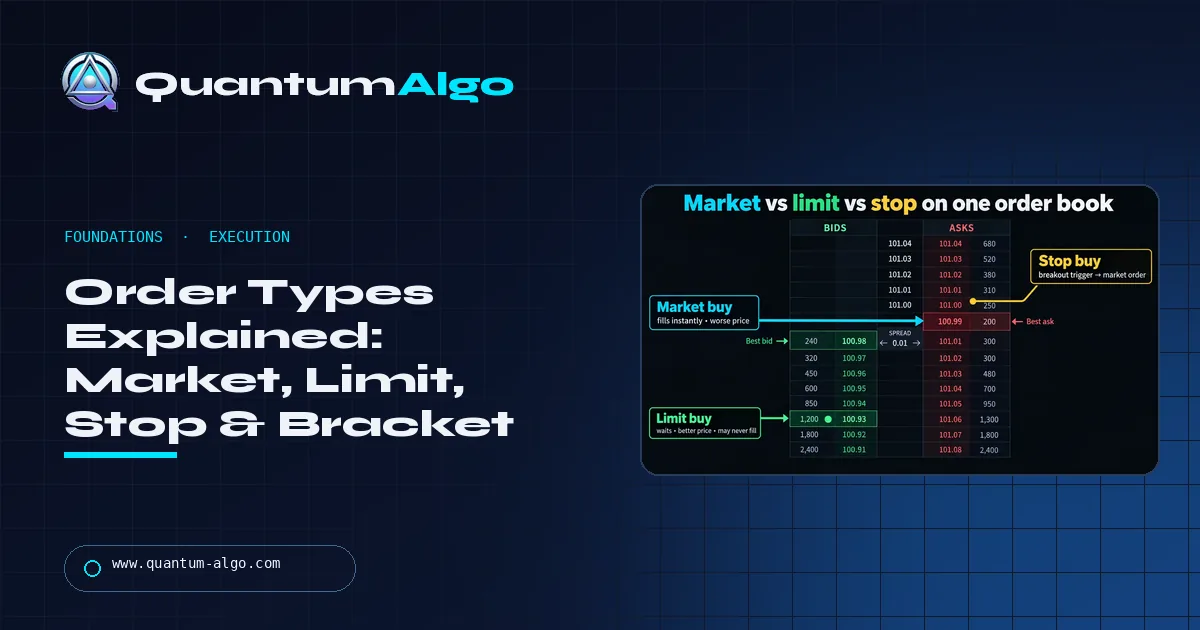
The four order types behind every trade: a market order fills at the best available price; a limit order fills only at your price or better; a stop order waits at a level, then becomes a market order; a stop-limit waits, then becomes a limit. Bracket/OCO attach a stop-loss and take-profit to an entry so both exits are live.
Indicators decide whether you trade; order types decide what price you actually get — and on a fast market that difference is regularly bigger than the edge. This is the page I wish someone had handed me before my first fill: what each order guarantees and what it doesn't, the gap that separates stop-market from stop-limit, and the bracket order that turns a Zeno signal (entry, stop, TP1/TP2 already on the chart) into one ticket.
Indicators that prove themselves in public.
One engine, four precision tools — the Gold (XAU) Scalper, the institutional Gravity Zone, the Zeno momentum Oscillator, and Zeno Stocks for equities.
What are the main order types in trading?
There are four order types you will use in almost every trade you ever place: a market order (buy or sell now, at whatever price is available), a limit order (buy or sell only at your price or better), a stop order (do nothing until price reaches a level, then become a market order), and a stop-limit order (do nothing until price reaches a level, then become a limit order). Everything else on a broker's menu — bracket, OCO, trailing, GTC, IOC — is one of those four with a condition attached.
I get asked about indicators far more often than about order types, and it is the wrong priority. The indicator decides whether you trade; the order type decides what price you actually get, and on a fast market that difference is regularly larger than the edge the indicator gave you. This page is the one I wish someone had handed me before my first fill.
Does a market order guarantee the fill or the price?
A market order says "fill me now". It buys at the best available ask or sells at the best available bid, and if the size at that level is not enough it walks to the next level and the next. On the order-book illustration in this guide, the market buy crosses the spread instantly — and pays it.
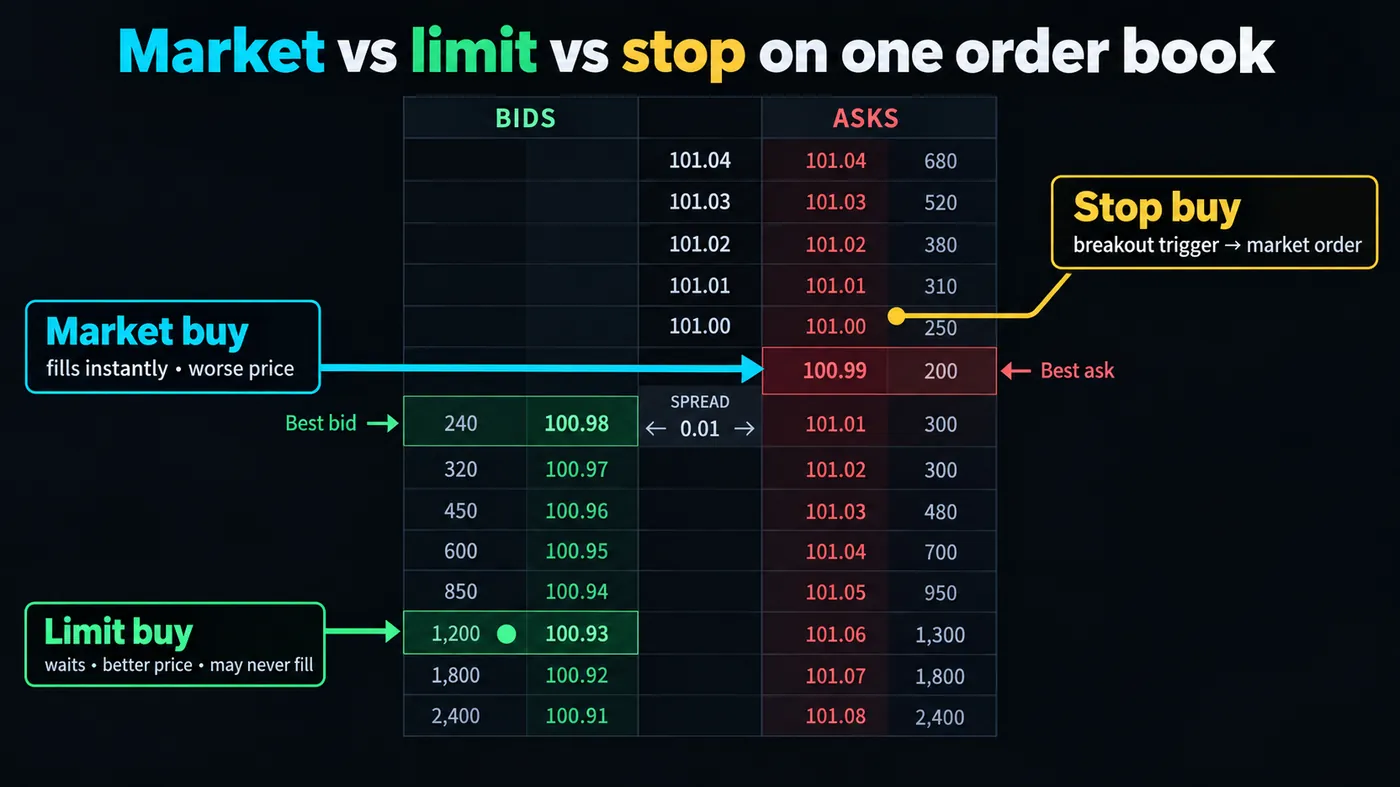
Use it when getting in or out matters more than the last tick: closing a losing position, exiting into a fast move, entering a liquid market where the spread is a fraction of your stop distance. Avoid it in thin markets, at the open, around news and in after-hours sessions, where "the best available price" can be several levels away from the last print.
What you pay: the spread, plus slippage on anything larger than the size resting at the top of the book. On EUR/USD in the London session that is a tenth of a pip; on a small-cap stock at 4:05 pm it can be 2%.
Does a limit order guarantee the price or the fill?
A limit order says "fill me at this price or better, or not at all". A buy limit rests below the current price and waits; a sell limit rests above. You choose the price, the market chooses whether to come to you.
The cost is opportunity. Price can touch your limit and reverse without filling you — there were orders ahead of yours at that level — or never reach it at all. That is why "I had a limit at the low" is the most common story of a trade that did not happen.
Use it for planned entries at a level (the retest of an order block, the edge of a range), for take-profit exits, and for anything in a thin market. On the illustration the limit buy sits under the bid, gets a better price than the market order, and may never fill — all three facts at once.
How does a stop order work?
A stop order is a market order in waiting. A sell stop below the current price is the classic stop-loss: nothing happens until price trades at the level, then it fires and sells at whatever is available. A buy stop above the current price is a breakout entry: it triggers when price clears the level.
Two things beginners miss. First, a stop order guarantees the trigger, not the price — in a gap it fills wherever the market reopens. Second, a stop is a resting order that other participants can see in aggregate; clusters of stops above equal highs and below equal lows are exactly the liquidity that gets swept, which is the whole subject of our liquidity sweep guide.
What is the trade-off in a stop-limit order?
A stop-limit order triggers at the stop price like a stop order, but then places a limit order at your limit price instead of a market order. It protects you from filling at a terrible price in a fast move. It also means you might not fill at all.
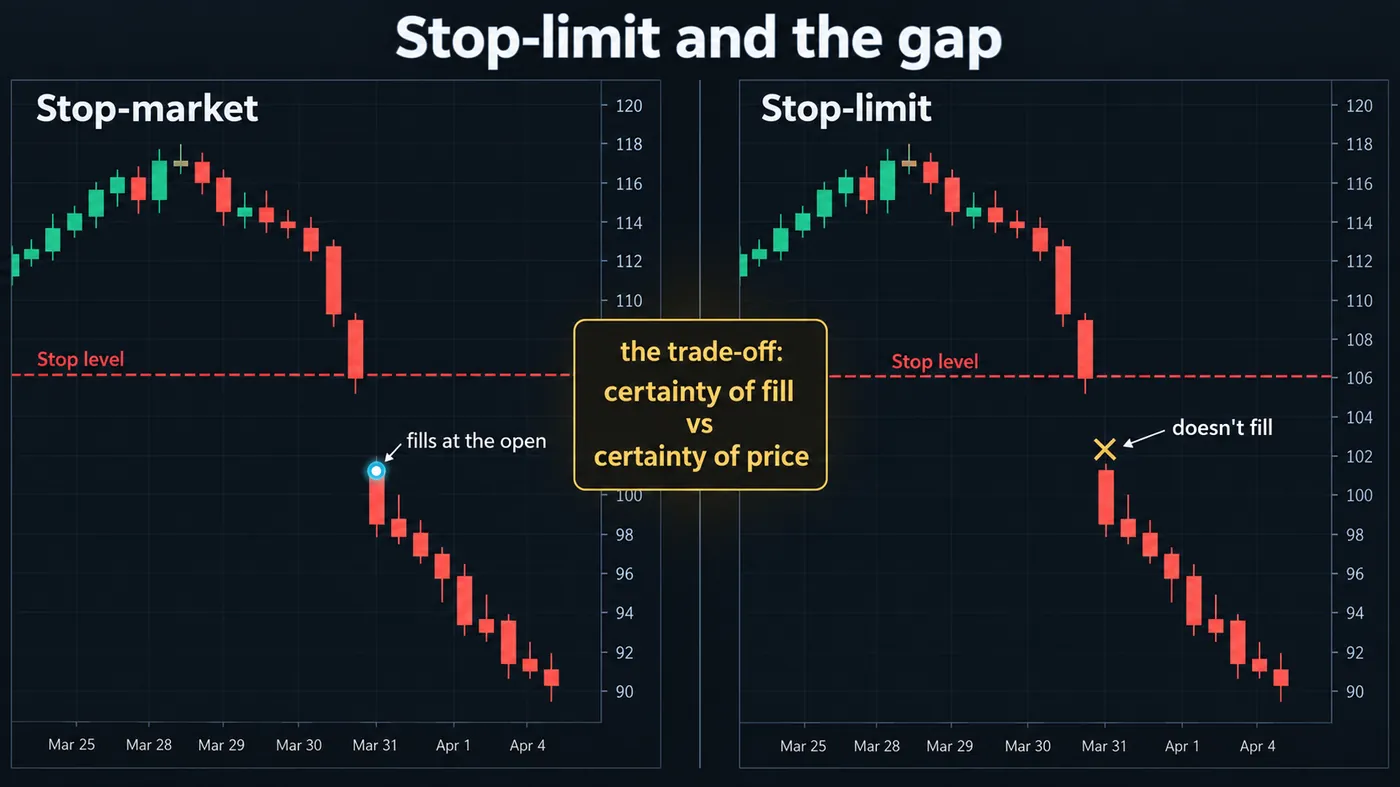
The gap illustration in this guide shows both outcomes on the same stock: the stop-market fills at the open, well below the stop level, but you are out; the stop-limit never fills because the open was below its limit, and the position rides the rest of the way down. Neither is wrong. The stop-market is the right choice for a stop-loss on a position you cannot afford to keep; the stop-limit is the right choice for a breakout entry where a bad fill would ruin the trade's maths.
The rule I use: stop-loss orders are stop-market, always. Entries can be stop-limit.
How do bracket and OCO orders work together?
A bracket order is an entry with two exits attached: a stop-loss below and a take-profit above (for a long). The two exits are linked as OCO — one cancels the other — so when one fills, the other is removed. The bracket illustration in this guide shows it on XAUUSD: entry, stop, target, and the ticket with the three fields filled.
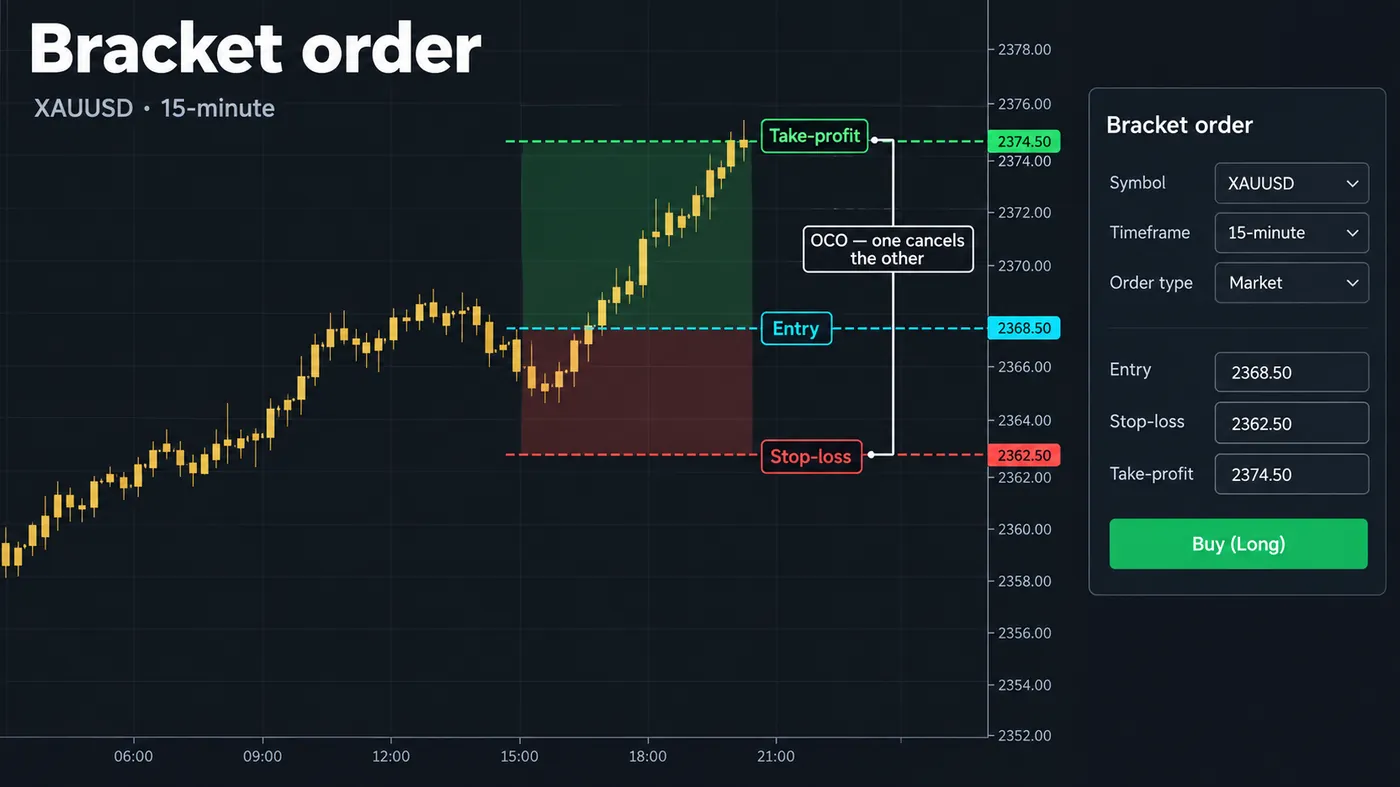
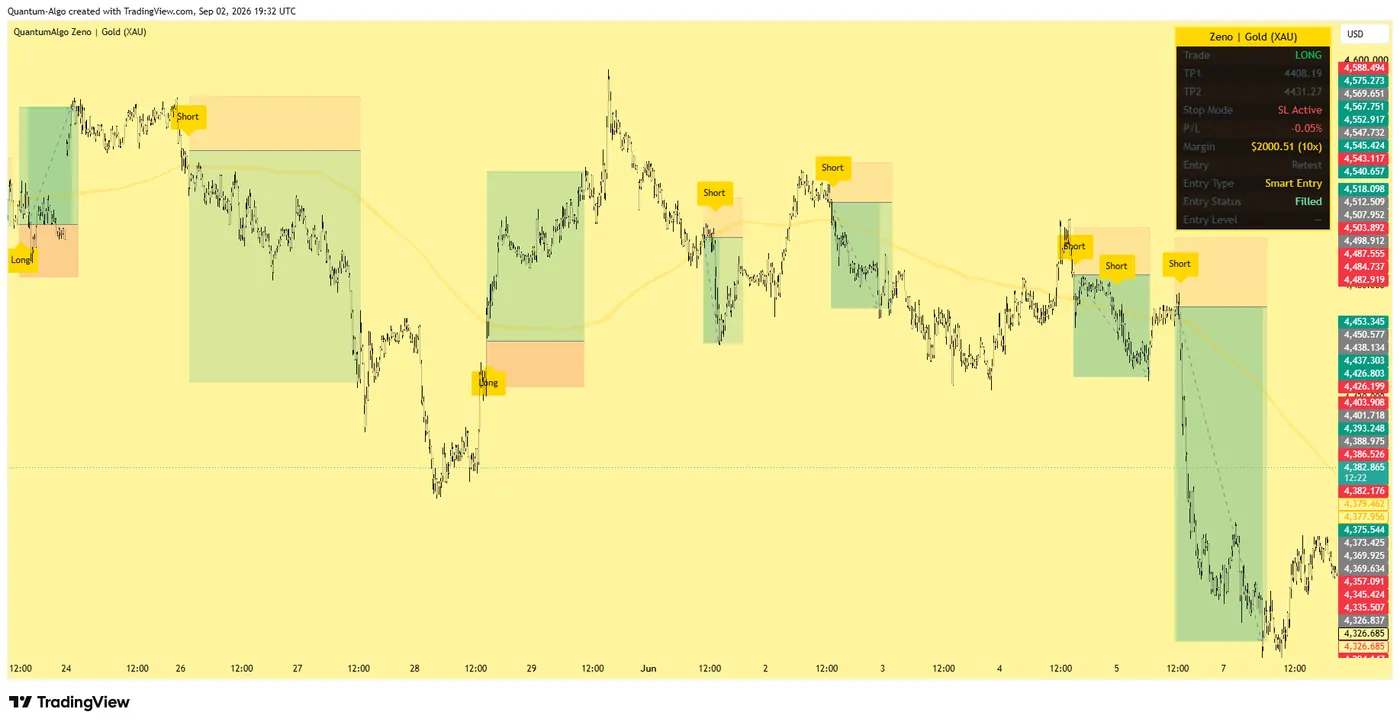
This is the order type that turns a Zeno signal into a trade in one click. The chart already shows entry, stop and TP1/TP2; a bracket puts all three in the market at once, which means the exit exists before your emotions do. Most brokers support it under different names — "bracket", "OCO", "attached orders", "TP/SL" — and TradingView's Trading Panel exposes it for any integrated broker.
What is time-in-force, and how long does an order live?
- Day — cancelled at the session close if unfilled. The default on most stock brokers.
- GTC (good till cancelled) — stays until filled or cancelled, usually up to 60–90 days. Use for resting limit entries at levels that may take days to reach.
- IOC (immediate or cancel) — fill what you can right now, cancel the rest. Avoids walking the book.
- FOK (fill or kill) — fill the whole size now or nothing.
- Post-only (crypto) — the order is rejected if it would fill immediately, guaranteeing you pay the maker fee, not the taker fee.
The one that bites: a Day limit order placed after hours on a stock broker may be queued for the next open, or rejected, depending on the broker. Check before assuming.
Which order type should you use, and when?
| Situation | Order | Why |
|---|---|---|
| Exiting a losing position | Market (via stop-market) | You need out, not a good price |
| Entering on a retest of a level | Limit at the level | Price comes to you; better fill, defined risk |
| Entering on a breakout | Stop or stop-limit above the level | Only trigger if the move happens |
| Taking profit at a target | Limit | You want the price, not the moment |
| Any trade with a signal that includes stop and target | Bracket / OCO | One ticket, exits in the market before you can change your mind |
| Thin market, wide spread, after-hours | Limit only | A market order here pays whatever is there |
Order types on TradingView and at the broker
TradingView's Trading Panel offers market, limit, stop and stop-limit for every integrated broker, with bracket orders (stop-loss and take-profit fields on the same ticket) for most. Placing them on the chart — dragging a limit to a level, a stop below a swing — is the same as typing them, and it is the workflow QuantumBot automates: the signal's levels become the order's levels, nothing is retyped.
Crypto exchanges add reduce-only (the order can only close a position, never open one), post-only and trigger orders with mark-price or last-price triggers; the trigger source matters on perpetuals, where a wick on last price can fire a stop that the mark price never touched.
Mistakes that cost money
- Using a market order in a thin market and blaming the broker for the fill.
- Using a stop-limit as a stop-loss, then watching a gap go straight through it.
- Placing stops at round numbers and obvious swing points, exactly where the sweep is aimed.
- Forgetting a GTC limit order that fills weeks later in a completely different market.
- Entering with a market order and adding the stop "in a minute". The bracket exists so that the minute never happens.
Market orders buy certainty of fill with price; limit orders buy certainty of price with fill; stops trigger at a level and then become one of the two. Use stop-market for protection, limit for planned entries and targets, stop or stop-limit for breakouts, and a bracket to put the whole trade in the market at once. In thin markets, limits only.
◆ Interactive check
Do you know what your order guarantees?
Questions traders ask about order types
A limit order fills only at your price or better and rests in the book until then. A stop order does nothing until price reaches your level, then becomes a market order and fills at whatever is available. Limits control price; stops control the trigger.
Once triggered, a stop-loss (stop-market) order is a market order. A stop-limit order becomes a limit order instead, which can fail to fill in a gap — that is why stop-losses should be stop-market.
An entry with a stop-loss and take-profit attached, linked so that when one exit fills the other is cancelled (OCO). It puts the whole trade — entry, risk, target — into the market in one ticket.
Orders at a price fill in queue order, and price can touch a level without enough volume trading there to reach yours. To improve the odds, place the limit slightly inside the level rather than exactly on it.
Not sensibly. A sell limit above the market is a take-profit; a limit order cannot be placed below the market as a stop without a trigger. Use a stop-market for protection.
A market order fills immediately at the best available price and guarantees the fill. A limit order fills only at your price or better and guarantees the price, not the fill.
Stop-market. A stop-limit can be skipped by a gap, leaving the position open past your risk. Stop-limits belong on entries, where a bad fill would break the trade's maths.
A stop that follows price in your favour by a set distance and never moves back. It is covered in detail in the trailing stop loss guide.
Usually yes on stocks, with the order queued for the next session or the extended session depending on the broker; on futures, forex and crypto the market is open, so the order rests immediately.
Zeno prints the levels; QuantumBot places the bracket — entry, stop, TP1/TP2 — on your own exchange account from those levels, so nothing is retyped.
References & Related Guides
Read next
- What Is a Stop Loss? How It Works, Where to Put It, and the Order Type That Actually Protects You
- How to Start Trading Stocks: Accounts, Rules, Your First Trade, and the Week That Follows
- Best Trading Platforms: For Day Trading, for Beginners, and on Your Phone
- Trailing Stop Loss Explained
- What Is Slippage in Trading?
- What Is Trading?
- Liquidity Sweep Trading
- What Is Paper Trading?
- What Is After-Hours Trading?
- Best Trading Bots
- Stop-Loss Placement (Academy)
Authoritative sources
- SEC Investor.gov: types of orders
- FINRA: order types
- CME Group: order types
- TradingView: order types in the Trading Panel
- Binance: stop-limit and OCO orders