SuperTrend Engine [Quantum Algo]
A SuperTrend that shows you the whipsaws it saved you from, tells you its real win rate on your chart, and admits when it is wrong — the factor adapts by a formula you can check, every flip carries its statistics, every marker settles into its outcome, and a trade plan prints on each confirmed flip.
The short answer
The SuperTrend Engine is a free, open-source TradingView indicator built on one idea: every SuperTrend gives you signals — this one shows you the whipsaws it saved you from, tells you its real win rate on your chart, and admits when it is wrong. It self-tunes its ATR factor with a fully transparent formula (Kaufman's Efficiency Ratio, shown live), confirms flips through a Whipsaw Shield that absorbs fake-outs and marks every one it absorbed, stamps every buy and sell flip with its honestly computed win rate on the current symbol, settles every marker into its real outcome ten bars later, and draws the trade geometry — entry, trailing stop, 1R and 2R references — the moment a flip confirms.
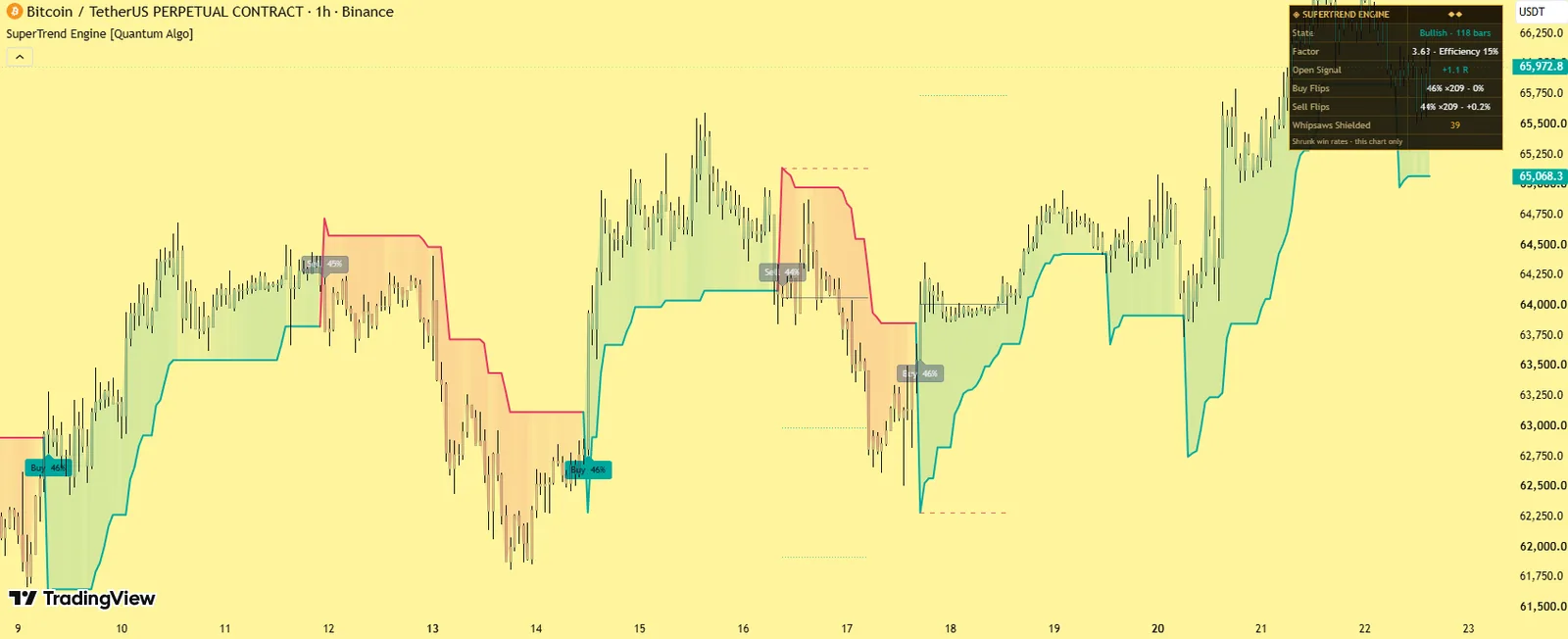
An adaptive trail, flips stamped with live win rates, ghost markers for absorbed whipsaws, and entry / stop / 1R / 2R on every confirmed flip.
The Whipsaw Shield renders the failures it absorbed; markers settle grey when a flip failed.
No — flips, shields, grades, statistics and settlement on closed bars.
What a SuperTrend is
A SuperTrend is a trailing stop built from the Average True Range: a band placed a volatility-scaled distance from price that ratchets in the trend's favour and never retreats. While price holds above the band the trend is up and the band trails below as a stop; a close through the band flips the state. It is one of the most followed trend tools in retail trading, and its famous weakness is the whipsaw: sideways markets flip it back and forth, and a fixed factor that survives chop is too slow in trends. This engine is built specifically against that weakness. Our SuperTrend guide covers the standard version; this page is the engine.
What it draws
The adaptive trail
The ratcheting SuperTrend band, factor interpolated between your trend bound and chop bound by the Efficiency Ratio.
Buy and Sell flip markers
Stamped with the live win rate on this symbol and timeframe, with sample count and Wilson bound in the tooltip.
Ghost × markers
Where a raw flip reversed before confirming — the whipsaws absorbed.
The trade plan
On every confirmed flip — entry, trailing stop, 1R and 2R reference levels.
A breathing glow
Between price and trail that intensifies with trend distance, grade-A flips in the accent colour, and optional candle tinting.
The dashboard
Live factor and efficiency, the open signal's running R-multiple, whipsaws shielded, and the statistics rows.
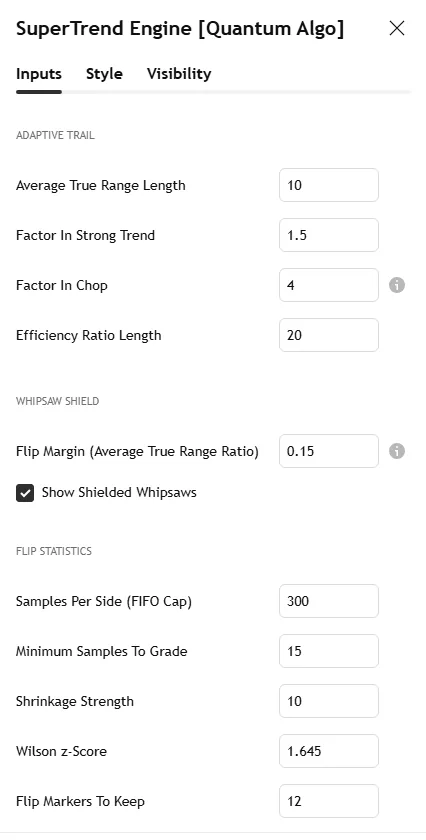
The Bitcoin 1-hour screenshot on this page shows the trail, a confirmed flip with its plan and several ghost markers; the settings screenshot shows the Inputs tab.
Why it is different
The Whipsaw Shield — visible absorbed fake-outs.
A flip confirms only when the close clears the opposite band by a volatility margin. When the raw trail flips and reverses first, the engine holds its direction and prints a ghost marker where the whipsaw died, with a running Whipsaws Shielded counter. Other tools reduce whipsaws quietly; this one renders the failures it absorbed.
Honest per-symbol flip statistics.
Every flip carries its live win rate on this exact symbol and timeframe — shrinkage-adjusted so thin history cannot show fake confidence, with a Wilson confidence bound and sample count.
Markers that settle into their outcome.
Each marker resolves ten bars later: trend colour if the flip delivered, faded grey if it failed. Scroll any chart and read the engine's true record off the markers — losses included.
Transparent adaptation.
The factor self-tunes between your bounds using the Efficiency Ratio — tight when price moves cleanly, wide in chop — and the dashboard shows the live factor every bar.
A trade plan, not just a line.
Entry, trailing stop, 1R and 2R on every confirmed flip, with the running R-multiple tracked live.
How it works
Adaptive trail. Classic ratcheting bands from the ATR, with the factor interpolated between the trend bound and the chop bound by the Efficiency Ratio — net movement over path length across the lookback.
Whipsaw Shield. The raw band flip is a candidate, not a signal; only a close beyond the opposite band plus the margin confirms it. A raw flip that reverses first is counted, marked, and absorbed.
Statistics. Each confirmed flip records what price did ten and thirty bars later in the flip's direction; win rates are pulled toward 50% by pseudo-samples and carry Wilson lower bounds; until the minimum sample is met, markers read "collecting history".
Outcome settlement. Every marker stores its flip price and recolours by the realised ten-bar outcome.
Grading. Volume z-score, efficiency and break decisiveness combine into an A, B or C grade on every flip.
Non-repainting. Flips, shields, grades, statistics and settlement are evaluated on closed bars; once printed, nothing moves.
Settings
| Group | Input | What it does | Where to start |
|---|---|---|---|
| Adaptive trail | ATR length | Volatility basis | 10 |
| Factor in strong trend | Tight bound | 2.0 | |
| Factor in chop | Wide bound | 4.0 | |
| Efficiency Ratio length | The adaptation lookback | 20 | |
| Whipsaw Shield | Flip margin, ghost marker toggle | Confirmation distance; show absorbed flips | 0.25 ATR; on |
| Statistics | Sample cap, minimum samples to grade, shrinkage strength, Wilson z, markers to keep | How the win rates are computed | 60 / 10 / default / 1.28 / 30 |
| Trade plan | Toggle, plans to keep | Entry, stop, 1R, 2R | on; 3 |
| Visuals | Colours, glow fill, candle tinting | Appearance | — |
| Dashboard | Position, four text sizes, title band, background, frame, grid, three text colours | Themeable | — |
Alerts
Three named conditions: Buy Flip, Sell Flip (the adaptive trail flipped with the confirmation margin cleared), Whipsaw Shielded (a raw flip reversed before confirming), and Grade A Flip (volume, efficiency and a decisive break together).
How to use it
Treat the flip as regime information and the trail as the stop. The line is the invalidation; the 1R and 2R references scale targets to the risk the stop defines.
Read the ghost markers as the tool working. A cluster of × marks in a range is the chop a fixed-factor SuperTrend would have traded.
Judge fresh flips against the settled history. A symbol whose markers keep settling grey is telling you trend-following struggles there.
Use the grade for confidence. An A-grade flip with volume, high efficiency and a decisive break is a different event from a drift-through.
Watch the live factor and efficiency to see the adaptation reasoning in real time.
Three ways to trade it
The confirmed flip with structure.
A Buy flip that coincides with a change of character from the Smart Money Concepts Engine and a return to a demand block: enter on the flip, stop at the trail, targets at 1R and 2R or the next liquidity.
The trail as a trailing stop.
Already in a position from a Zeno signal or an order-block entry? The trail is the invalidation; move the stop with it and exit on the confirmed opposite flip, not the raw one.
The ghost-cluster filter.
Three or more ghost markers in a short span means range — skip trend entries until the Choppiness Index or Keltner Rings regime reads trend again.
Recommended settings by market
Crypto perpetuals, 1H–4H:
Trend factor 2.0, chop factor 4.0, margin 0.25 ATR — the default profile.
Forex majors and gold, 15m–1H:
Trend factor 1.8, chop 3.5, ER length 14; the London-open flip is the cleanest of the day.
Index futures, 5m–15m:
ATR 7, trend 1.6, chop 3.0; a wider margin (0.35 ATR) tames the open.
Daily charts, any market:
ATR 14, trend 2.5, chop 5.0; flips are swing-trade regime changes.
How it compares
Against the standard SuperTrend: same ratchet, but the factor adapts transparently, fake-outs are shielded and shown, every flip carries a real win rate, and a trade plan prints. Against other adaptive or "AI" SuperTrends: adaptation itself is not the claim — the differences are one verifiable formula shown live, the whipsaws rendered instead of hidden, and markers that settle into their outcome. Against the Adaptive Trend Sentinel: the Sentinel is the pure ratcheting boundary with binary regime signals; the engine adds the shield, statistics, grading and plans. Against Zeno: Zeno's signals come from structure and order flow with multi-timeframe confluence; the engine is the free trend-following layer you can run beside it.
Limitations
Trend-following flips underperform in prolonged ranges; the shield reduces but cannot eliminate that cost, and shielded entries confirm slightly later than raw ones. Statistics need history to mature and are honest about being thin early. Volume grading is less meaningful on symbols with unreliable volume.
Credits
The SuperTrend trailing stop was created by Olivier Seban; the Average True Range by J. Welles Wilder Jr. (1978); the Efficiency Ratio by Perry J. Kaufman; the Wilson score interval by Edwin B. Wilson (1927). The Whipsaw Shield, the transparent adaptive-factor design, the per-symbol statistical engine, the outcome-settling markers, the trade plan layer and all code are original work by Quantum Algo, published open source.
Step-by-step: adding it to your TradingView chart
Open the script page on TradingView (link above) and click Add to favorites, then Use on chart — or on any chart open Indicators, search "SuperTrend Engine Quantum Algo" and add it. Free on every TradingView plan.
Open the indicator's settings and set the inputs for your market and timeframe from the table above; the defaults are tuned for crypto on intraday and 4-hour charts.
In the Style tab, match the colours to your chart theme; the dashboard position and text size are in Inputs.
To set alerts, right-click the chart → Add alert, choose the indicator as the condition and pick the event; set "Once per bar close" so alerts match the closed-bar logic.
Save the layout, and add the other free Quantum Algo tools to it — they are designed to sit together.
To read or reuse the code, click Source code on the script page; republishing is subject to TradingView's house rules.
Inside the code, for developers
Pine Script, open source. Worth reading if you want to modify it: every detection and signal gated on barstate.isconfirmed; state held in capped arrays of drawing objects with explicit create, update and retire functions; statistics kept in first-in-first-out arrays with shrinkage and a Wilson bound computed inline; named alertcondition calls so webhooks receive a consistent payload. The Academy's Pine Script tutorials and the TradingView backtesting guide cover strategy conversion.
Using it with the other free indicators
The free tools layer on one chart: the Smart Money Concepts Engine for bias and the Confluence Score; Order Blocks with Volume, Fair Value Gaps + Inversion and Institutional Key Levels for the zone; Liquidity Sweeps, Sessionscope and Liquidation Magnet for the liquidity and the trigger; OTE + Silver Bullet for the time-qualified entry; the Institutional Volume Profile and Pressure Oscillator for whether volume agrees; and the trend and volatility family — the Adaptive Trend Sentinel, SuperTrend Engine, Golden Cross Engine, Anchored VWAP Engine, Trendline Architect, Keltner Rings and Volatility Storm Tracker — for regime, direction and the room a move has. The free-indicators hub lists every tool; the SMC guide is the method behind the layering.
Common mistakes with this indicator
- Trusting the developing bar — every event waits for the close.
- Trading every marker — the tool gives regime and context; the entry needs a structure level and a stop beyond it.
- Default lengths on the wrong timeframe — adjust the inputs, as the settings table shows.
- Reading the statistics as promises — they describe this chart's history, shrunk toward neutral on purpose.
- Stacking ten random scripts — the free tools layer because they were built to.
Want the signal, not just the structure?
Zeno reads Smart Money structure across timeframes and prints the entry, stop, TP1 and TP2 on your chart — with a public record of 160 posted trades, 120 wins and 40 losses at the stated levels. QuantumBot executes it on Bybit, Binance, OKX, Bitget and Kraken.
Glossary for this indicator
Frequently asked questions
Does the SuperTrend Engine repaint?
No. Every flip, shield event, grade, statistic and marker settlement is evaluated at bar close; once printed, nothing moves.
What does a ghost × marker mean?
The raw SuperTrend flipped there and reversed before clearing the confirmation margin. The engine held its direction and counted the whipsaw it absorbed.
Why does a marker turn grey?
The flip failed: ten bars later, price had not moved in its direction. Grey markers are the audit trail working.
Why do win rates hover near 50% on some symbols?
Because that is the truth of trend-flip performance there. The shrinkage and confidence bounds display small honest numbers rather than large misleading ones.
What are the best SuperTrend settings?
There is no universal answer, which is why the factor adapts: set the trend bound around 2 and the chop bound around 4 and let the Efficiency Ratio interpolate; the presets above adjust by market.
How does it relate to Zeno?
Zeno prints structure-based signals with entry, stop, TP1 and TP2; the SuperTrend Engine is a free trend layer whose trail works as the trailing stop for those trades.
What is the difference between this and the standard SuperTrend?
Same ratchet, but the factor adapts transparently, fake-outs are shielded and shown as ghost markers, every flip carries a real win rate with a confidence bound, markers settle into their outcome, and a trade plan prints.
Why is the flip later than my old SuperTrend?
The Whipsaw Shield requires the close to clear the opposite band by a margin; the margin trades earliness for reliability. Reduce it if you prefer raw flips — the ghost markers show what you would have traded.
What are the best settings for crypto?
Trend factor 2.0, chop factor 4.0, ATR 10, Efficiency Ratio 20, margin 0.25 ATR — the defaults; the presets section adjusts by market.
Can I use it as a strategy?
The flips and plans are strategy-ready; convert it in Pine or feed the alerts to a bot. Check the settled record on your symbol first — grey markers are the honest warning.
Why "collecting history"?
Until the minimum sample is met, the engine refuses to invent a win rate; the marker says so instead.
How does it relate to Zeno?
Zeno prints structure signals with entry, stop, TP1 and TP2; the engine is the free trend layer whose trail works as their trailing stop.
The trend and volatility family
Regime, direction and room — the tools built to sit under the Smart Money layer.
Add SuperTrend Engine to your chart
One click on TradingView, free on every plan, code you can read. Nothing repaints.