Best Trading Platforms: For Day Trading, for Beginners, and on Your Phone
The best trading platform is the one whose chart you can execute from, whose costs match how often you trade, and whose regulator makes your money recoverable, in that order. For most retail traders that is a regulated broker connected to TradingView. Day traders weight execution and cost per round trip; beginners a paper account and low minimums; phones execute.
"Best day trading platform", "best trading platform for beginners" and "best trading app" look like one search and are three different jobs, so this guide answers each properly: the criteria that decide it, a ranking by platform type rather than brand (brands change pricing every quarter; types do not), the cost arithmetic, the regulation matrix, and a 30-day test to run before you fund. No platform paid to be here. The picker and fee calculator below turn your market, volume and segment into a shortlist.
Indicators that prove themselves in public.
One engine, four precision tools — the Gold (XAU) Scalper, the institutional Gravity Zone, the Zeno momentum Oscillator, and Zeno Stocks for equities.
What is the best trading platform?
The best trading platform is the one whose chart you can execute from, whose costs match how often you trade, and whose regulator makes your money recoverable — in that order. For most retail traders that means a regulated broker connected to TradingView, because TradingView is the chart everyone analyses on and an integrated broker lets you place the trade on the same screen. Day traders should weight execution speed and total cost per round trip; beginners should weight a real paper-trading account and low minimums; anyone trading from a phone should accept that the app is for alerts and execution, not for analysis.
That answer is short because the long version depends on which of three questions you are actually asking. "Best day trading platform", "best trading platform for beginners" and "best trading app" look like one search and are three different jobs. This guide is built to answer all three properly — the criteria that decide each, a ranking by platform type rather than by brand (brands change pricing every quarter; types do not), the cost arithmetic, the regulation that matters, and the honest limits of every option. It is long on purpose. Choosing a platform is a decision you make once and live with for years.
A note on what this page is not: it is not an affiliate table. No platform on this page paid to be here, the ranking is by type and criteria, and where a named product appears it is because we use it or because the claim about it is verifiable on the vendor's own documentation.
What are the four kinds of trading platform?
Every "best platform" list mixes four different things, and the platform-types illustration in this guide separates them:
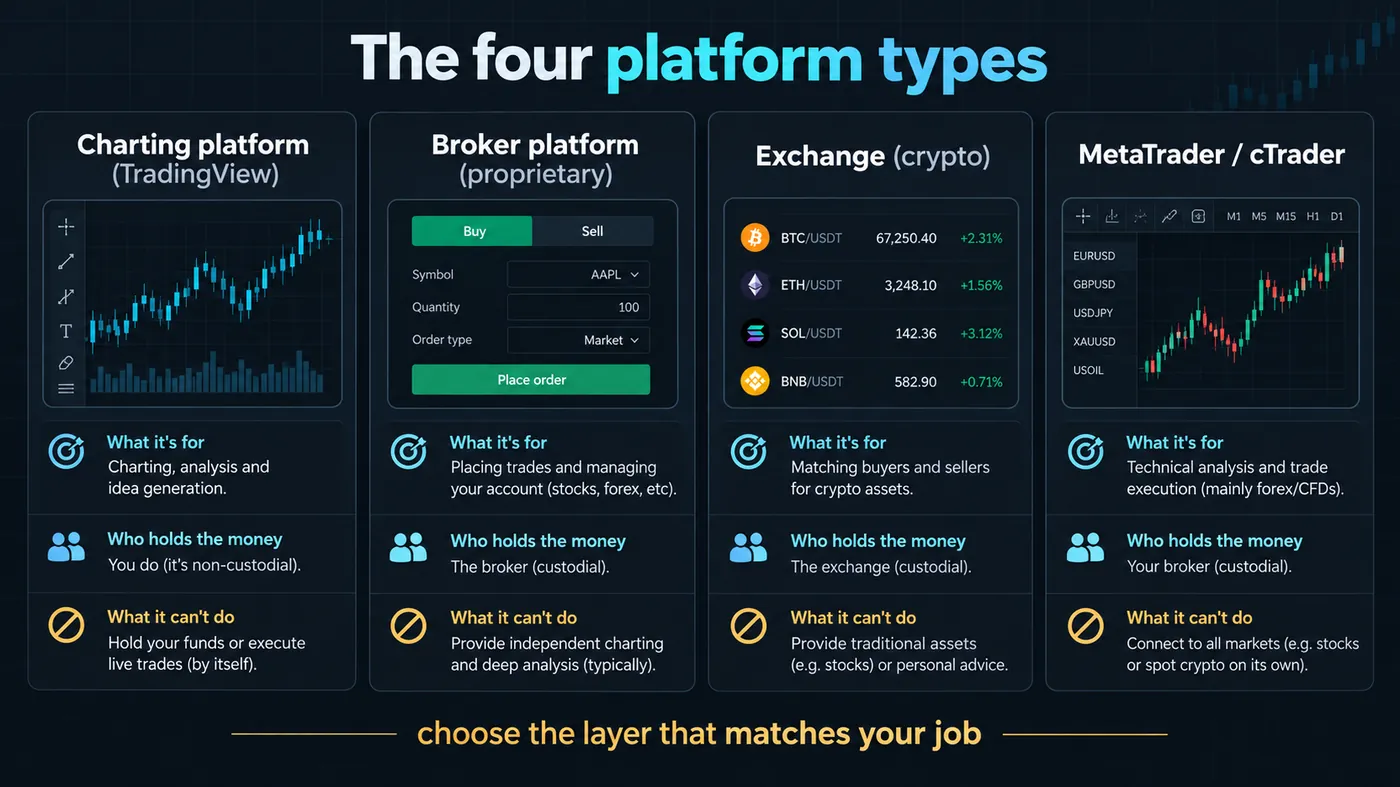
- Charting platforms. TradingView is the one that matters. It draws the chart, runs scripts and alerts, and — through its Trading Panel — routes orders to brokers that integrate with it. It does not hold your money.
- Broker platforms. The broker's own web or desktop application: Interactive Brokers' Trader Workstation, a spread-betting app, a stock broker's dashboard. The broker holds the money and the platform is their front end. Charting quality varies from excellent to unusable.
- Exchanges. Crypto venues — Bybit, Binance, Kraken, Coinbase — where you trade against an order book directly. The exchange is broker, venue and custodian at once, which is convenient and is also the whole counterparty risk.
- Third-party terminals. MetaTrader 4/5 and cTrader: platforms licensed by many brokers, with their own automation ecosystems (Expert Advisors, cBots). The broker holds the money; the platform is shared.
The reason this matters: when someone says "TradingView is the best platform for day trading", they mean the chart; when someone says "Interactive Brokers is the best", they mean the broker. You will end up using one from the first category and one from the second, third or fourth — and the most common mistake is choosing a broker with a bad chart because it had low commissions, then analysing on TradingView anyway and retyping every order.
Which criteria matter most when choosing a trading platform?
Execution from the chart. Can you place, move and cancel orders on the chart you analyse on? For a day trader this is the difference between a two-click bracket order and a forty-second retyping exercise during which the entry has gone. Integrated brokers, exchanges with TradingView-style charting, and MT5/cTrader all pass; most proprietary broker apps fail.
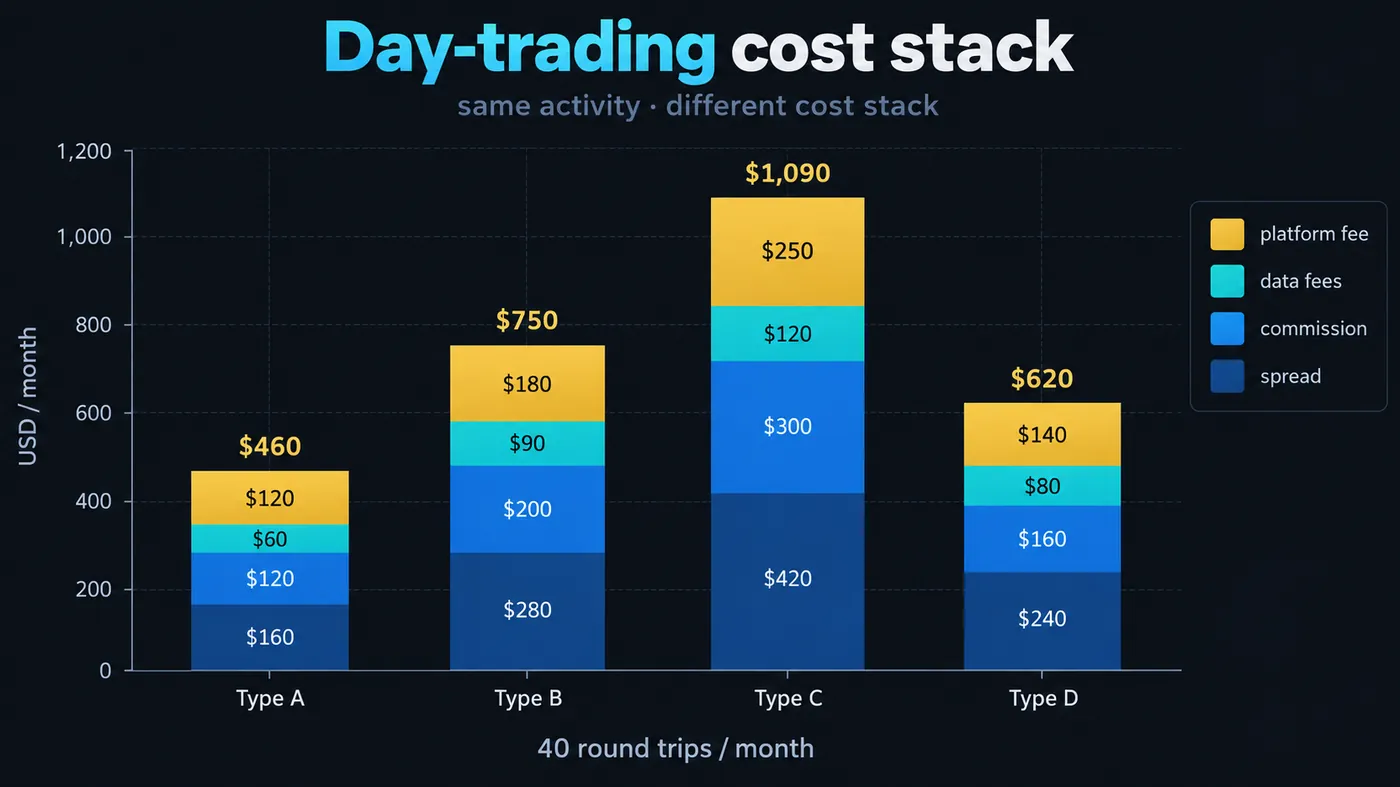
Total cost per round trip. Spread plus commission plus any per-order fee, at your actual size. Platforms advertise the smallest of these; the cost-stack illustration in this guide shows the same 40 round trips a month across four platform types, and the ranking by total is not the ranking by headline commission.
Regulation of the entity holding your money. Segregated client funds, negative balance protection where it applies, and an investor-compensation scheme (SIPC in the US, FSCS in the UK) are worth more than any feature. The protection matrix later on this page lists what each platform type actually provides.
Fill quality. Slippage on market orders, rejections, requotes. Invisible on the pricing page, decisive in your P&L, and only measurable by trading small for a month and reading the fills.
Data. Real-time quotes are free on crypto and most forex, cost money on US stocks and futures (exchange fees), and matter more the shorter your timeframe.
Alerts and automation. Price alerts, indicator alerts, webhooks to bots. TradingView is the reference; MT5 and cTrader have their own; most broker apps have basic price alerts only.
Paper trading. A simulator on the same interface as live, at a balance you set. Essential for beginners; useful for everyone testing a new market.
Product breadth and hours. Stocks, options, futures, forex, crypto — few platforms do all five well, and you should pick for the one or two you actually trade.
Minimums and funding. Account minimum, deposit methods, withdrawal speed and fees. Beginner-relevant; irrelevant to a funded day trader.
What are the best day trading platforms?
The short answer for day traders
The best day trading platform is a regulated broker you can execute from inside TradingView, with per-trade costs low enough that 40 round trips a month do not eat the edge, real-time data for your market, and fills you have tested at small size. For US stocks that usually means a discount broker with direct-access routing; for futures, an FCM with a fast front end and CME data; for forex and gold, a raw-spread ECN broker on cTrader or a TradingView-integrated broker; for crypto, a major exchange with a deep order book and mark-price triggers. What it does not mean is the platform with the flashiest charts, because you will not be looking at their charts.
What does day trading demand that swing trading does not?
A swing trader places three orders a week and can retype them. A day trader places three hundred a month and cannot. Everything about the day-trading choice follows from volume and speed:
- Cost compounds. At 40 round trips a month, a $2 difference per round trip is $960 a year; a 0.2-pip difference in EUR/USD spread at 1 lot is $2 a trade, the same $960. The cost-stack illustration puts four platform types side by side: Type A (discount stock broker with commission-free trades but wider effective spreads and data fees) lands around $460 a month; Type B (raw-spread ECN forex with commission) around $750; Type C (a proprietary broker platform with commission, platform fee and data) around $1,090; Type D (crypto exchange at maker/taker rates) around $620. The cheapest headline was not the cheapest total.
- Hotkeys and bracket orders. One key to buy with the stop and target attached; one key to flatten. Direct-access stock platforms, futures front ends and TradingView's Trading Panel offer this; browser-based broker dashboards often do not.
- Level 2 / DOM. Order-book depth for stocks and futures. Necessary for scalpers, optional for everyone else.
- Data latency. Delayed data is disqualifying. Exchange data fees on stocks and futures are the price of admission.
- Uptime at the open. The first fifteen minutes carry the day's volume; a platform that lags at 9:30 costs more than one with higher commissions.
Which platform type wins for day trading each market?
| Market | Platform type that wins | Why | Watch for |
|---|---|---|---|
| US stocks | Direct-access discount broker (Interactive Brokers, or a comparable direct-routing broker) analysed on TradingView | Per-share pricing at volume, direct routing, borrowable shorts, Level 2 | Until your broker adopts FINRA's new intraday margin standards (by 20 October 2027), the PDT rule below $25,000 in a margin account; data fees |
| Index futures | Futures FCM with a fast front end (NinjaTrader, Sierra Chart, Tradovate-style web) and CME data | No PDT rule, micro contracts, 23-hour session, tick-precise costs | Data fees on top of the platform; intraday margin is not your risk |
| Forex & gold | Raw-spread ECN broker on cTrader, or a TradingView-integrated broker | Spreads from 0.1 pip + commission, DOM, deep session liquidity | Which regulated entity holds the account; overnight financing on CFDs |
| Crypto | Major exchange with deep books (Bybit, Binance, Kraken) | 24/7, maker rebates, mark-price triggers, native TradingView charts | Counterparty risk; funding on perpetuals; liquidation engine |
| Options | Options-first broker (tastytrade-style) or Interactive Brokers | Chains, spreads, per-contract pricing | Options are securities: the PDT rule applies wherever the broker still uses it (replaced 4 June 2026) |
The day trader's screen
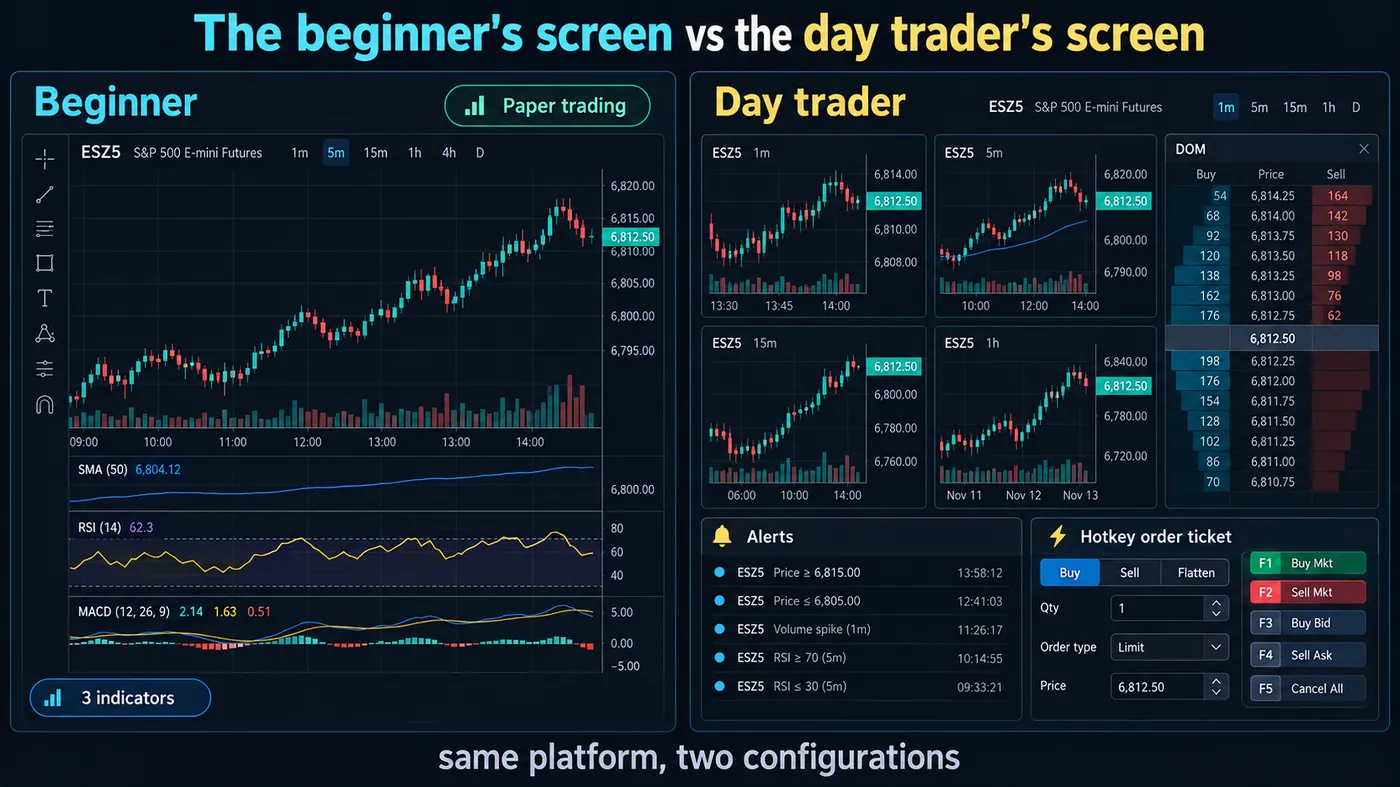
The beginner-vs-day-trader illustration in this guide shows the same platform configured two ways. The day trader's version has four charts, a DOM, an alert panel and a hotkey order ticket; nothing on it is decorative. If a platform cannot be configured to look like the right-hand panel — multiple charts, order entry visible at all times, one-click flatten — it is not a day-trading platform regardless of what its marketing says.
How does the pattern day trader rule shape the US stock choice?
Under $25,000 of equity in a margin account, FINRA's pattern day trader rule has limited you to three day trades in five business days. FINRA replaced it with intraday margin standards effective 4 June 2026, but brokers may keep the old limit until 20 October 2027, so check your broker. While it applies, that single fact sends most US beginners who want to day trade toward micro futures or crypto, where the rule never existed — which is why "best day trading platform" for a $10,000 US account is usually a futures platform, not a stock broker. Our PDT rule guide has the arithmetic.
Best trading platform for beginners
The short answer for beginners
The best trading platform for a beginner is one with a real paper-trading account on the same interface as live, a low minimum, simple order tickets with the stop-loss field impossible to miss, transparent all-in costs, and a regulator that protects the deposit. TradingView's free paper-trading account plus a regulated broker connected to it is the combination we recommend most, because the beginner learns on the chart they will keep using. What beginners do not need is the platform with the most features — complexity is a cost when you are learning the five decisions of a trade.
What does a beginner actually need from a platform?
The criteria change completely from the day-trading section, and the beginner-vs-day-trader illustration shows why: the left-hand screen is one chart, three indicators, a paper-trading badge. That is the right screen for the first ninety days.
- Paper trading first. A simulator at the balance you will fund — not 100,000 by default — on the exact interface you will trade live. Our paper-trading guide explains what the simulator cannot show; the platform's job is to make it available without friction.
- Order tickets that make the stop obvious. Bracket orders (entry + stop + target) as the default ticket rather than a buried option. A platform that lets a beginner place a market order with no stop in one tap is doing them harm.
- Low minimums and fractional sizes. Micro lots in forex, micro contracts in futures, fractional shares in stocks, small coin sizes in crypto — so risk can be sized correctly on a small account.
- Transparent costs. A pricing page a beginner can read: spread, commission, financing, data, inactivity fees. If it takes a calculator to find the cost, the platform has decided you should not know it.
- Education that is not a sales funnel. Some brokers' education is genuinely good; much of it exists to make you trade more. A free, independent curriculum — our Academy, for instance — plus the platform's own documentation is a better pairing.
- Support you can reach. Chat or phone, in your timezone, before you need it.
- A regulator. Beginners are the traders most likely to end up at an offshore broker offered 1:500 leverage by an ad. The protection matrix below is the first thing to check.
Which platform type suits a beginner in each market?
| Market | Recommended type for a beginner | Why |
|---|---|---|
| Forex & gold | Regulated broker (FCA / ASIC / CySEC entity) with micro lots, connected to TradingView | Small sizes, clear spreads, leverage capped at 1:30 so the account survives the learning phase |
| Index futures | Futures broker with micro contracts and a free simulator | MES / MNQ at $5 and $2 a point; the simulator is usually the same front end |
| Stocks | Regulated stock broker with fractional shares and a paper account | Fractional shares let a $1,000 account size correctly; use a cash account to sidestep the PDT rule where your broker still applies it |
| Crypto | Major regulated-jurisdiction exchange, spot only at first | Learn on spot; perpetuals and leverage come after fifty logged trades |
What mistake do beginners make choosing a platform?
They choose on features and on the welcome bonus. The features they will not use for a year, and the bonus is a condition on withdrawing their own money. Choose on the four things you will use in the first month: paper account, order ticket, cost page, regulator. Everything else can be added later, usually by adding TradingView on top of whatever broker you picked.
What are the best trading apps?
The short answer for mobile
The best trading app is the mobile version of the platform you already use on desktop — TradingView's app for charts and alerts, your broker's or exchange's app for execution — because an app is an extension of a workflow, not a replacement for one. Use the phone for alerts, for managing positions you already planned, and for executing a setup you already marked. Do not use it to find setups: the screen is too small for structure and the platforms know it, which is why most trading apps are designed to make you trade more, not better.
What can a trading app do, and what can it not?
The desk-to-phone list in this guide sets the expectations. An app can: deliver alerts reliably, show a chart with your saved indicators, place and modify orders including brackets, show open positions and P&L, and — in TradingView's case — sync the exact layout you use on desktop. An app cannot: run multi-chart layouts, show a usable DOM, write or edit Pine scripts, hold a top-down analysis of three timeframes at once, or protect you from a fat-finger market order in a moving market.
So the honest workflow: analysis and planning on desktop; alerts to the phone; execution on the phone only when the plan is already written, and only with a bracket. That is also exactly the way QuantumBot subscribers use the phone — the bot executes the rules, the phone shows them what it did.
Apps by job
- Charts and alerts: TradingView's mobile app. Every indicator, drawing and alert from desktop, synced. The Trading Panel works with integrated brokers, so execution is possible from the same screen.
- Stocks: the broker's app. Judge it on bracket orders, real-time data and how hard it is to place a naked market order by accident.
- Forex and gold: the broker's app or MetaTrader/cTrader mobile. cTrader's mobile app is the most complete for order management; MT5 mobile is universal.
- Crypto: the exchange's app. Judge it on mark-price triggers, reduce-only orders and whether the leverage slider defaults to something sensible.
- "AI trading apps": the fastest-growing search term in this category and the least defined. Most are signal feeds or copy-trading wrappers with an interface; a few are genuine execution bots. The questions to ask are the same as for any signal service: is there a public record, who holds the money, what happens when it is wrong. Our copy-trading-vs-automation guide has the checklist.
What to turn off
Every trading app ships with notifications designed to bring you back: price movers, "trending", social feeds, streaks. Turn them off on day one and keep only your own alerts. The best trading app is the one that interrupts you only when your plan says so.
How do you calculate a platform's real trading cost?
The cost-stack illustration is the summary; here is the method so you can run it on any platform. Take your realistic monthly volume — round trips for stocks and futures, lots for forex, notional for crypto — and price five lines:
- Spread — the difference between bid and ask at the time you trade, times your size. On "commission-free" platforms this is where the cost lives.
- Commission — per share, per contract, per lot, or a percentage of notional.
- Data — exchange fees for real-time stock and futures data; free on most forex and crypto.
- Platform fee — monthly software charges on some futures front ends and proprietary platforms; zero on TradingView's free tier, $15–60 a month on paid tiers you may want for multiple charts and alerts.
- Financing — overnight financing on CFDs, margin interest on stocks, funding on crypto perpetuals. Zero for a pure day trader who is flat at the close.
Then divide by trades. The number that comes out is what your edge has to beat before you make money. The fee calculator on this page does the sum for the four platform types with your inputs.
What does regulation protect on each platform type?
The protection matrix illustration in this guide compares four platform types on six rows. The version in words:
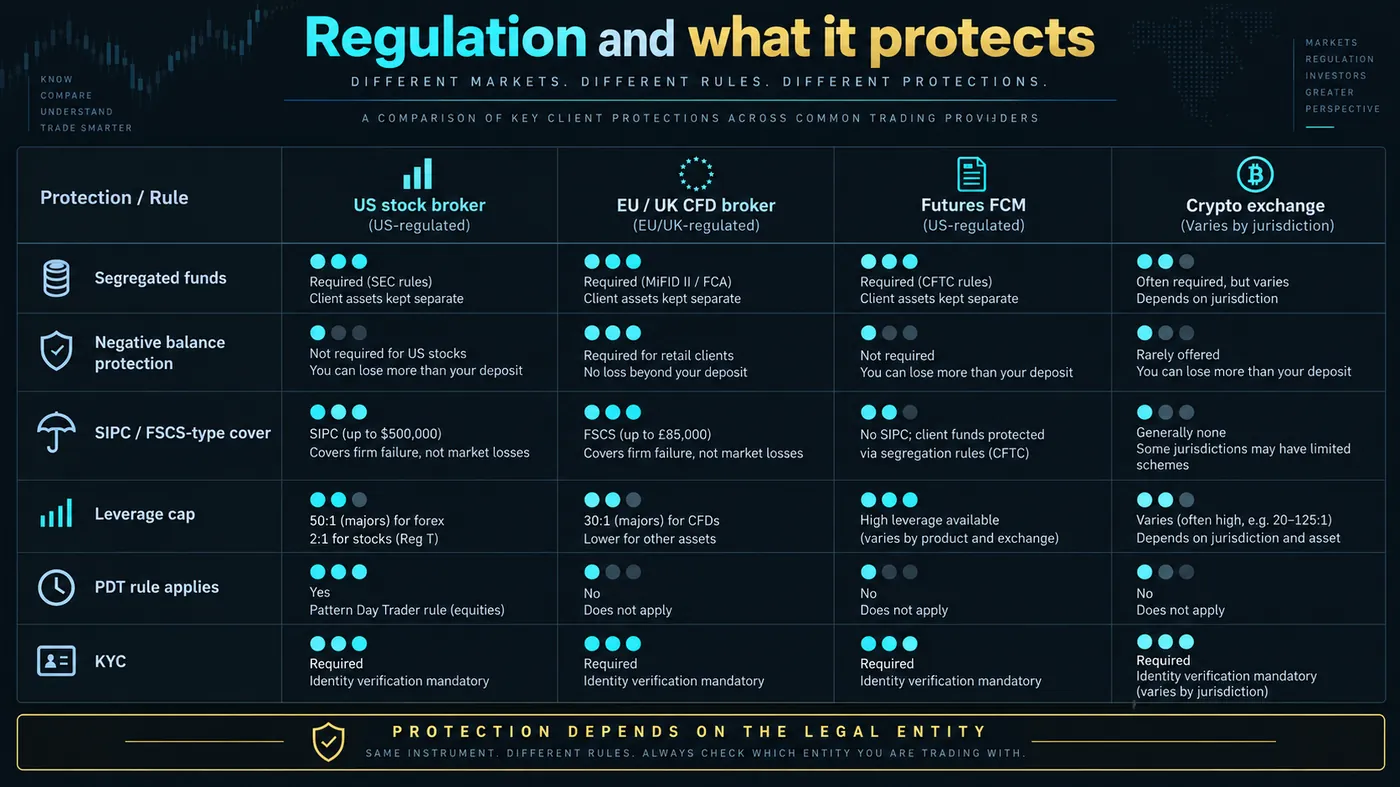
- US stock broker (SEC/FINRA): segregated client assets; SIPC cover up to $500,000 against broker failure (not against losses); no negative balance protection as such but margin rules limit it; leverage 2:1 overnight, 4:1 intraday; the PDT rule applies until the broker adopts FINRA's new intraday margin standards (by 20 October 2027); full KYC.
- UK/EU/AU CFD or forex broker (FCA/CySEC/ASIC): segregated funds; negative balance protection mandatory for retail; FSCS cover in the UK up to £85,000 against broker failure; leverage capped at 1:30 majors, 1:20 indices and gold; no PDT rule; full KYC. The protections apply to the specific regulated entity your account is opened with — the same brand may run an offshore entity for other clients.
- Futures FCM (CFTC/NFA): segregated customer funds by law; no negative balance protection (you can owe more than your deposit in a gap); no SIPC-style cover; exchange-set margin; no PDT rule; full KYC.
- Crypto exchange: varies from licensed and audited to none of the above. Assets typically not segregated in the legal sense; no compensation scheme; liquidation engines prevent negative balances on perpetuals in normal conditions; leverage up to 100×; no PDT rule; KYC on major venues.
The order of concern for a beginner is: is my deposit segregated, is there negative balance protection, and is there a compensation scheme. For a day trader the order is: is the entity regulated, and does the platform have the execution I need. For anyone: which entity, not which brand.
The ranking by type
This is the ranking most "best trading platform" pages hide behind brand names. Types, ranked for a chart-driven retail trader who wants one setup that lasts:
- TradingView + a regulated integrated broker. Analysis and execution on one screen; the broker's regulation and pricing; TradingView's charting, scripts and alerts; paper trading built in. Best overall, best for beginners who plan to stay, best for swing and day traders who are not scalping the DOM.
- Regulated futures FCM with a dedicated front end. Best for index and commodity day traders, and for US day traders under $25,000 whose stock broker still applies the PDT limit. Costs are exact, the session is long, micros make it accessible. Charting is usually secondary — most futures day traders also run TradingView.
- Raw-spread ECN forex broker on cTrader. Best for forex scalpers who need a DOM and the lowest all-in cost. cTrader's charting is the best of the third-party terminals; its automation (cBots) is C#.
- Major crypto exchange. Best for crypto by necessity; the charts are TradingView's library; the counterparty risk is the trade-off you accept.
- Direct-access stock broker. Best for US stock day traders above the PDT threshold or at a broker that has adopted FINRA's new intraday margin standards; per-share pricing, routing control, Level 2. Usually paired with TradingView for charts.
- MetaTrader 5 broker. Best for Expert Advisor automation and for traders whose broker only offers MT5. Charting is the weakest of the terminals for structure-based trading.
- Proprietary broker apps. Fine for beginners who will never load an indicator; limiting for everyone else. Judge them on paper trading, order tickets and cost transparency, and plan to add TradingView.
- Anything offshore offering 1:500 leverage with no verification. Not a platform choice; a warning sign.
How we choose, and what we use
Quantum Algo's engine runs on TradingView because that is where the chart is, and the signals it prints — entry, stop, TP1, TP2 — become bracket orders on whichever broker or exchange the subscriber uses. Our own trading is on gold, indices and crypto; the gold and index calls go through a TradingView-integrated broker, the crypto through a major exchange with QuantumBot executing the rules. We do not receive payment from any platform named on this page, and the public record on the track-record page is the same regardless of the venue a trade was executed on.
Switching platforms without losing your setups
- Open a TradingView account if you do not have one; it becomes the constant while brokers change.
- Rebuild your levels once. Drawings do not transfer; indicators do.
- Open the new broker at the smallest size, trade it for a month alongside the old one, and compare fills on identical setups.
- Move the balance only when the fills, costs and withdrawals have all been tested.
- Keep the old account open for a quarter in case the new broker's regulator, pricing or platform changes.
Three traders, three answers
The fastest way to see why the ranking is by type is to run it for three real profiles.
A US trader with $8,000 who wants to day trade indices. While the broker still applies the pattern day trader rule (allowed until 20 October 2027), the stock route is closed — three day trades a week is not day trading. The answer is a futures FCM with micro contracts: MES at $5 a point and MNQ at $2, a front end with hotkeys and a DOM, CME data for around $10–15 a month on the basic bundle, and per-contract commissions that make a six-point stop cost $30 in risk and about $1.50 in fees on one micro.
Charts stay on TradingView, where the free indicators mark the structure; execution is on the futures front end or, with an integrated futures broker, on the same TradingView chart. Total platform cost for a month of 40 round trips: under $100, all of it visible on the pricing page.
A UK trader with £20,000 who works and swing trades gold and forex. No PDT rule, but an FCA-regulated entity matters because the account is leveraged. A TradingView-integrated FCA broker — or a raw-spread ECN broker with an FCA entity, analysed on TradingView — gives 1:30 leverage, negative balance protection, FSCS cover, micro lots for correct sizing, and alerts to the phone for a trader who checks candles at the close. The cost that matters here is not spread; it is overnight financing on positions held for days, which varies more between brokers than spreads do and is the line to compare before opening the account.
A trader anywhere with $3,000 who wants crypto, 24/7. A major exchange with a deep order book, mark-price stop triggers and a native TradingView chart. The cost is maker/taker fees on notional and funding every eight hours on perpetuals; the risk is the exchange itself, so the rules are: keep only the trading balance on the exchange, use API keys with withdrawal disabled if a bot executes, and trade spot until fifty logged trades say otherwise. QuantumBot fits this profile exactly — it executes Zeno's levels on the subscriber's own exchange account under keys the subscriber controls.
Three profiles, three different "best platforms", one method: chart first, then the entity that holds the money, then the cost at your volume.
Which fees do platforms leave off the pricing page?
Every platform type has at least one cost that is real and not headlined:
- Inactivity fees on some stock and CFD brokers — monthly charges after a period without trades, which a swing trader can trip.
- Withdrawal fees and minimums, especially on crypto exchanges (network fees vary by chain) and on some forex brokers for bank transfers.
- Currency conversion when the account currency differs from the instrument's quote currency or your deposit currency — a percentage on every conversion, often hidden in the rate.
- Data bundles that the platform requires for Level 2 or for a particular exchange.
- Overnight financing on CFDs, calculated on the full notional at a benchmark rate plus a mark-up, tripled over the weekend.
- Funding on perpetuals, paid or received every eight hours on notional.
- Margin interest on stock margin loans, accrued daily.
- Premium platform tiers — extra charts, alerts and replay on TradingView; add-ons on futures front ends.
The fee calculator on this page has fields for the first three lines; the financing lines depend on holding period and belong to the swing trader's comparison, not the day trader's.
How do you test a trading platform in thirty days?
Ranking pages, including this one, can only tell you which type to look at. The platform itself has to be tested, and the test is cheap:
- Week one — paper. Open the paper account at the balance you will fund. Place every order type you expect to use: market, limit, stop, bracket, OCO, trailing. Note which ones exist, which are buried, and how the ticket behaves when the market is moving.
- Week two — live at minimum size. Fund the account with the minimum and trade one micro lot, one micro contract, a fraction of a coin. Record every fill against the price you clicked: the average slippage in ticks or pips is the number the marketing does not print.
- Week three — the edges. Trade through a scheduled news release, a session open and a session close. Check whether alerts arrive on time, whether the app holds up, whether the platform froze at 9:30.
- Week four — money out. Withdraw part of the balance. Time it, note the fee, and confirm the money lands where it should. A platform that makes deposits instant and withdrawals a week is telling you something.
Only after the fourth week does the balance move. The trader who skips the test and funds fully on day one is the one writing the one-star review about withdrawal delays six months later.
Day trading, beginners and mobile: the differences in one table
| Criterion | Day trader | Beginner | Mobile user |
|---|---|---|---|
| First thing to check | Cost per round trip, execution speed | Paper account, regulator | Alerts, bracket orders |
| Charts | Multiple, with DOM and hotkeys | One, three indicators | The synced desktop layout |
| Data | Real-time, exchange bundle | Real-time on the market they learn | Real-time, but for confirmation |
| Order ticket | Hotkeys, bracket default | Bracket default, stop unmissable | Bracket only, no naked market orders |
| Leverage | Whatever the stop allows | Capped by the regulator, on purpose | Same as desktop; the risk is the tap |
| Platform fee | Justified by volume | Free tier | Free tier |
| Biggest risk | Cost and latency eating the edge | Choosing on features and bonus | Trading unplanned setups from a notification |
| Best type | Integrated broker or futures front end | Integrated broker with paper account | The app of the platform you already use |
Chart first, then the entity that holds the money, then the cost at your volume. Day traders: execution and cost per round trip, and futures or crypto under the PDT threshold while your broker still applies it. Beginners: a paper account on the live interface, bracket orders by default, a regulator. Phones: alerts and execution only. Rank by type, test for thirty days, and keep TradingView as the constant while brokers change.
◆ Interactive check
Do you know what to weight?
Questions people ask about trading platforms
One with a paper-trading account on the live interface, low minimums, bracket orders by default and a regulator that protects the deposit. TradingView's free paper account plus a regulated broker connected to it is the pairing we recommend, because you learn on the chart you will keep.
Below $25,000 in the US, a futures platform with micro contracts or a crypto exchange — both were always outside the pattern day trader rule, which FINRA replaced on 4 June 2026 but brokers may apply until 20 October 2027. Outside the US, a regulated forex or CFD broker with micro lots. In every case, cost per round trip decides the rest.
No. TradingView is a charting platform; it routes orders to brokers that integrate with its Trading Panel and holds none of your money. You need a broker or exchange as well.
The app is as safe as the company behind it. Judge the regulator, the entity holding your money and the withdrawal record — not the app store rating. Then turn off every notification that is not your own alert.
It depends on the market: per-share direct-access brokers for stocks, raw-spread ECN brokers for forex, maker rebates on crypto exchanges, per-contract pricing on futures. The all-in cost — spread plus commission plus data plus platform fee — at your volume is the only comparison that counts.
Not to start. The free plan gives you one chart layout, three indicators and a few alerts. Paid plans add multiple charts, more indicators and more alerts — useful for a day trader, unnecessary for the first ninety days.
You can execute on it; you should not analyse on it. Plan on desktop, send alerts to the phone, execute with a bracket order only when the setup was already marked.
The one whose regulated entity segregates client funds, provides negative balance protection and sits under a compensation scheme — an FCA or ASIC broker for CFDs and forex, an SEC/FINRA broker for stocks, a CFTC/NFA FCM for futures. No crypto exchange offers all three.
For Expert Advisor automation and for brokers that offer nothing else, yes. For chart-based trading, TradingView or cTrader are better and MT5's community-script ecosystem is weaker than it was.
Two: a charting platform (TradingView) and one venue that holds the money for the market you trade. A third only when you add a second market with different requirements — a futures FCM next to a forex broker, for example. More than that fragments capital and attention.
References & Related Guides
Read next
- Benzinga Pro Review
- Scammed by a Trading Platform? What to Do in the First 72 Hours, Where to Report, and the Second Scam to Avoid
- Best Futures Trading Platforms & Prop Firms
- Best Forex Brokers
- Best Paper Trading Platforms
- Best CFD Trading Platforms With Charting
- TradingView Alternatives
- Pattern Day Trader Rule
- How to Start Trading: 90-Day Roadmap
- Order Types Explained
Authoritative sources
- FINRA: day trading and the pattern day trader rule
- SIPC: what SIPC protects
- FCA: Financial Services Register
- NFA BASIC: broker and FCM registration database
- ESMA: retail CFD measures — leverage caps and negative balance protection
- TradingView: brokers in the Trading Panel