Best CFD Trading Platforms With Charting: Ranked for Chart-Driven Traders
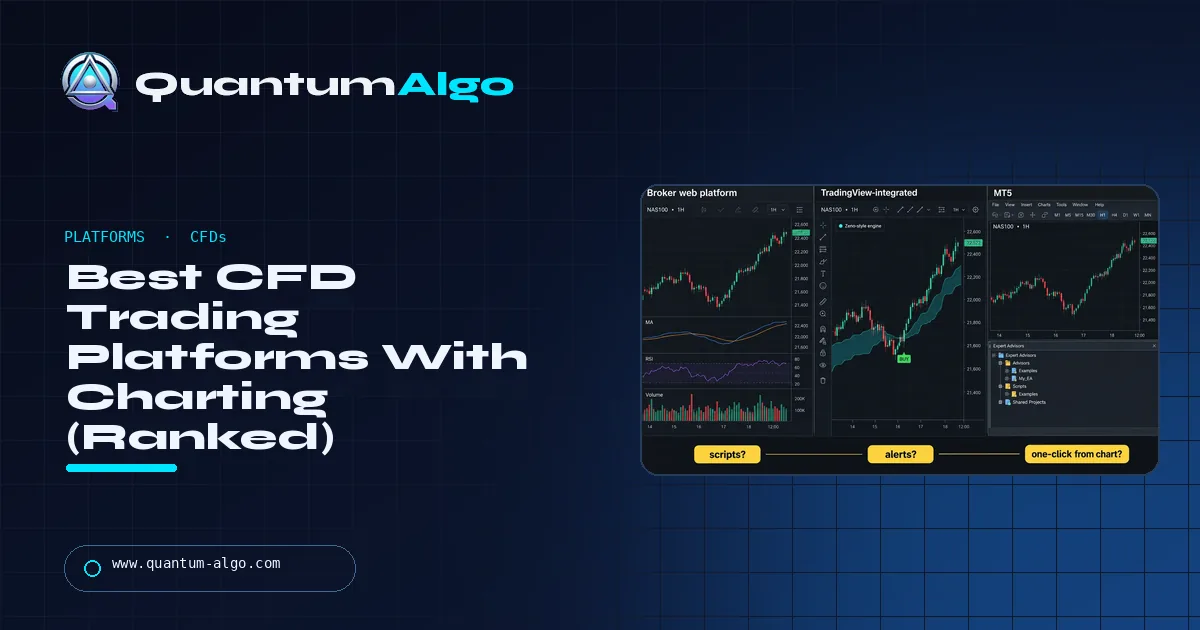
For a chart-driven trader the best CFD platform is a regulated broker that lets you execute from the real TradingView chart, with your scripts, drawings and alerts and no second window. cTrader wins for raw-spread scalpers with a DOM, MetaTrader 5 for Expert Advisors, and proprietary web apps only if you never load an indicator. Chart first, broker second.
I have opened accounts at more CFD brokers than I would like to admit, and the thing that decided whether I kept them was never the spread — it was whether I could put my own indicators and alerts on the chart I executed from. This ranking is built in that order: chart, automation, real holding cost, then regulation. The NAS100 chart at the top of this page is a CFD quote with Zeno loaded — the exact chart an integrated broker lets you trade from.
Indicators that prove themselves in public.
One engine, four precision tools — the Gold (XAU) Scalper, the institutional Gravity Zone, the Zeno momentum Oscillator, and Zeno Stocks for equities.
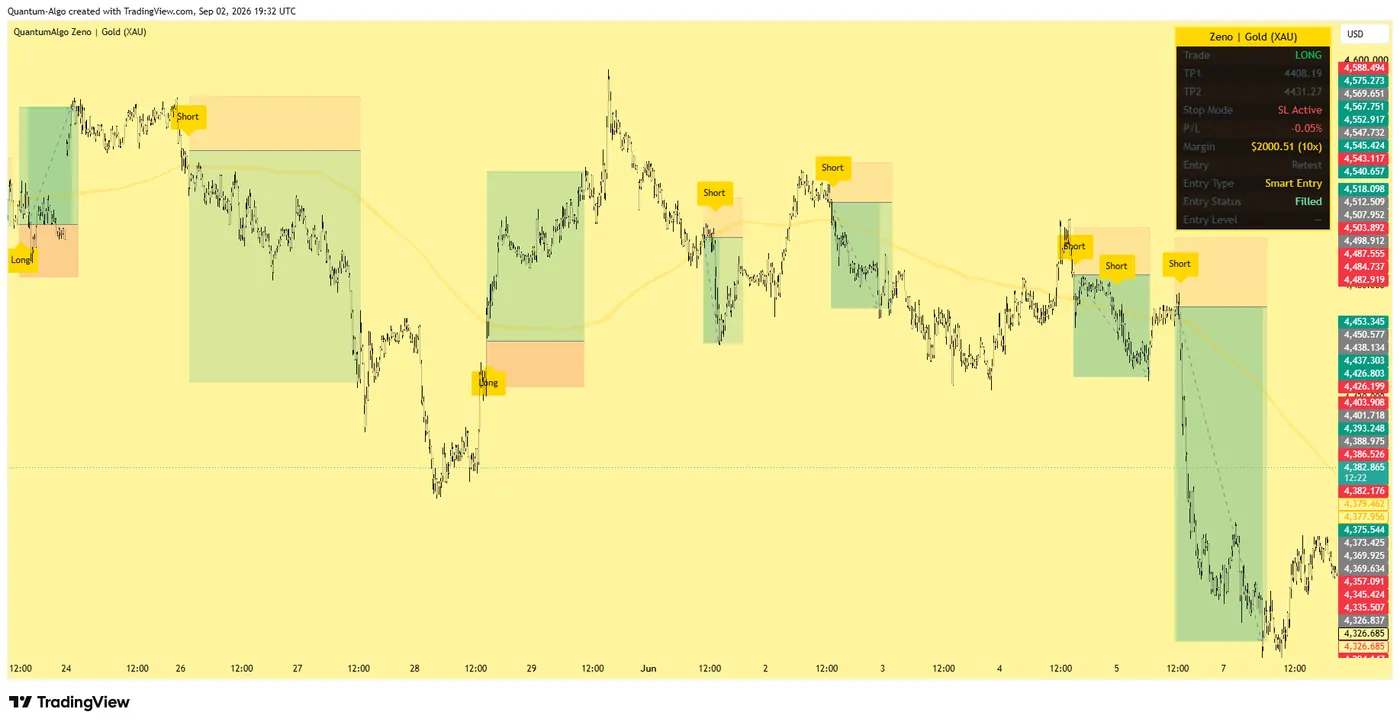
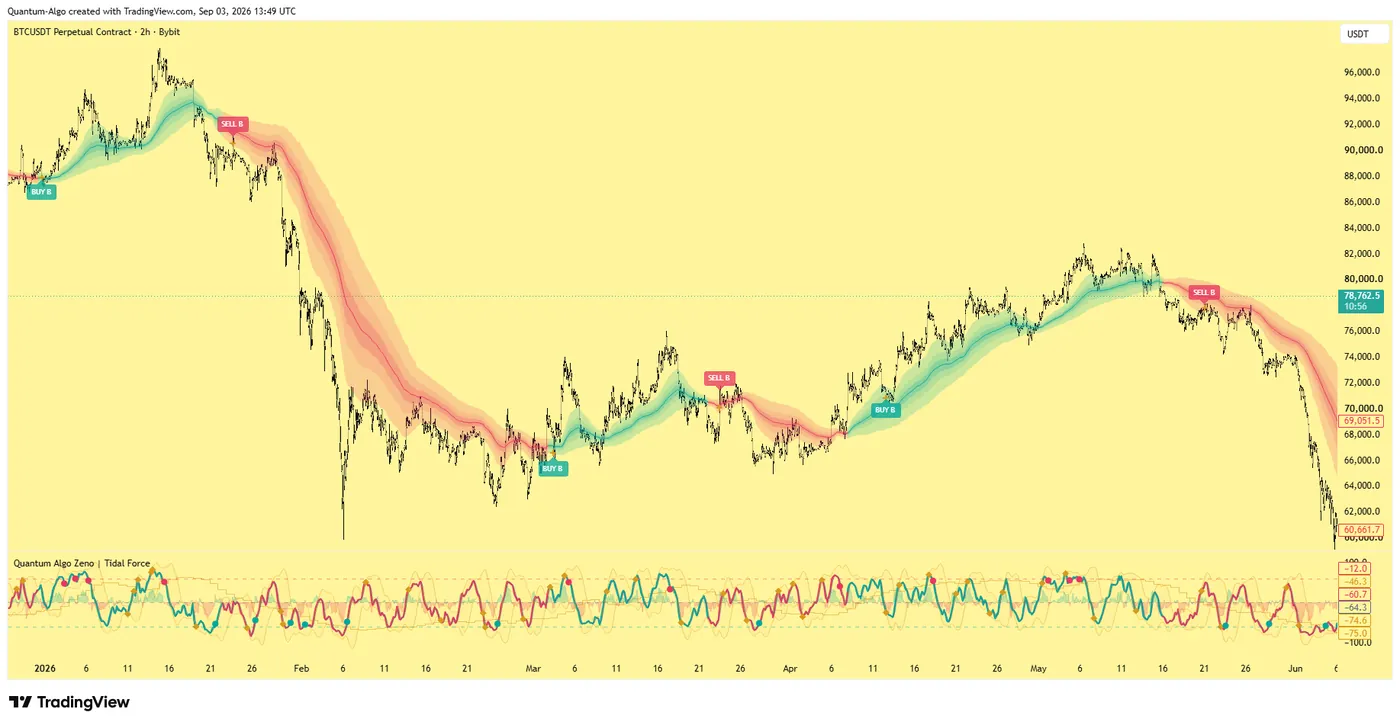
What makes a CFD platform good for chart-driven traders?
A CFD platform is two products bolted together: the broker that quotes the contract and the software you look at all day. Most "best CFD platform" lists rank the broker — regulation, spreads, leverage — and say almost nothing about whether the charts are usable. If your edge lives in a script, a drawn level or an alert, the chart is the product, and the broker is plumbing.
So this ranking asks four questions in a specific order:
- Can you load your own indicators and alerts on the chart you execute from?
- Is the chart the real TradingView, a licensed TradingView library with broker restrictions, or a proprietary chart with a TradingView-looking skin?
- What does it cost to hold a position — spread, commission and overnight financing together?
- Is the broker regulated somewhere that gives you negative balance protection and segregated funds?
Every platform below is judged in that order. The winners for a Smart Money trader are not always the winners for a scalper paying for raw spreads, and I have said so where it applies.
How do CFD platforms connect to charts?
There are three architectures and they matter more than any feature list.
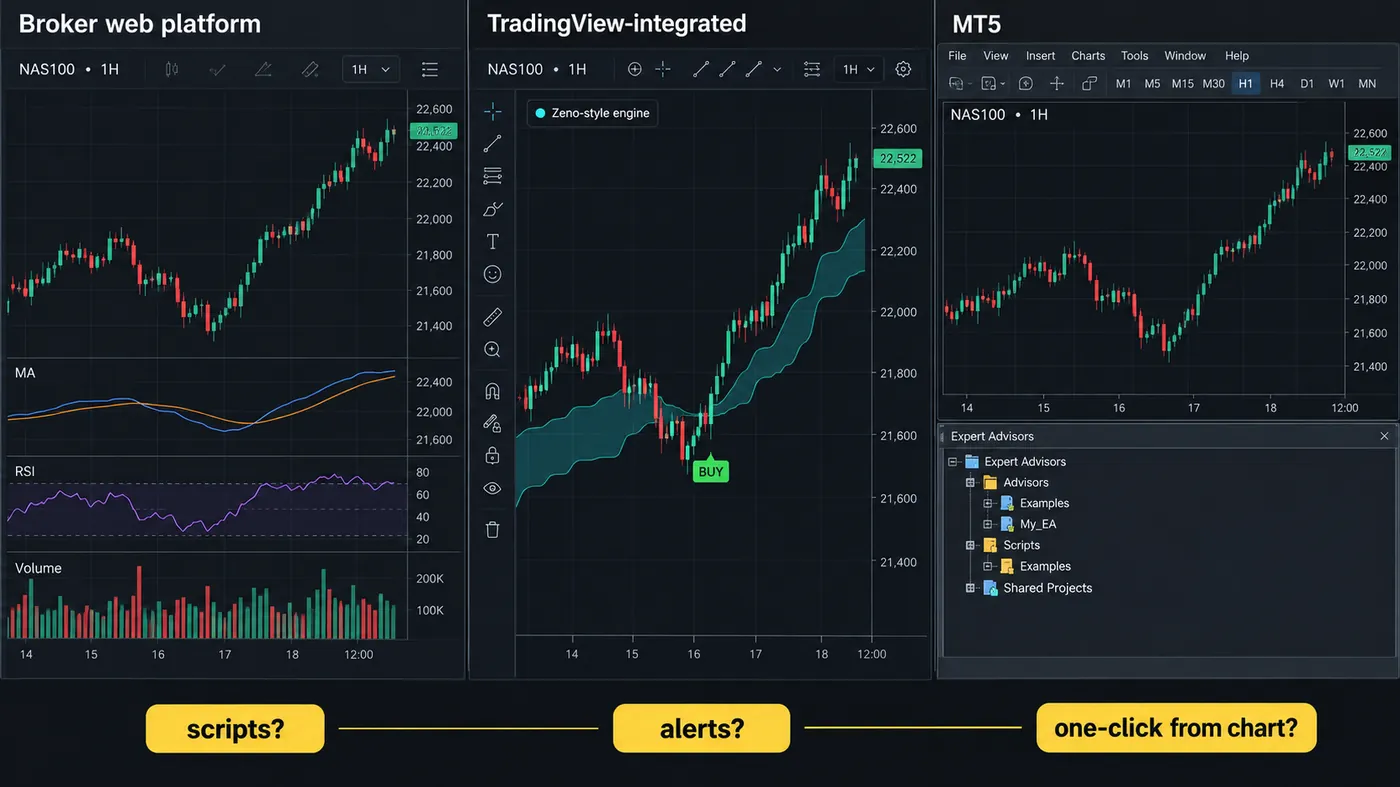
TradingView-integrated brokers appear in the Trading Panel at the bottom of tradingview.com. You trade from the same chart you analyse on, with every script and alert you already have. The broker sees your orders; TradingView owns the chart.
Licensed TradingView charts are the charting library embedded inside a broker's own web platform. It looks like TradingView and draws like it, but community scripts, Pine, and cloud alerts are missing — the broker chose which indicators to expose.
Proprietary and MetaTrader charts are the broker's own software or MT4/MT5. MT5 has a huge Expert Advisor ecosystem and broker-native execution; its charting is the weakest of the three for structure traders, and there is no Pine.
The "charting parity check" illustration in this guide shows the same NAS100 hour on all three so you can see what "same chart" really means before you fund an account.
The seven platforms ranked
| Rank | Platform type | Charting | Automation | Regulation typical | Best for |
|---|---|---|---|---|---|
| 1 | TradingView-integrated broker (e.g. a UK/EU/AU broker in the Trading Panel) | Full TradingView | Alerts + webhooks | FCA / ASIC / CySEC | Structure & script traders |
| 2 | cTrader broker | Excellent native + TradingView library | cBots (C#) | FCA / ASIC / CySEC | Forex ECN, DOM users |
| 3 | MetaTrader 5 broker | Adequate | Expert Advisors | FCA / ASIC / CySEC | EA traders |
| 4 | Proprietary web platform | Varies, often TradingView library | Usually none | Varies | Beginners, mobile-first |
| 5 | Spread-betting app (UK) | Good | Limited | FCA | UK tax treatment |
| 6 | Crypto-native CFD desk | TradingView library | API | Often offshore | Crypto leverage |
| 7 | Offshore high-leverage CFD | Basic | Varies | Unregulated / light | Nobody, honestly |
Names are deliberately types rather than brands: brokers change licence, pricing and platform every year, and a name that was right in January can be wrong by June. The type is what decides your experience; use the picker below to match the type to your trading.
Why does a TradingView-integrated broker suit structure traders?
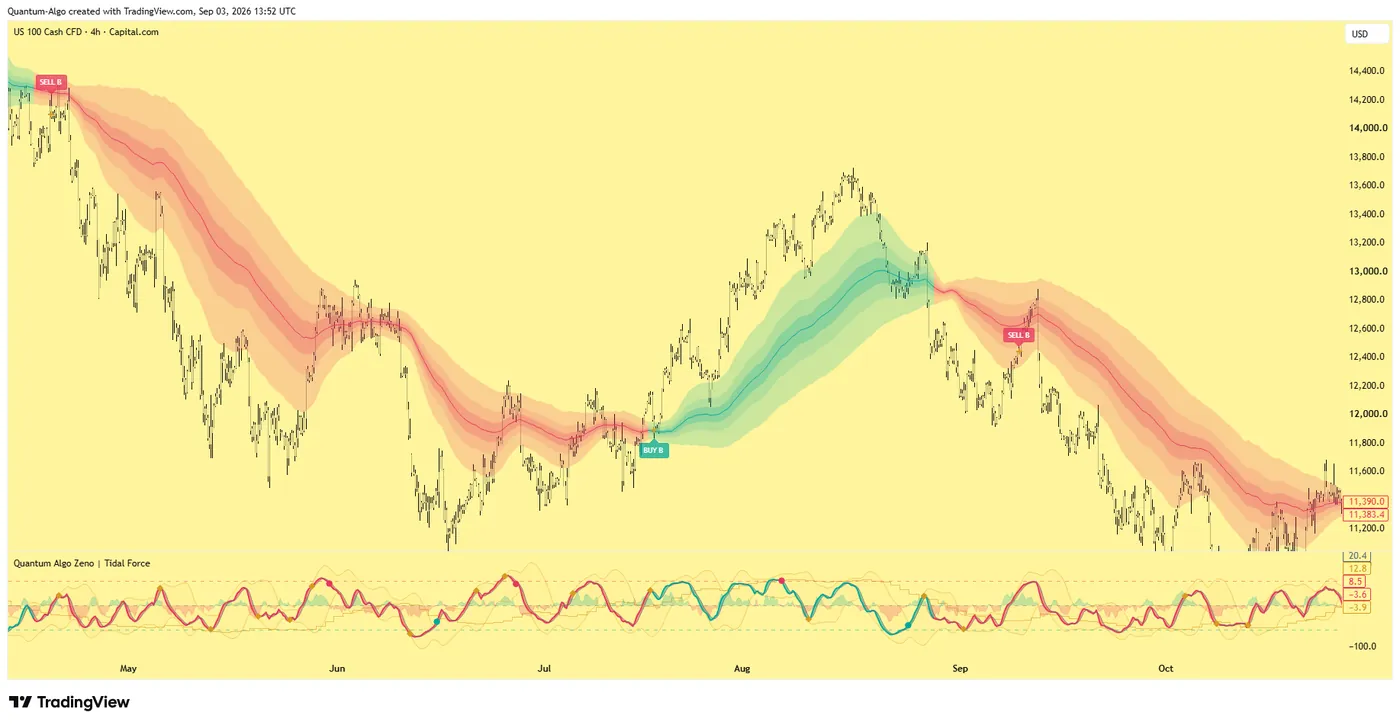
Because nothing else lets you execute from the chart the signal printed on. Zeno runs on TradingView; the NAS100 chart at the top of this page is a CFD quote from a Capital.com feed with the Zeno cloud and Tidal Force loaded — the exact chart you would trade from with an integrated broker, no re-drawing, no second window. A Buy label with the stop and TP1/TP2 already on the chart becomes a bracket order in two clicks.
The trade-off is that the integration exposes what the broker allows: some restrict order types or symbols, and a few charge slightly wider spreads on the TradingView route than on their own app. Check the spread on the instrument you trade most, in the session you trade it, before deciding.
What hidden costs do CFD platforms charge?
The Spread + Overnight Cost Stack chart in this guide is illustrative, but the shape is real: for a 1-lot NAS100 position held three days, the overnight financing is usually the largest line, then spread, then commission. Brokers advertise the smallest of the three.
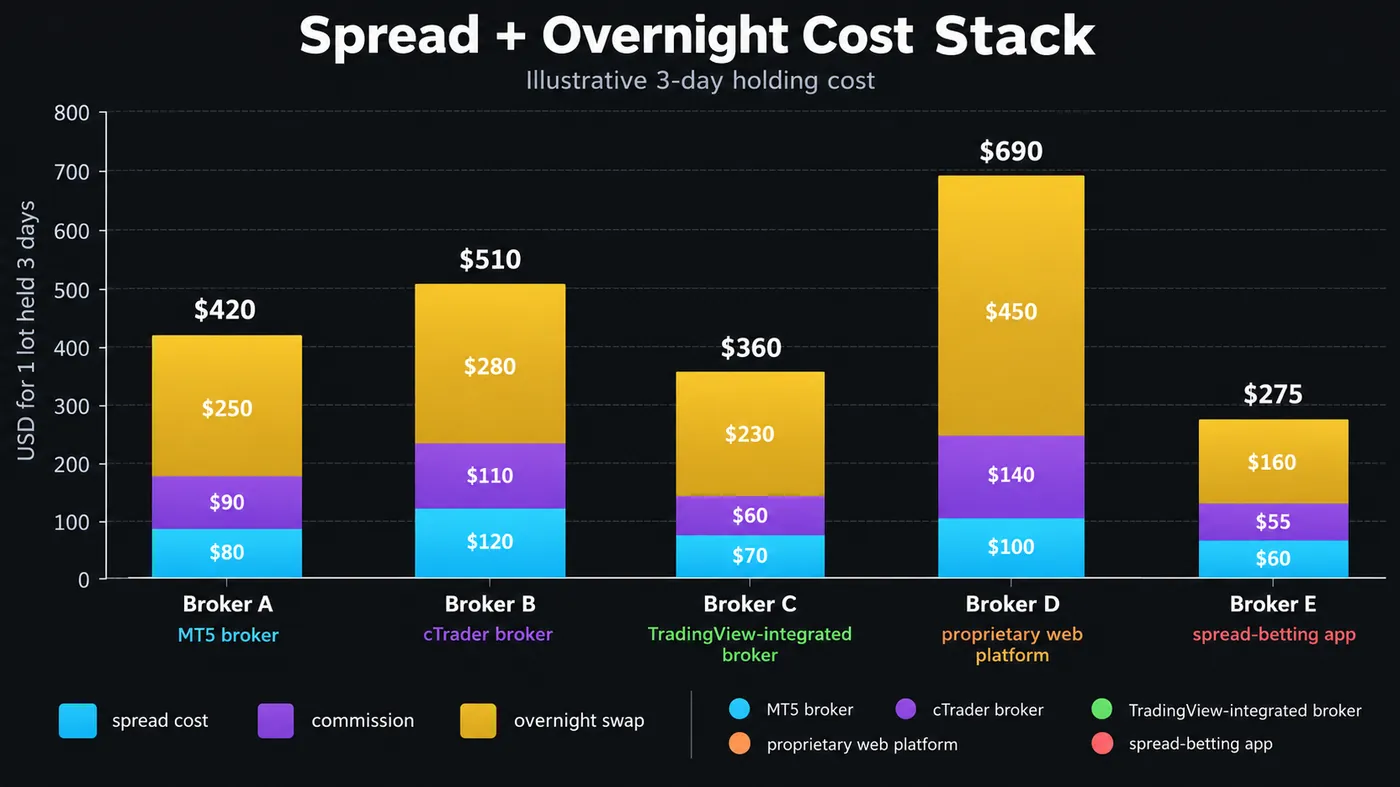
Financing on CFDs is charged on the notional at a benchmark rate plus a broker mark-up — typically SOFR or the relevant central-bank rate plus 2.5% to 3.5% a year, applied daily, with a triple charge on the weekend roll. On a $50,000 NAS100 position that is roughly $10–$12 per night. It is nothing for a scalper and the whole edge for a swing trader.
For anyone holding more than a session, the comparison that matters is: (spread in points × point value) + commission + (nights held × financing) — not the spread alone.
Which CFD regulations actually protect you?
Three items on a licence matter more than the rest.
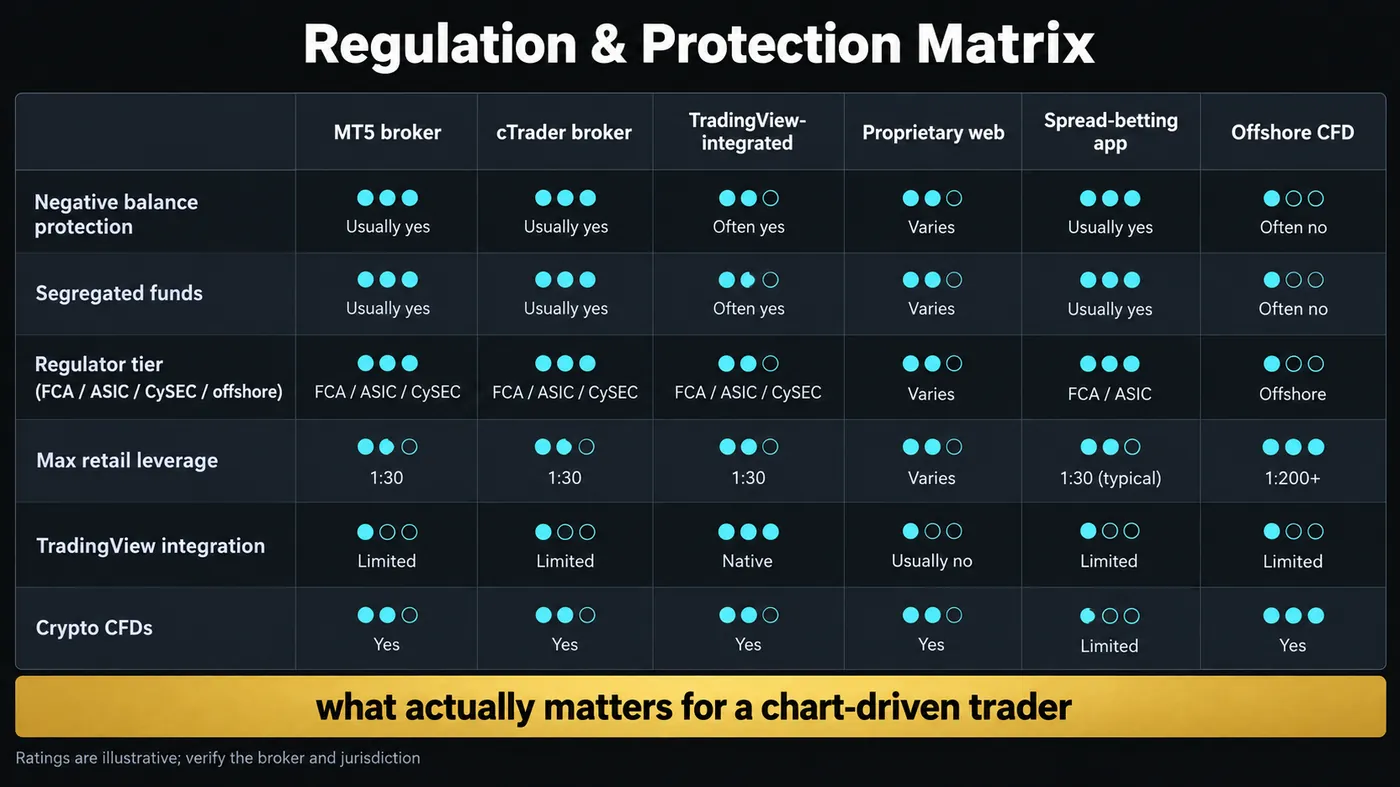
Negative balance protection — you cannot lose more than your deposit. Mandatory for retail clients under ESMA rules (EU), the FCA (UK) and ASIC (Australia). Often absent offshore.
Segregated client funds — your money is held apart from the broker's operating cash. Same jurisdictions.
Leverage caps — 1:30 on major forex and 1:20 on indices for retail clients in those jurisdictions. Offshore brokers offering 1:200 or more are offering it precisely because they are outside those rules, and the same absence of rules covers the first two protections.
The regulation matrix in this guide summarises how the six platform types usually score. "Usually" is doing real work in that sentence: the same brand can be an FCA entity for UK clients and an offshore entity for everyone else, and the protections apply per entity, not per brand. Check which entity your account is opened with.
Which platform type fits you?
The picker below asks three questions and returns the platform type plus the one thing to verify before you fund. In prose:
- You trade structure with scripts and alerts → TradingView-integrated broker. Verify the spread on your main instrument during your session.
- You run or plan to run automated strategies → MT5 (EAs) or cTrader (cBots). Verify VPS availability and execution stats.
- You scalp forex on raw spreads with a DOM → cTrader ECN broker. Verify commission per lot and whether the DOM is real depth.
- You are UK-based and hold positions for weeks → spread-betting app, for the tax treatment. Verify financing rates.
- You want crypto leverage on CFDs → regulated broker with crypto CFDs first; crypto-native desks only if you accept the counterparty risk.
- You are offered 1:500 leverage and no verification → that is the product, not a feature. Close the tab.
How do you move from a broker platform to TradingView?
Most traders arrive at this page because they already have a broker account with charts they have outgrown. The migration is simpler than it looks:
- Open a free TradingView account and add your broker in the Trading Panel if it is supported; if it is not, keep executing on the broker and analyse on TradingView — the alert-to-phone path still works.
- Rebuild your levels once. Drawings do not transfer; indicators do, because most of them exist as free community scripts.
- Set alerts once per bar close, not on every tick, so you are not woken up by intrabar noise.
- If you use Zeno, load it on the new chart, confirm the same signals print, and route the alerts to your phone or to QuantumBot.
Rank the chart before the broker. A regulated TradingView-integrated broker gives a structure trader everything on one screen; cTrader and MT5 win for DOM scalpers and EA traders; proprietary apps are fine until you load your first indicator. Compare holding cost as spread + commission + financing, and check which regulated entity actually holds your account.
◆ Interactive check
Chart first, broker second?
Questions traders ask about CFD platforms
Yes, through brokers listed in TradingView's Trading Panel. You analyse and execute on one chart; the broker holds the account.
It is excellent for automated Expert Advisors and broker-native execution, and weaker for structure-based charting: no Pine, limited community indicators and no cloud alerts.
For scalpers, a cTrader ECN broker on raw spreads plus commission is usually cheapest per trade. For swing traders, the overnight financing rate dominates and varies more between brokers than spreads do.
The high leverage they offer exists because they are outside the rules that require negative balance protection and segregated funds. Treat the account as money you are prepared to lose to the broker, not just to the market.
Zeno and the free indicators run on TradingView, so they work on any CFD quote you can chart there — the NAS100 CFD chart at the top of this page is one. Execution depends on your broker: integrated brokers trade from the chart, others take the alert.
The broker quotes and settles the contract and holds your money; the platform is the software you chart and place orders on. Many brokers offer several platforms (their own app, MT5, cTrader, TradingView), and the charting experience differs far more than the pricing does.
No. Brokers license the charting library, which draws like TradingView but omits community scripts, Pine, and cloud alerts. The broker decides which built-in indicators you get.
Typically the benchmark rate (SOFR, SONIA, RBA cash rate) plus 2.5–3.5% a year on the notional, charged daily with a triple charge on the weekend roll. On a $50,000 index position that is roughly $10–12 a night.
Yes. Zeno runs on TradingView, so it works on any CFD symbol you can chart there — the NAS100 CFD chart on this page is one. With an integrated broker you trade from the chart; with any other broker you take the alert and place the order in their app.
References & Related Guides
Read next
- Best Forex Brokers: How to Choose One That Protects Your Money (US, UK/EU/AU and Everywhere Else)
- Best Trading Platforms: For Day Trading, for Beginners, and on Your Phone
- TradingView Alternatives: Best Charting Platforms
- Best Indicator for NASDAQ (NAS100)
- Best Indicator for DAX (GER40)
- Leverage Trading: Complete Guide
- What Is Notional Value in Trading?
- Best Trading Bots
- TradingView Platform Guide
- What Is Slippage in Trading?
Authoritative sources
- TradingView: brokers available in the Trading Panel
- ESMA: retail CFD measures — leverage limits, negative balance protection
- FCA: permanent restrictions on CFDs for retail consumers
- ASIC: product intervention order on CFDs
- MetaQuotes: MetaTrader 5 terminal documentation
- Spotware: cTrader documentation