What Is Paper Trading? How to Practise Without Risking Money (and When to Go Live)
Paper trading is placing simulated-money trades on live prices with the real order ticket. It proves the rules are complete, the setup recurs and you can follow them; fills are too good, emotions missing. Use your real balance, subtract costs by hand, log every trade, and go live at minimum size after fifty trades show stable win rate and expectancy.
Paper trading is the most under-used tool in retail trading and the most misused. Used well, it is where you find out whether your method has an edge before your money does; used badly, it teaches habits live trading punishes. This page is both halves — what the simulator gets right, what it cannot reproduce, how to run it so the log means something, and the exact conditions for moving to real money. The readiness scorer below turns those conditions into a number.
Indicators that prove themselves in public.
One engine, four precision tools — the Gold (XAU) Scalper, the institutional Gravity Zone, the Zeno momentum Oscillator, and Zeno Stocks for equities.
What is paper trading?
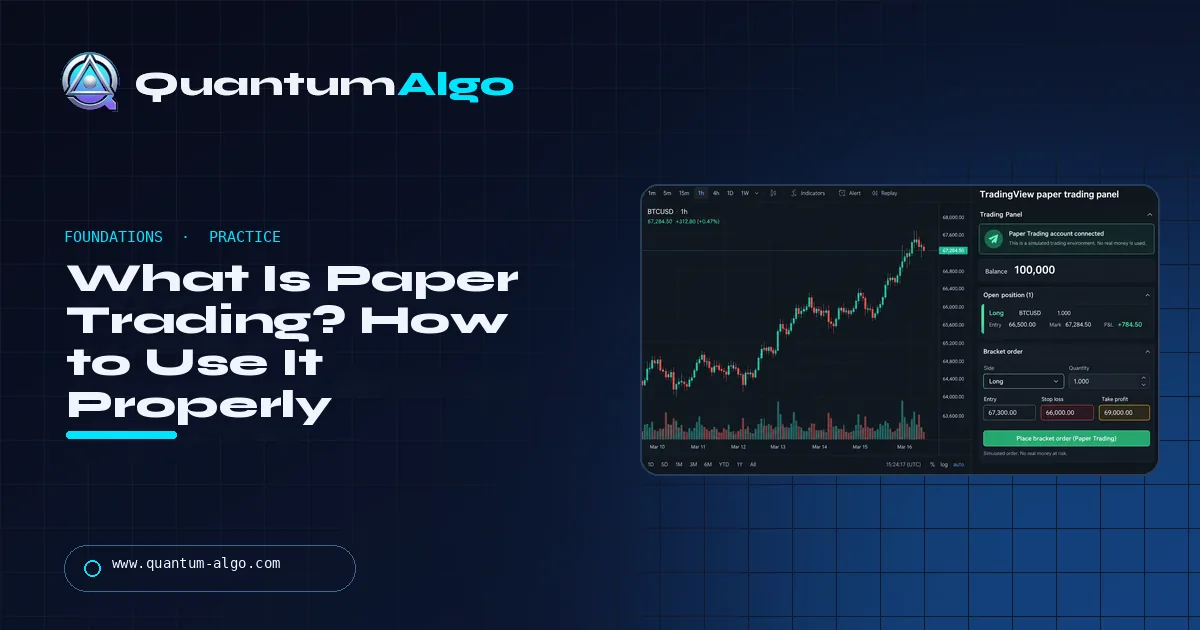
Paper trading is placing trades with simulated money on real, live market prices, so you can practise a strategy, a platform or your own discipline without risking a cent. The name comes from the days when people wrote hypothetical trades on paper; now every major platform has a paper account with a fake balance and the real order ticket. TradingView's is free and sits in the same Trading Panel you would later use with a real broker.
It is the single most under-used tool in retail trading, and also the most misused. Used well, it is where you find out whether your method has an edge before your money does. Used badly, it teaches you habits that live trading punishes. This page covers both.
What does paper trading get right?
The mechanics are real. The prices are the real quotes, the chart is the real chart, and the order ticket asks you the same questions — side, quantity, entry, stop, target — that the live one will. That means paper trading is a faithful test of three things:
- Whether your rules are complete. If you cannot fill in the ticket without hesitating, the rule is not written down yet.
- Whether the setup appears often enough. A strategy that produces four trades a month on paper will produce four trades a month live.
- Whether you can follow the plan. Moving a stop, skipping a signal, adding to a loser — you will do all of it on paper first, and the log will show you.
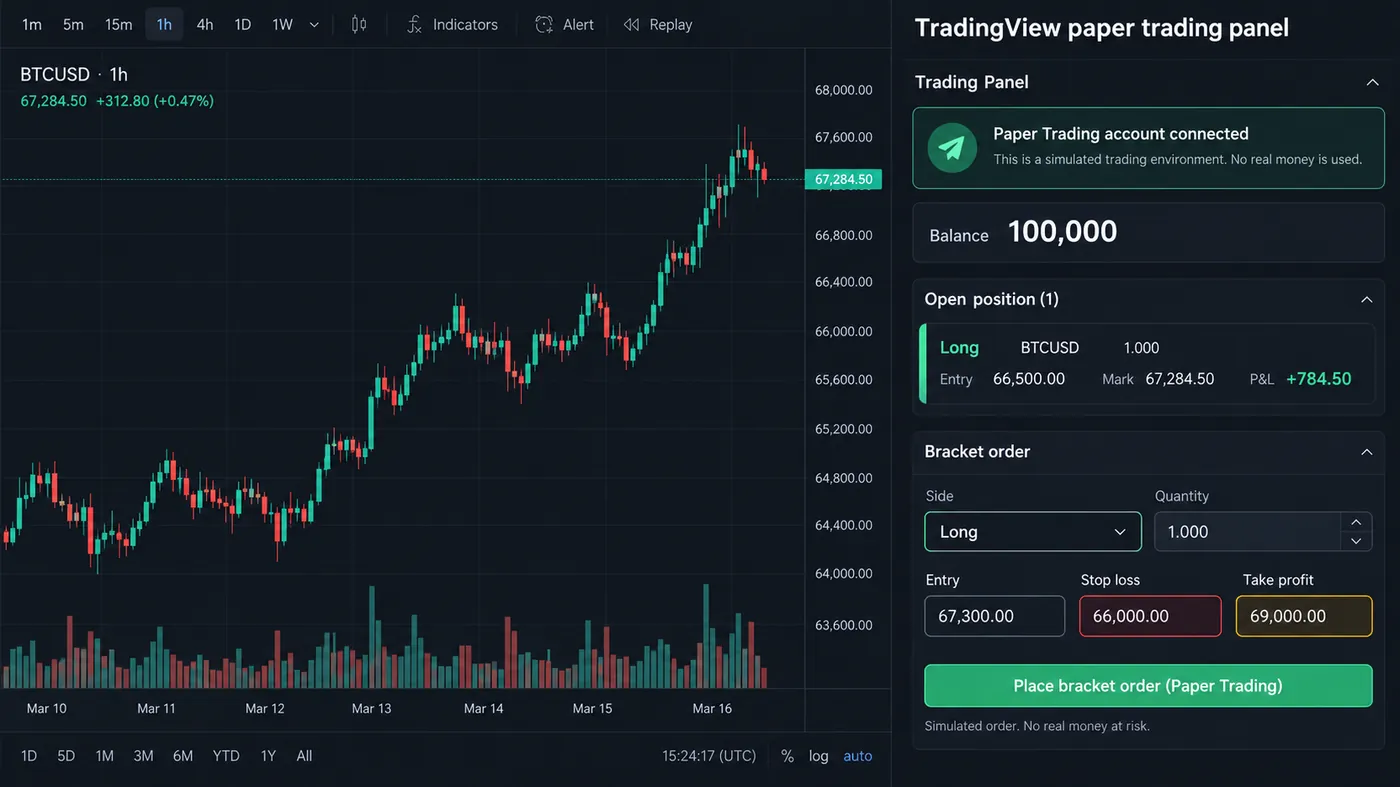
The TradingView panel illustration in this guide shows what the environment looks like: paper account connected, a 100,000 balance, one open position, a bracket order with stop and target already attached.
What does paper trading get wrong?
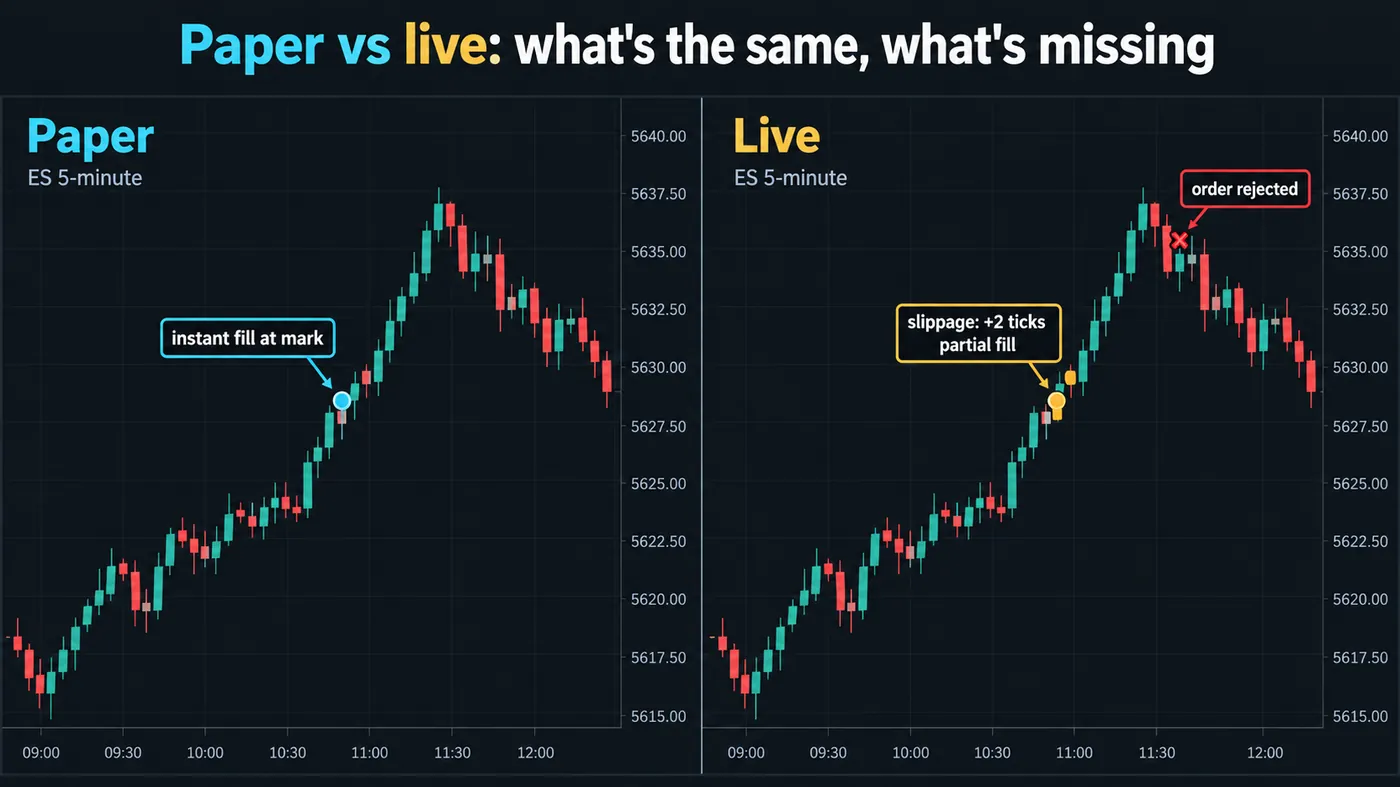
The fills are too good. A paper order fills instantly at the mark price; a live market order pays the spread, sometimes slips a tick or two, and in fast markets fills partially or is rejected. The paper-vs-live illustration in this guide shows the same ES session both ways — the paper entry is a clean dot, the live one is two ticks worse and half-filled, and a later order is refused. Over a hundred trades those ticks are the difference between a strategy that looks like 2R and one that is 1.6R.
The emotions are missing. Nobody's heart rate changes when a simulated position is down $400. That is the point of paper trading and also its limit: it tests the plan, not the person. The first live week feels nothing like the last paper week, however good the paper results were.
The size is unreal. A 100,000 paper balance encourages 1,000-share positions you will never take with a 5,000 real account. Set the paper balance to what you will actually fund.
Paper trading vs live trading
| Aspect | Paper trading | Live trading |
|---|---|---|
| Prices | Real live quotes | Real live quotes |
| Fills | Instant at the mark price | Spread, slippage, partial fills, rejections |
| Costs | None unless subtracted by hand | Paid on every entry and exit |
| Emotions | Missing | Present on every open position |
| Account size | Any balance you choose | What you actually fund |
| What it proves | Rules are complete and can be followed | Whether the edge survives real fills |
◆Set the paper balance to your real starting capital so the size question is honest.
How do you paper trade so it counts?
- Set the balance to your real starting capital. If you will go live with $5,000, paper trade with $5,000.
- Trade only the written plan. Market, timeframe, setup, entry trigger, stop rule, target rule, size rule. If it is not in the plan, it is not a trade.
- Log every trade at the time, not at the end of the week: the setup name, the fill you planned, the fill you got, the outcome in R, and one line on what you did well or badly.
- Add costs by hand. Subtract the spread and a tick of slippage from every paper trade. If the strategy survives that, it is worth more attention.
- Run it for at least fifty trades or a full month, whichever is longer, across at least one bad week. Ten winning paper trades in a trending week prove nothing.
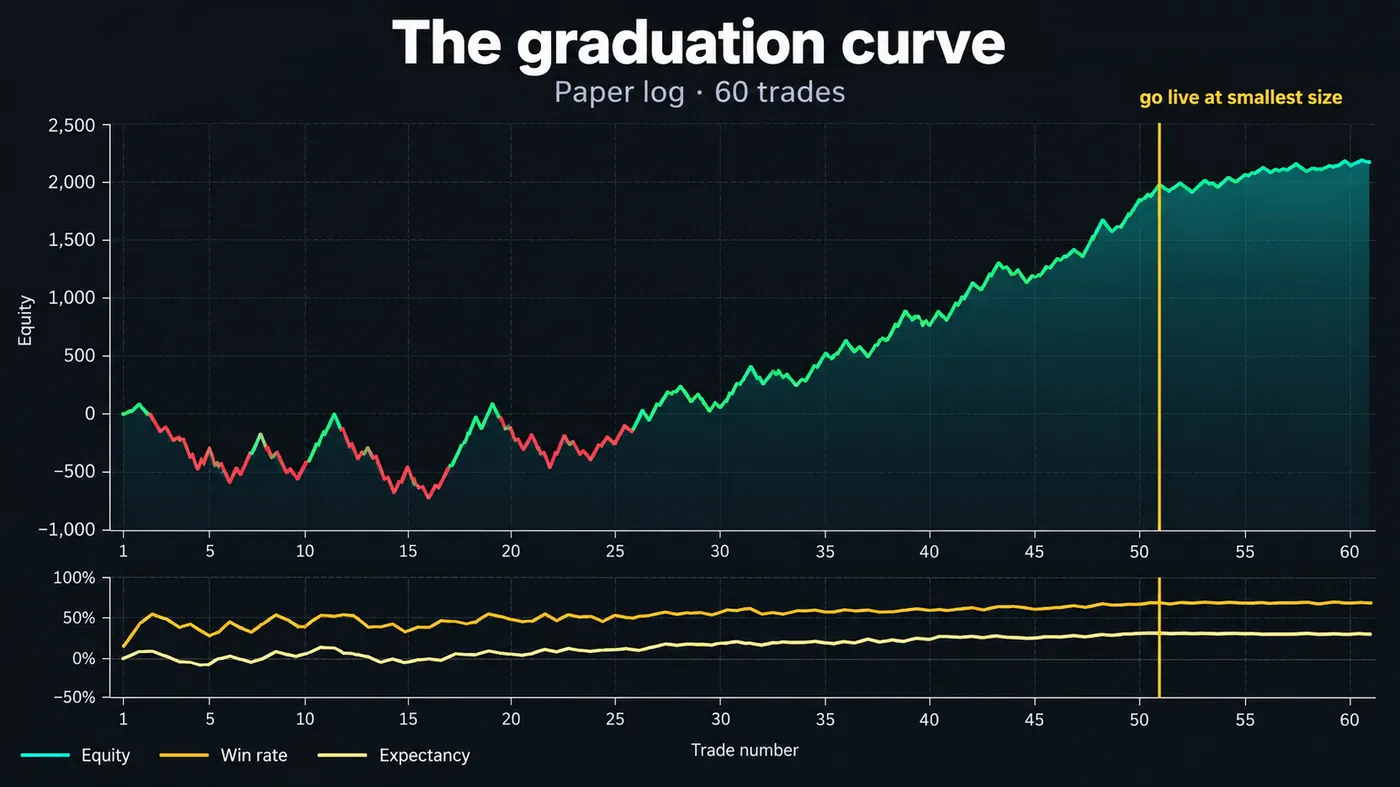
The graduation-curve illustration in this guide shows what a good log looks like: a rough first twenty trades, then win rate and expectancy flattening into a stable line by trade fifty. That flattening — not the equity number — is the signal you are ready.
When should you move from paper to live trading?
Move when the log says three things: the win rate and average R have been stable for at least twenty trades; you followed the plan on more than ninety percent of trades; and you can explain every deviation. Then go live at the smallest size the broker allows and keep the same log. The first live month is a second paper period with real emotions attached; size up only when the live log matches the paper log.
If you skip the first condition you go live with an unproven method; if you skip the second you go live with a proven method you cannot follow. Both end the same way.
How do you paper trade on TradingView?
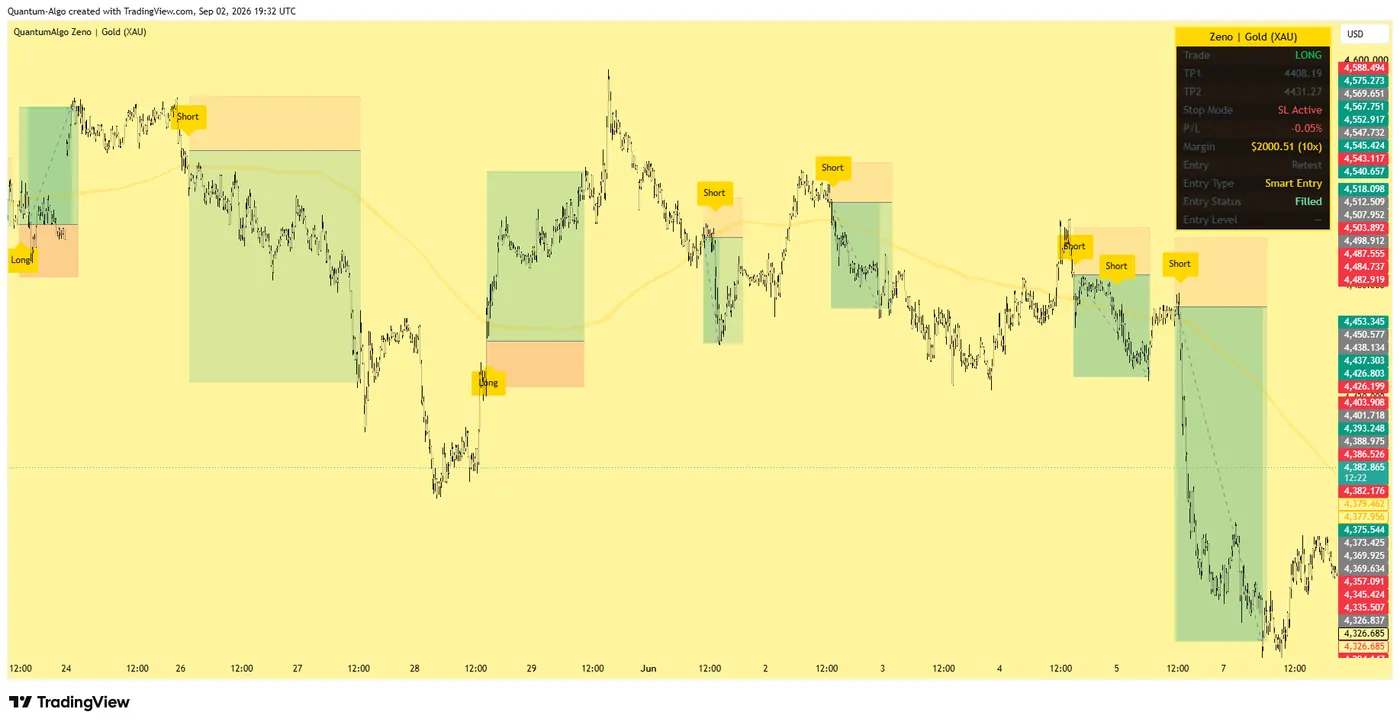
Open any chart, click the Trading Panel at the bottom, choose Paper Trading, and connect. The account is free, the balance is adjustable, and every order type you would use live — market, limit, stop, bracket — is there. Indicators and alerts work exactly as they do on a live account, which is why we use it: a Zeno signal with its stop and TP1/TP2 drawn on the chart becomes a paper bracket order in the same two clicks it would be live.
Alerts fire on paper too, so you can practise the alert-to-order workflow before it costs anything.
How do you paper trade an automated strategy?
For a bot or an alert-driven strategy, paper trading has a second job: it tests the operational path — data feed, signal, webhook, order, log — through real conditions like gaps, outages and API errors. Our free algorithmic trading course puts this at Stage 8 for that reason. QuantumBot subscribers run the same paper period on their exchange's testnet before enabling live keys.
Paper trading proves the plan, not the person. Run it at your real balance, subtract costs by hand, log every trade the moment it closes, and read the log for a stable win rate and expectancy rather than a big number. Go live at the smallest size when fifty trades and one bad week say the method holds and you can follow it — then keep the same log so the only variable that changed is the money.
◆ Interactive check
Is your paper log telling you the truth?
Questions traders ask about paper trading
Yes on TradingView and on most brokers' platforms. The paper account uses live data and the real order interface; only the money is simulated.
Until your log shows a stable win rate and expectancy over at least fifty trades and you have followed the plan on more than ninety percent of them. For most people that is one to three months.
Yes, with the caveat that intraday fills are where paper is least realistic. Subtract the spread and a tick of slippage from every trade, and paper trade at the size you will actually use.
Yes. TradingView's paper account works on any symbol you can chart, including crypto perpetuals and forex pairs.
Usually size, emotion and fills. The fix is to go live at minimum size with the same log, so the only thing that changed is the money, and to compare the live log against the paper log trade by trade.
It counts as experience with the method and the platform, not with the pressure. Treat a good paper record as permission to start live at minimum size, not as evidence you will perform the same with money on the line.
No. Set the balance to what you will fund; if you want to test scaling, test it live in small increments after the first live month matches the paper log.
Yes — on TradingView every indicator, script and alert works identically on paper and live. That is why the alert-to-order workflow can be rehearsed on paper first.
Broker demo accounts are paper trading under another name. The main differences are the data feed (some demos use delayed or synthetic quotes) and the fill model; TradingView's paper account uses the live feed.
QuantumBot connects to your own exchange account; the paper period is run on the exchange's testnet with the same signal and risk settings before live API keys are enabled.
References & Related Guides
Read next
- Best Paper Trading Platforms: Where to Practise, and What Each Simulator Hides
- Best Trading Platforms: For Day Trading, for Beginners, and on Your Phone
- TradeZella Review: The All-in-One Trading Journal — Where It Earns Its Price and Where It Doesn't
- FX Replay Review: The Best Bar-Replay Backtester for Manual Traders — With Its Limits
- How to Start Trading: A 90-Day Roadmap (One Market, Fifty Paper Trades, Then Live)
- What Is the Pattern Day Trader (PDT) Rule? What Changed, What Counts, and What Brokers Still Apply
- Order Types Explained: Market vs Limit vs Stop vs Bracket Orders (and Which to Use When)
- What Is Trading?
- Trading Journal: Complete Guide
- How Much Money to Start Day Trading?
- What Is Slippage in Trading?
- Free Algorithmic Trading Course
- Backtesting Trading Strategies
- Trading Psychology: Complete Guide
- SMC Practice Simulator
Authoritative sources
- TradingView: how to start paper trading
- SEC Investor.gov: paper trading (glossary)
- CME Group: practice trading simulators
- FINRA: day-trading margin requirements
- Investopedia: paper trade