Best Paper Trading Platforms: Where to Practise, and What Each Simulator Hides
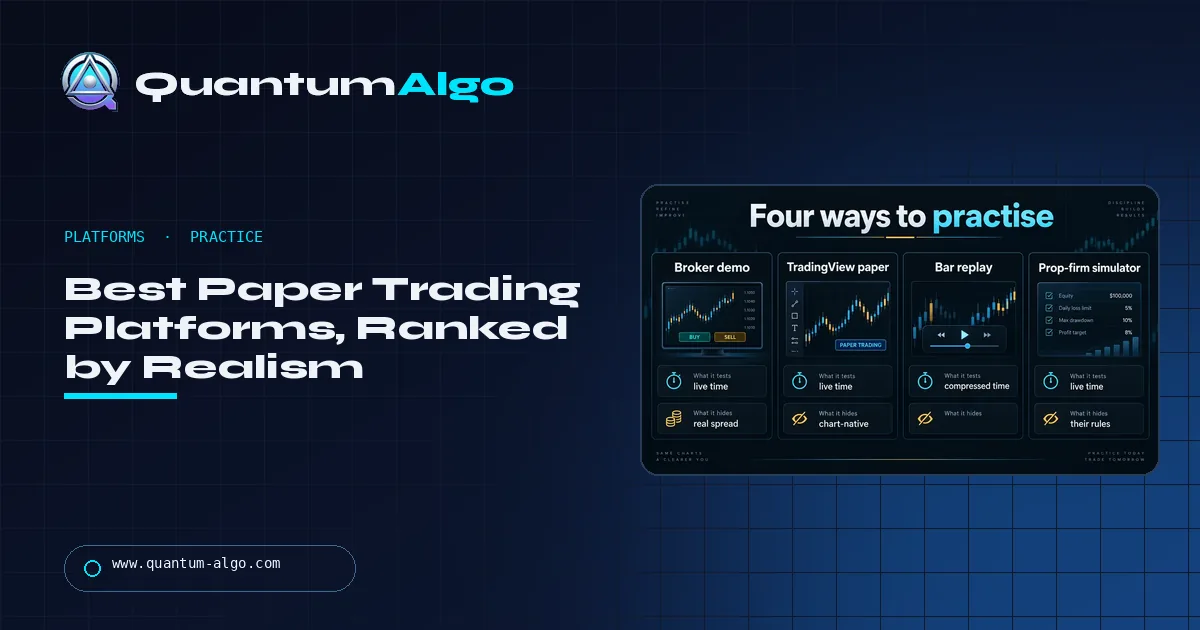
The best paper trading platform runs on the interface you will trade live, at a balance you set, filling at least at the live bid and ask: TradingView paper trading, a broker simulator for futures and options, an exchange testnet for crypto perpetuals, and FX Replay for fifty logged trades fast. Every simulator hides spread, slippage, partial fills and fear.
Simulators are ranked on a ladder from "instant fill at mark" to "queue position", and almost every retail platform sits near the bottom. That is fine — as long as you know which rung yours is on and subtract the difference. This page ranks the four ways to practise, describes the platforms one by one, shows what happens to a paper expectancy when the same trades go live, and gives a four-week plan that ends with a fifty-trade record and a first live month. The realism scorer below tells you how much to trust your simulator's numbers.
Indicators that prove themselves in public.
One engine, four precision tools — the Gold (XAU) Scalper, the institutional Gravity Zone, the Zeno momentum Oscillator, and Zeno Stocks for equities.
What is the best paper trading platform?
The best paper trading platform is the one that runs on the interface you will trade live, at a balance you set, with fills that at least use the live bid and ask — and, once you have a written setup, a bar-replay tool that compresses months of practice into weeks. In practice that is TradingView's free paper-trading account for most traders, the broker's own simulator for futures and options, and a replay platform such as FX Replay or TradingView's replay for building a fifty-trade record quickly. The best platform is also the one you are honest about: every simulator hides spread, slippage, partial fills and fear, and the practice only counts once you correct for them.
This page ranks the four ways to practise, explains the fill-realism ladder that separates them, and shows what happens to a paper expectancy when the same trades go live. It is the companion to our paper-trading guide, which covers the method; this one covers the tools.
What are the four ways to practise trading?
The four-tiles illustration in this guide lays them out:
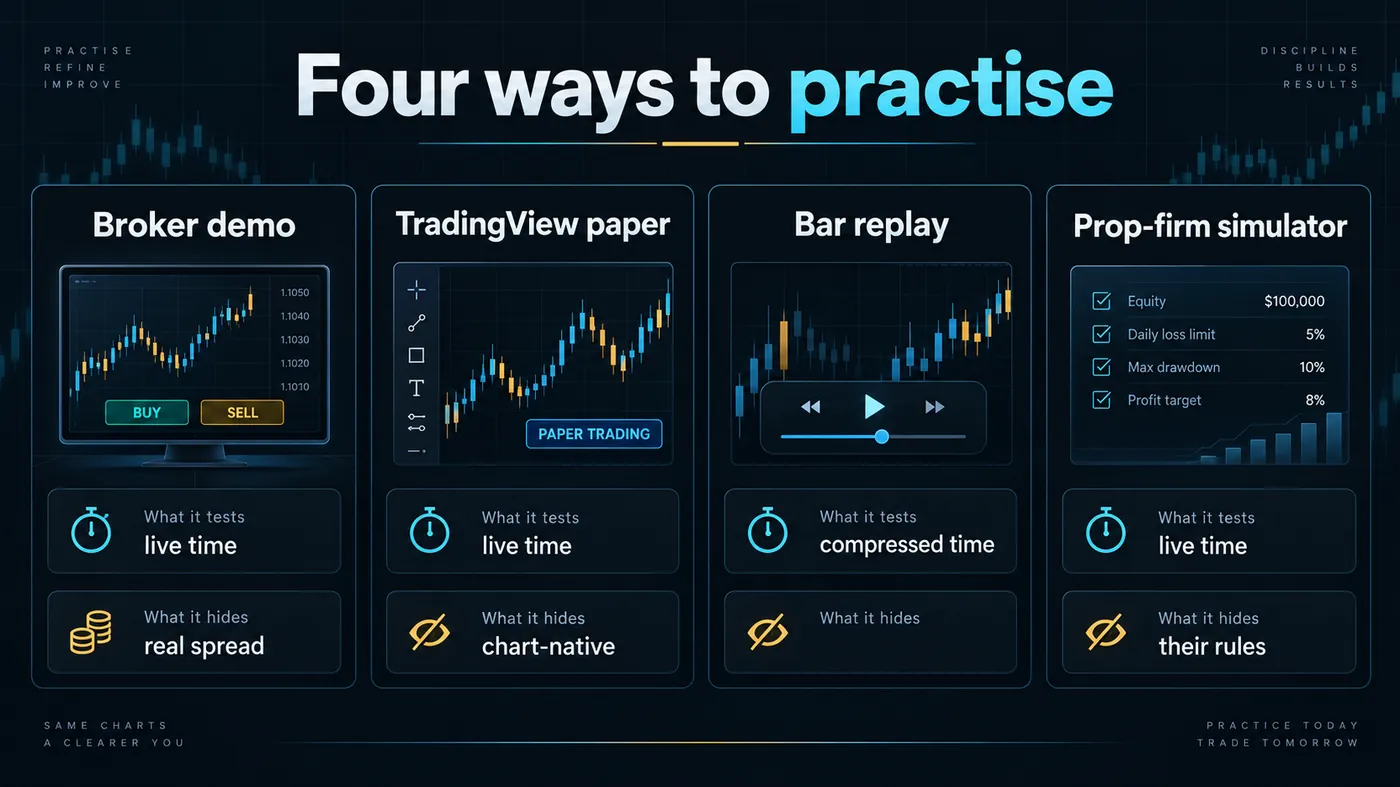
- Broker demo account. Live time, the broker's real spread, the broker's own platform. Tests: the platform, the order ticket, the spread you will actually pay. Hides: slippage and partial fills (demo fills are usually perfect), and the emotion of real money.
- TradingView paper trading. Live time, on the chart you analyse on, with every indicator and alert you use. Tests: the workflow from signal to order, chart-native execution, alerts. Hides: broker-specific spread (it fills at the chart's mark), slippage, and — like every simulator — fear.
- Bar replay. Compressed time: history plays forward candle by candle and you trade it. Tests: the setup itself, across many markets and regimes, fast; discipline in taking only the written rules. Hides: everything about live fills, and it cannot surprise you with news you did not know was coming unless the tool shows the calendar.
- Prop-firm simulator. Live time, their rules — daily loss, trailing drawdown, consistency. Tests: whether you can trade inside a rulebook. Hides: the fact that the rules are designed so most participants fail, and that the "account" is simulated at the funded stage too.
The right sequence uses three of the four: replay to build the record, TradingView or a broker demo to practise the live workflow, and the prop simulator only if you intend to buy an evaluation.
Which simulators have the most realistic fills?
The ladder illustration in this guide is the honest ranking of simulators, from least to most realistic:
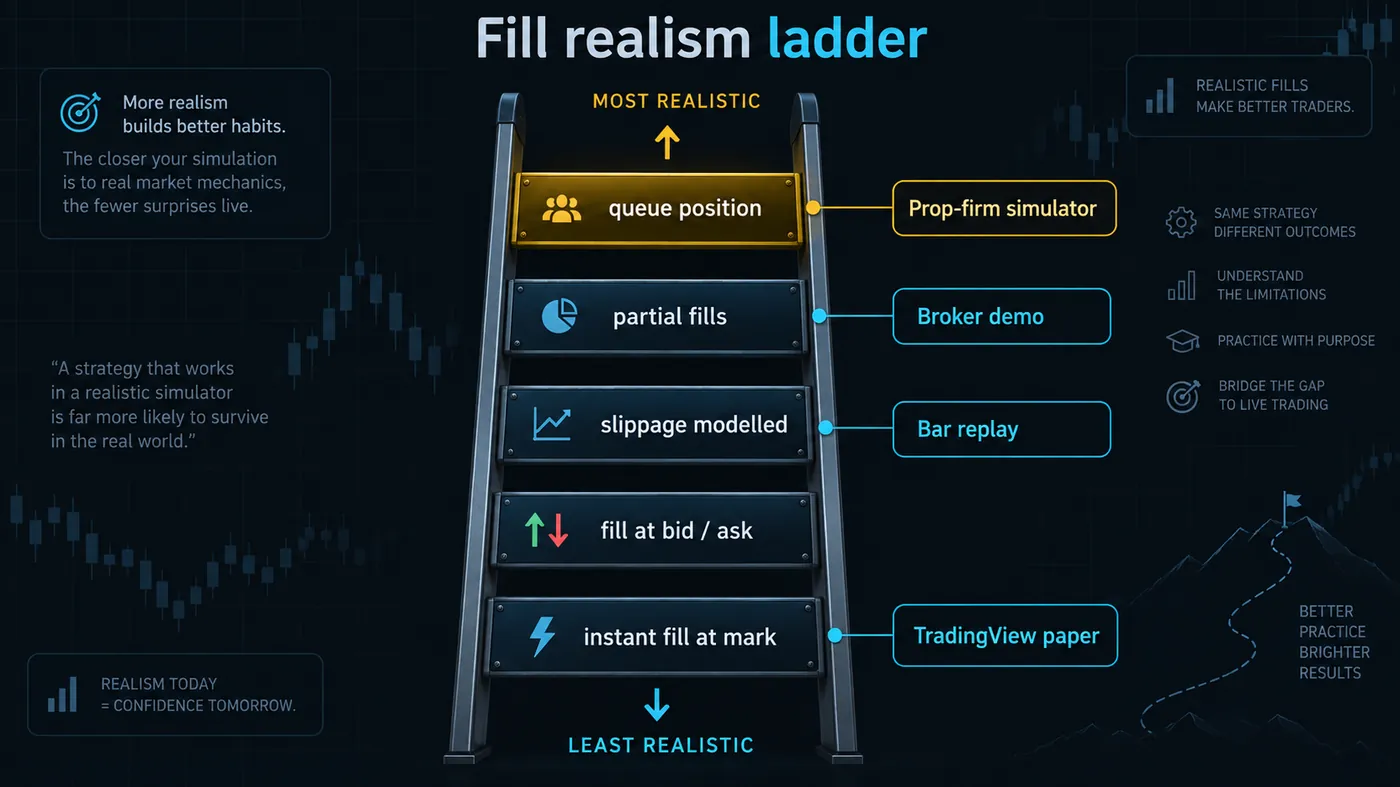
- Instant fill at mark — the order fills at the last price the moment you click. TradingView paper trading and most replay tools sit here. Fine for testing a setup; optimistic for testing execution.
- Fill at bid/ask — you pay the spread. Broker demos sit here.
- Slippage modelled — the fill moves a tick or two against you on market orders. A few futures simulators and some replay tools with a slippage setting.
- Partial fills — a large order fills in pieces, or not at all at your limit. Rare in retail simulators; prop-firm sims sometimes model it.
- Queue position — your limit order waits behind the orders ahead of it at the same price. Almost no retail simulator does this; live trading always does.
Each rung you go up removes an excuse. If your simulator sits on the bottom rung, subtract the spread and a tick of slippage from every paper trade by hand before you believe the expectancy.
How much of a paper trading edge survives going live?
The two-panel illustration in this guide shows what the ladder costs in practice: the same trader, the same setup, a paper month at 0.45R expectancy and the first live month at minimum size at 0.31R. The gap is annotated — spread, slippage, hesitation — and it is typical. Roughly a third of a paper edge disappears on contact with a live market, and a setup that only showed 0.15R on paper is a setup that loses live.
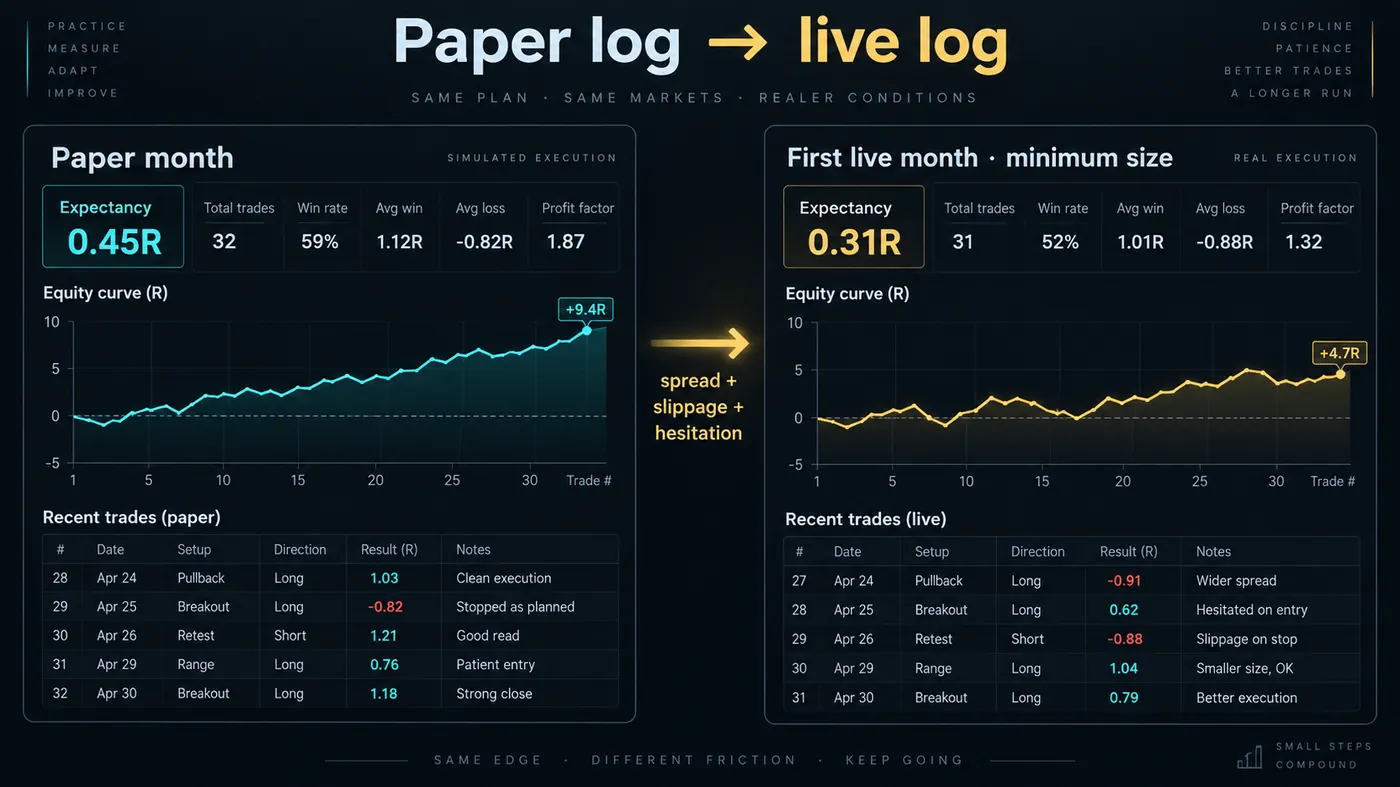
That number is the reason the paper-trading gate in our roadmap is set at a stable expectancy over fifty trades rather than a good one: stable means the gap is measurable and you can decide whether the setup survives it.
Best paper trading platforms by need
| Need | Platform | Why |
|---|---|---|
| Practise the live workflow on the chart you use | TradingView paper trading (free) | Same chart, indicators, alerts and Trading Panel as live; balance adjustable |
| Practise on your broker's exact ticket and spread | The broker's demo account | Real spread, real platform, live time |
| Build fifty logged trades in two weeks | FX Replay (forex, gold, indices, crypto; futures and stocks on Pro) or TradingView bar replay | Compressed time, journal built in (FX Replay), multi-timeframe sync (FX Replay) |
| Practise futures with a DOM | The futures broker's simulator (NinjaTrader Sim, Tradovate-style sim, Sierra Chart replay) | Same front end as live, exchange data, tick-accurate |
| Practise options | An options-first broker's paper account | Chains, spreads and assignment mechanics need a real options ticket |
| Practise under prop rules | The prop firm's own simulator or a journal that syncs the rules (TradeZella's Prop Firm Sync) | The rulebook is the test |
| Practise crypto perpetuals | The exchange's testnet | Mark-price triggers, funding and liquidation logic on the real engine |
The platforms, one by one
- TradingView paper trading. Free on every plan; open the Trading Panel, choose Paper Trading, connect. Adjustable balance, market/limit/stop/bracket orders, positions and P&L in the panel, every indicator and alert live. Fills at the chart's mark price — the bottom of the realism ladder — but the workflow is identical to trading with an integrated broker, which is why it is the default recommendation. Reset the account when you change strategies so the log is clean.
- Broker demo accounts (forex, CFD, stocks). Almost every regulated broker offers one, usually time-limited (30–90 days) or renewable. Real spread, the broker's own platform or MT5/cTrader, and the broker's order ticket — the right place to learn that broker. Ask for the demo to be set to your intended balance; many default to $100,000.
- NinjaTrader Sim / Sierra Chart replay / web-broker sims (futures). Free simulators on the live front end with exchange data; some model slippage. Sierra Chart's replay can re-run recorded sessions with the order book, which is the most realistic retail practice available. Use the sim of the platform you will trade live.
- MetaTrader 5 and cTrader demos. Universal; MT5's Strategy Tester doubles as a backtester for Expert Advisors; cTrader's demo has the same DOM and order management as live. Fills at the broker's demo spread.
- FX Replay. Bar replay with synchronised multi-timeframe charts, risk-based sizing and a session journal; free plan, paid tiers for futures, stocks and seconds data. The fastest way to fifty logged trades. Reviewed in full on this site.
- Forex Tester Online. The long-standing alternative to FX Replay with a lifetime-licence option; comparable replay, older interface.
- TradingView bar replay. Free single-chart replay on any symbol; enough for practising one-timeframe setups, no journal.
- Exchange testnets (crypto). Bybit, Binance and others run test environments with the real matching engine, funding and liquidation logic on play money. The only honest way to practise perpetuals — and the place QuantumBot subscribers run the bot before enabling live keys.
- Prop-firm simulators. The firm's evaluation environment, often the same front end as retail with the rulebook applied. Practise here only if you intend to buy the evaluation; the value is learning the rules, not the market.
- Journals with replay (TradeZella-class). Not a simulator, but a place where practice and live trades can be logged together and replayed; useful once the paper month is over.
A four-week practice plan
- Week 1 — replay. FX Replay or TradingView replay on your one setup, thirty to sixty minutes a day. Goal: twenty-five logged trades, rules followed. Read nothing about the results yet.
- Week 2 — replay through bad conditions. Deliberately pick a ranging month and a news-heavy week. Goal: twenty-five more trades; now read expectancy and plan adherence.
- Week 3 — live-time paper. TradingView paper or the broker demo, same setup, in your real session. Goal: the workflow — alert, order, bracket, management — done without hesitation; ten to fifteen trades.
- Week 4 — live at minimum size. One micro lot, one micro contract, a fraction of a coin. Goal: the first live log, compared trade by trade with the paper log.
A trader who completes the four weeks has a fifty-trade record, has seen a bad week, knows the platform, and has felt real money on a size that cannot hurt. That is the whole purpose of a paper trading platform, and no platform does it for you.
How does paper trading differ by market?
- Forex and gold. The variable is spread by session. A simulator that fills at mark hides the fact that GBP/USD costs 0.3 pips at 09:00 UTC and 2 pips at 22:00. Practise in the session you will trade, and record the live spread at each entry from the broker's quote so you can subtract it.
- Index futures. Tick-accurate simulators exist and should be used; the variable is slippage at the open and around data. Practise the first thirty minutes after 9:30 ET deliberately, because that is where a sim's instant fills are most misleading.
- US stocks. A cash-account paper trader should respect settlement (T+1) and a margin-account paper trader should respect the pattern day trader count where the live broker still applies it, or the paper month teaches habits the live account will not allow. Most broker simulators enforce neither; do it by hand.
- Crypto perpetuals. Use the exchange's testnet, not a generic simulator: funding every eight hours, mark-price versus last-price triggers, and the liquidation engine are the three things that separate a perpetual from a spot chart, and only the real engine models them.
- Options. A simulator without a real chain — bid/ask per strike, assignment, expiry mechanics — is a toy. Use an options-first broker's paper account.
How do you read a simulator's fill report?
Most simulators show planned price and fill price on every order. Export them. The average difference in ticks or pips on market orders is the platform's honesty score, and the number to compare across simulators: 0 means instant-at-mark (add the spread and a tick yourself), 1–2 ticks means slippage is modelled, and a fill report that shows partial fills on larger orders is the closest a retail simulator gets to live.
When should you reset a paper trading account?
Reset when you change the setup, the market or the timeframe, so the log for each is clean. Do not reset because the results are bad — that is the record you need. A paper account that has been reset five times in a month is a trader avoiding the number.
Simulators and the fifty-trade gate
The reason every platform on this page exists is the fifty-trade gate in our roadmap: a stable expectancy over fifty logged trades, through at least one bad week, with the plan followed on more than ninety percent. Replay reaches it fastest; live-time paper proves the workflow; the live minimum-size month proves the person. A paper trading platform that does not feed that log — no export, no per-trade record — is a demo of the software, not a practice tool.
Which paper trading metrics matter, and which can you ignore?
Read: win rate and average R after fifty trades (together — neither alone), plan-adherence rate, the R distribution of the losers (a fat tail means the stop is being moved), and expectancy by session. Ignore: the equity number (it is fake money at a balance you chose), the best trade, streaks, and anything the simulator's leaderboard says.
Mistakes that make paper trading useless
- Trading a 100,000 balance when you will fund 3,000.
- Taking trades outside the written setup "to see what happens".
- Reading results after ten trades.
- Never practising through news or the open.
- Treating the simulator's instant fills as real.
- Going live at full size because the paper month was good.
How to make a simulator honest
- Set the balance to what you will fund.
- Trade only the written setup; the simulator is not for exploring.
- Log every trade with the planned fill and the actual fill.
- Subtract the spread and a tick of slippage by hand on every trade if the simulator fills at mark.
- Practise through a news release and a session open, not just quiet hours.
- Run at least fifty trades and one bad week before reading the numbers.
- Compare the first live month against the paper month, trade by trade.
The realism scorer on this page asks how your simulator fills and returns a score with the correction to apply to its expectancy.
What can paper trading not test on any platform?
Fear and greed at size. The paper account does not change your heart rate; the live one does, and the first live month is a second paper month with emotions attached. No simulator fixes that; only minimum size does. That is why the sequence is replay → paper → live at minimum → scale, and why the last step is the one with the real test in it.
Practise on the interface you will trade live, at your real balance, and know which rung of the realism ladder your simulator sits on so you can subtract the difference. Replay for the record, live-time paper for the workflow, the exchange testnet for perpetuals, minimum size for the person. Expect a third of the paper edge to vanish on contact with a live market — that is why the gate is a stable expectancy, not a good one.
◆ Interactive check
Do you know what your simulator hides?
Questions people ask about paper trading platforms
Yes — a free simulated account in the Trading Panel, on any TradingView plan, with an adjustable balance and the same order types as an integrated broker.
Yes in substance. Broker demos usually fill at bid/ask and use the broker's platform; TradingView's paper account fills at mark on the TradingView chart. Both are simulators; neither models slippage.
Until fifty logged trades through at least one bad week show a stable expectancy and you followed the plan on more than ninety percent of them. With bar replay that can be two weeks; in live time, one to three months.
The simulator of the front end you will trade live — NinjaTrader's sim, a Tradovate-style web sim, or Sierra Chart replay — on exchange data. Practising on a different platform than you will use live wastes the platform-learning part of the exercise.
Fills, spread and emotion. Simulators fill at mark or at the spread with no slippage and no fear; live trading has all three. Subtract costs by hand on paper, go live at minimum size, and compare the two logs.
Yes — the free indicators and Zeno run identically on a paper chart and a live one on TradingView, and a signal with its stop and targets becomes a paper bracket order in the same two clicks. In FX Replay you learn to read the structure by hand first, then check against the indicators on TradingView.
TradingView paper trading is free on every plan; most regulated brokers offer free demos; futures front ends include free sims; crypto exchanges run free testnets. Paying is only necessary for replay tools with journals and multi-timeframe sync.
TradingView's app for practising alerts and chart-native orders on a paper account; otherwise the app of the broker you will use live. An app-only simulator that differs from your live platform teaches the wrong interface.
Only usefully on an options-first broker's paper account with a real chain — bid/ask per strike, spreads, assignment and expiry mechanics. Generic simulators do not model those.
Export the fill report and compare planned price to fill price on market orders. Zero difference means instant-at-mark; one to two ticks means slippage is modelled; partial fills on larger orders mean it is closer to live.
References & Related Guides
Read next
- Options Trading for Beginners: How Options Work, Calls vs Puts, and How to Start Without Getting Hurt
- What Is Paper Trading?
- FX Replay Review
- TradeZella Review
- How to Start Trading: 90-Day Roadmap
- Best Trading Platforms
- Trading Journal: Complete Guide
- Best Futures Trading Platforms & Prop Firms
- SMC Practice Simulator
Authoritative sources
- TradingView: how to start paper trading
- NinjaTrader: futures trading simulator
- Bybit testnet
- SEC Investor.gov: paper trading
- FINRA: day-trading margin requirements (respect them on paper)