Myfxbook Review: What It Does, How Verification Works and How to Read a Track Record
Myfxbook is a free website that connects to MT4, MT5, cTrader, TradeLocker and Oanda accounts through read-only access and turns the trade history into statistics. A "Track Record" badge means the history matches the broker; "Trading Privileges" means the owner proved they control the account. It is safe to connect with an investor password, and useful for checking signal sellers, but a verified account can still hide risk. Rating: 4.2/5.
When a signal seller or EA vendor shows you a track record, the link usually goes to Myfxbook. That makes it one of the most important pages in retail forex, and one of the most misread. I went through Myfxbook's tools, its help centre and dozens of public system pages on 11 November 2026. This review explains what the site does, what its badges prove and what they do not, and how to read the numbers before you trust anyone's results.
What is Myfxbook?
Myfxbook is a website that reads your trading account and turns its history into a public or private statistics page: gain, drawdown, win rate, average trade, monthly returns and dozens of breakdowns. It is not a broker and it does not hold money. Around that core it runs a community forum, an economic calendar, a sentiment page, forex calculators, broker spreads and reviews, and newer tools such as a manual backtester and an AI strategy generator.
The reason traders search for it is simple: Myfxbook became the standard proof page for forex systems, EAs and signal services. When someone sells a strategy, buyers ask for a Myfxbook link. That is a sensible habit, as long as you know how to read what the link shows. The sections below cover the tracking, the verification badges and the numbers that mislead most often.
How does Myfxbook connect to a trading account?
You add an account under Settings, then Add Account, and pick the platform. MetaTrader accounts connect with the server name and the investor password, a read-only password that can see history but cannot place or close trades. cTrader accounts connect through a Spotware login; TradeLocker and Oanda have their own connectors.
| Method | Platforms | Update interval | Cost |
|---|---|---|---|
| Auto Update | MT4, MT5 | Every 2 to 4 hours (MT5 once a day) | Free |
| EA Publisher | MT4, MT5 (Windows) | Every 5 minutes while the terminal is open | Free |
| Live Update | MT4, MT5 | Real time, on Myfxbook's servers | $60 a year per account |
| Native connector | cTrader, TradeLocker, Oanda | Set by the connector | Free |
For MetaTrader the method matters. Auto Update is free and runs on Myfxbook's servers every few hours. The EA Publisher is also free but runs inside your terminal, so it stops when the platform is closed and works on Windows only. Live Update is the paid option: real-time sync on Myfxbook's servers for $60 a year per account. A trading journal answers different questions, but Myfxbook is the quickest way to get a third-party view of your own statistics.
What does "verified" mean on Myfxbook?
Myfxbook's full verification has two parts, and you need both before an account can be made public on the systems list.
- Track Record verified. The history on Myfxbook matches the history the broker reports. It confirms the trades happened; it says nothing about how risky they were.
- Trading Privileges verified. The person who added the account proved they hold the master password, either by temporarily setting the investor password to a code Myfxbook gives them, or by placing a pending order with that code as the comment. It confirms the seller controls the account they are showing you.
What verification does not prove: that the account is the seller's only account (losing accounts can simply be left off), that the balance is meaningful, that the strategy will keep working, or that the risk per trade is sane. A verified grid or martingale EA looks perfect right up to the day it does not. Always check the drawdown, the start date and the deposits, which is what the next section is about.
Indicators that prove themselves in public.
One engine, four precision tools — the Gold (XAU) Scalper, the institutional Gravity Zone, the Zeno momentum Oscillator, and Zeno Stocks for equities.
Why is Myfxbook gain so different from absolute gain?
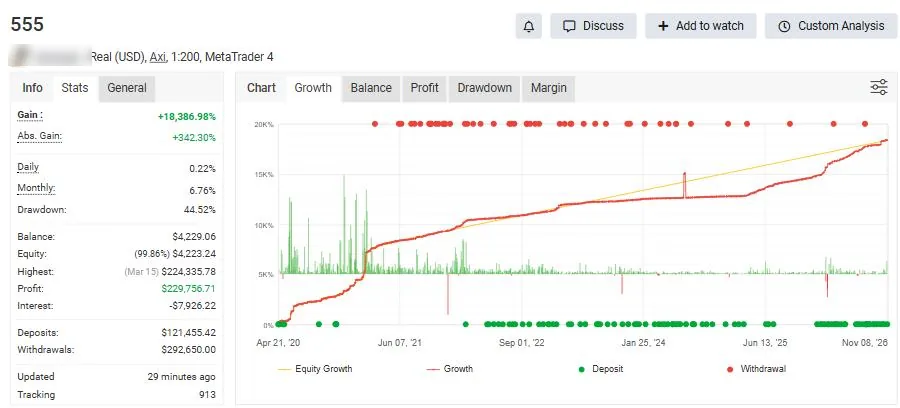
This is the number that misleads most buyers. Myfxbook's headline Gain is time-weighted: it chains together the return of each period between deposits and withdrawals, so cash flows do not distort the figure. Absolute gain is plainer: profit divided by money deposited.
The two can differ by orders of magnitude. The public account above shows a Gain of +18,386.98% and an absolute gain of +342.30%. Both are honest calculations. The first says that one dollar compounded through every period would have grown enormously; the second says the account made a bit over three times what was put in, after very large deposits and withdrawals. If an account started tiny, grew fast and then received a big deposit, the time-weighted gain will look spectacular while most of the money never earned it.
Read Gain alongside absolute gain, the deposits and withdrawals, the drawdown (44.52% here) and the tracking period. A strategy that needed a 44% drawdown to make its return is a very different product from one that made half the return with a 10% drawdown. Our risk management guide explains why drawdown is the number to anchor on.
How do you read a Myfxbook track record before you trust it?
Use this checklist on any system page a vendor sends you. It takes ten minutes and catches most bad offers.
| Check | Where on the page | Red flag |
|---|---|---|
| Both verification badges | Under the account name | Track record only, or no badges |
| Tracking period | Info tab: started / tracking days | Under six months, or a recent custom start date |
| Gain vs absolute gain | Stats tab | Huge Gain, small absolute gain, big deposits |
| Maximum drawdown | Stats tab and Drawdown chart | Above 30% to 40% for a "safe" product |
| Equity vs balance | Growth and Balance charts | Balance climbs while equity dips deep: open losers held |
| Lot size over time | Trading tab, history | Lots double after losses (martingale) or many layered orders (grid) |
| Live Update | Badge next to verification | Not essential, but its absence means stale data |
A verified account with a long history, moderate drawdown and steady monthly returns is a good start, not proof of a future edge. Backtests and forward tests still matter; our guides to backtesting a strategy and to whether swing trading is profitable cover the statistics that separate luck from edge.
What else does Myfxbook offer?
Myfxbook has grown into a broad toolkit. Most of it is free; a few features are paid.
- Calculators: position size, pip value, margin, risk of ruin, drawdown, compounding, swaps and a prop-firm consistency calculator. Our own lot size calculator covers gold and forex sizing in the same way.
- Market data: economic calendar, sentiment (community outlook), currency correlation, heat map, volatility, COT data and broker spreads.
- Backtest: a free manual market-replay tool with more than 20 years of history down to one minute.
- Strategy AI: generates Expert Advisor code from a description and backtests it, on paid credit plans.
- Prop Shield: tracks prop-firm rules such as daily loss, maximum drawdown and profit target on a connected account and warns before a breach.
- Premium access: verified public accounts can charge $20 to $100 a month for live trade notifications and full private data.
The AutoTrade copy-trading service that Myfxbook was once known for is no longer offered: the old AutoTrade address now redirects to the home page. If copy trading is what you want, look at broker-native social trading instead, and read our guide on what to do if a trading platform scams you before sending money to any signal provider.
What does the Myfxbook systems list show?
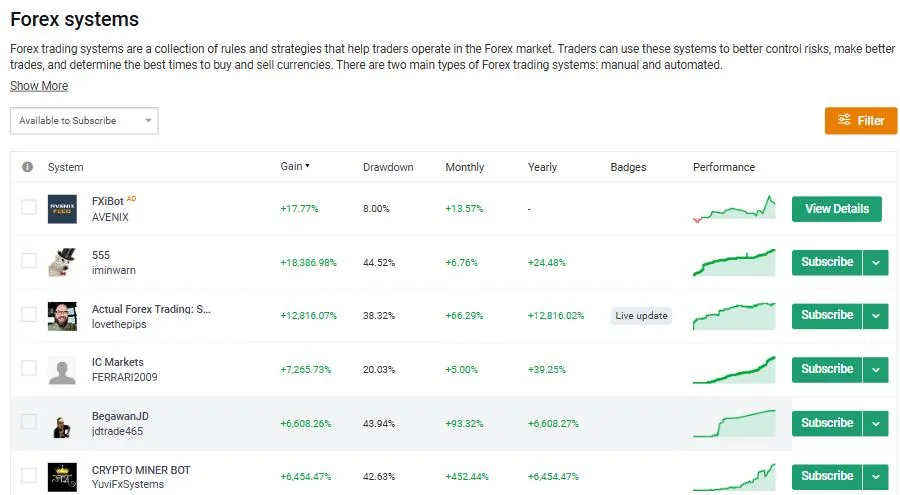
The systems page ranks public, verified accounts. You can sort by gain, drawdown, monthly or yearly return, and filter to accounts that are available to subscribe to. The default sort by gain rewards exactly the accounts the previous sections warn about: the top rows in our capture show gains in the thousands of percent with drawdowns above 40%.
Use the filter and sort by drawdown instead, then open accounts with at least a year of history. Compare the equity curve to a fixed-risk position sizing model: steady accounts move in small, uneven steps; risky ones climb in a smooth line and then drop.
Is Myfxbook safe to connect to your account?
Connecting with the investor password is low risk: that password can read history but cannot trade or withdraw. Do not give Myfxbook, or anyone else, your master password, and change the investor password if you stop using the service. The Trading Privileges check asks you to change the investor password temporarily or place a tagged pending order; neither hands over control of the account.
Three practical cautions. First, public accounts show your trading to everyone, so set the account private if you only want the statistics. Second, a few brokers have stopped supporting Myfxbook connections over the years, so check your broker before relying on it. Third, the site is supported by broker advertising and affiliate links; broker rankings and promotions on Myfxbook are not neutral research. Our best forex brokers guide explains how to check regulation yourself.
Is Myfxbook useful for prop firm traders?
Yes, in two ways. Prop Shield lets you enter a firm's rules (daily loss, maximum drawdown, minimum days, profit target) and watch them on one dashboard, which is useful if your firm's own dashboard updates slowly. And the consistency calculator helps with firms that cap how much of your profit can come from one day.
Check first that your platform connects: MetaTrader, cTrader and TradeLocker do, but futures platforms such as Tradovate and Rithmic-based ones do not. Futures prop traders, for example at TradeDay or Alpha Futures, should rely on the firm's dashboard and a spreadsheet instead. Forex prop traders on TradeLocker or MT5 can use both. More on the rules themselves in our prop firm strategy guide.
Reference data
| Item | Value (checked November 2026) |
|---|---|
| Type | Account tracking, analytics and community website |
| Platforms | MetaTrader 4, MetaTrader 5, cTrader, TradeLocker, Oanda |
| Access needed | Investor (read-only) password for MetaTrader |
| Price | Free; Live Update $60 a year per account |
| Verification | Track Record and Trading Privileges, both needed to go public |
| Premium access | Sellers set $20 to $100 a month |
| Extra tools | Backtest (free), Strategy AI (credits), Prop Shield, calculators, calendar |
| AutoTrade | No longer offered |
Track record checker
Enter the numbers from any Myfxbook system page. The checker turns them into a plain verdict and lists the red flags, so you can compare offers on the same terms.
The thresholds are rules of thumb, not standards: a short history or a deep drawdown is not proof of a bad strategy, only a reason to wait and watch.
What are the pros and cons of Myfxbook?
| Strengths | Weaknesses |
|---|---|
| Free tracking with read-only access | Headline Gain is easy to misread |
| Two-part verification for public accounts | Verification cannot show hidden or losing accounts |
| Deep statistics and calculators | Real-time sync costs $60 a year per account |
| Prop Shield and consistency calculator | No futures platforms; AutoTrade is gone |
| Free manual backtester | Broker ads and affiliate links throughout |
Who is Myfxbook for, and what is our verdict?
Myfxbook is for two groups. Forex and CFD traders who want free, detailed statistics on their own accounts, and anyone about to pay for a signal, EA or managed account who wants to check the seller's numbers. For the first group it is a useful mirror; for the second it is essential, as long as you read absolute gain, drawdown and history length rather than the headline Gain.
My rating is 4.2 out of 5. The core tracking and verification are free, well documented and widely trusted. It loses marks because the default views reward risky accounts, real-time data costs extra, and futures traders are left out. On TradingView, the free Quantum Algo indicators cover the charting side; Myfxbook covers the statistics once the trades are on.
Myfxbook is a free tracker that reads MT4, MT5, cTrader, TradeLocker and Oanda accounts with read-only access. Track Record verification proves the history matches the broker; Trading Privileges proves control of the account. Neither proves low risk: read absolute gain, drawdown, deposits and the tracking period before trusting any system.
◆ Interactive check
Can you read a Myfxbook page?
Questions traders ask about Myfxbook
Tracking and analysing trading accounts, publishing verified track records, checking signal sellers and EAs, and market tools such as an economic calendar, sentiment and forex calculators.
Yes. Account tracking, verification, calculators and the backtester are free. Live Update (real-time sync) costs $60 a year per account, and Strategy AI runs on paid credit plans.
Yes. The investor password is read-only: it can see history but cannot trade or withdraw. Never share your master password.
Track Record verified means the history matches the broker. Trading Privileges verified means the person who added the account proved they control it. Neither means the strategy is low risk.
Gain is time-weighted and removes the effect of deposits and withdrawals; absolute gain is profit divided by deposits. Gain can be far larger when an account grew from a small start.
The history of a verified account matches the broker, but sellers can still show only their winning accounts, use custom start dates, or run very high-risk systems. Check drawdown, deposits and history length.
No. The AutoTrade copy-trading service is no longer offered.
MetaTrader 4, MetaTrader 5, cTrader, TradeLocker and Oanda. Futures platforms such as Tradovate are not supported.
No. It is a tracking and analytics site; it never holds your money or places your trades.
References & Related Guides
Read next
- Best Forex Brokers
- Martingale Strategy
- Best MetaTrader Alternatives
- TradeLocker Review
- Trading Journal
- Backtesting a Trading Strategy
- Risk Management
- Is Forex Trading Legit?
- Prop Firm Trading Strategy
- Lot Size Calculator