Neural Confluence Engine [Quantum Algo]
Eight independent factors weighted into one 0–100 confluence score, two signal tiers from the same engine — every ribbon flip, and the high-confluence BUY+ / SELL+ gated by score and higher-timeframe trend — with entry, ATR stop, three targets and a trailing stop that ratchets at each hit, drawn on the chart.
The short answer
The Neural Confluence Engine is a free, open-source Pine Script v6 indicator that fuses eight independent technical factors — WaveTrend momentum, EMA alignment, VWAP position, RSI regime, MACD acceleration, ADX trend power, volume confirmation and squeeze state — into a single weighted directional strength score on a 0–100 scale. Signals come in two tiers: standard BUY / SELL on every EMA ribbon flip, and high-confluence BUY+ / SELL+ that fire only when the ribbon flips, the score clears your threshold and the higher-timeframe trend agrees. Every signal opens trade management — entry, ATR stop, three take-profit targets and a trailing stop that ratchets at each TP. With nearly five thousand traders using it, it is the second most-used script in the library. All signals are confirmed on bar close.
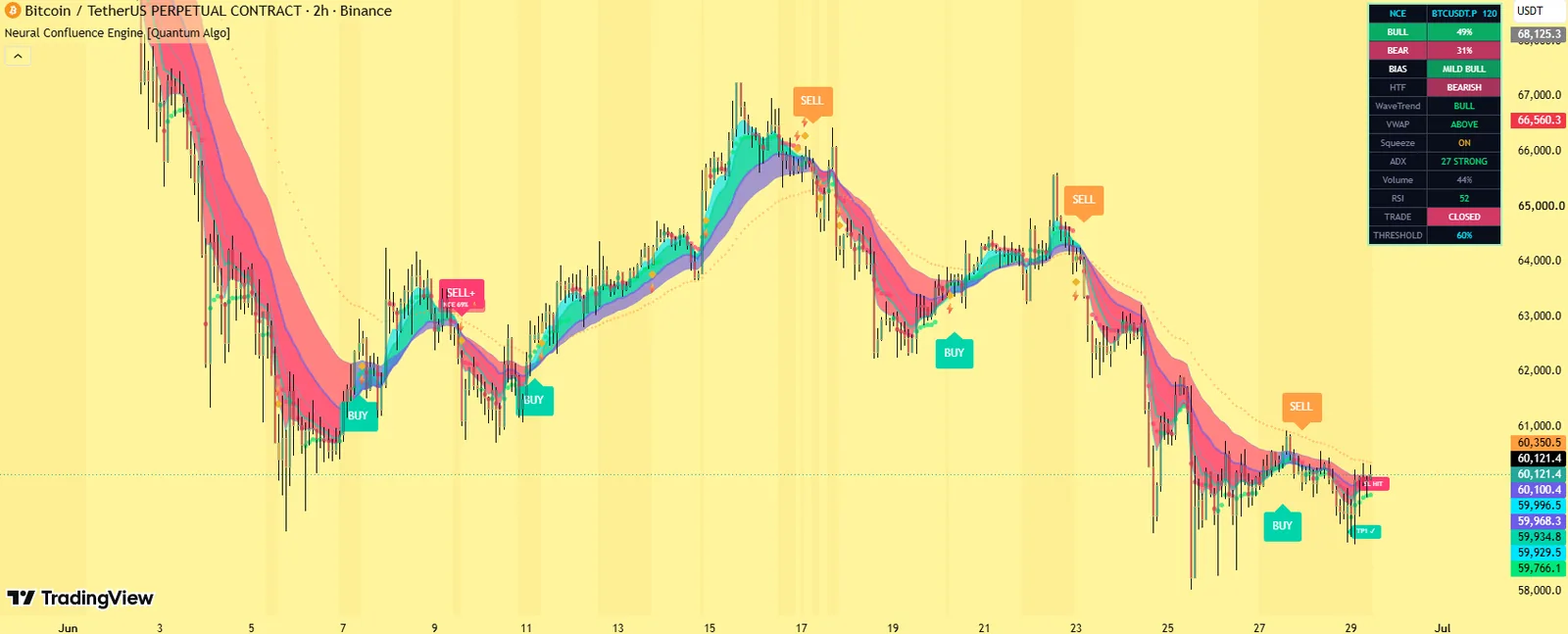
A six-line EMA ribbon, VWAP, BUY/SELL and BUY+/SELL+ labels, entry, stop and three targets, squeeze markers and a factor dashboard.
The weighted-score gate with HTF agreement and the tiered trailing stop tied to target hits.
No — signals and TP/SL hits on confirmed bars; HTF without lookahead.
The eight factors
WaveTrend Momentum (weight 1.5)
A custom oscillator from HLC3 with channel 9 and signal 12; oversold reversals below −40 score 1.0, readings above zero 0.8, positive crossovers below zero 0.5.
EMA Alignment (1.3)
Fast 9 > slow 21 > baseline 50 scores 1.0; fast > slow alone 0.6.
VWAP Position (1.0)
Above VWAP by more than 1 ATR 1.0; within 1 ATR 0.7; below 0.
RSI Regime (0.8)
Above 60 scores 1.0; 50–60 scores 0.6; below 50 scores 0.
MACD Histogram (0.8)
Rising above zero 1.0; positive but flat 0.6; negative 0.
ADX Trend Power (0.7)
Above 40 scores 1.0; 25–40 scores 0.7; below 25 scores 0.3 (a chop penalty, not zero).
Volume Confirmation (1.0)
Above the 20-bar average with a directional close 1.0; 80–100% of average 0.4; below 0.
Squeeze State (1.2)
Bollinger compression inside Keltner (20 SD, ATR 10); a firing bar with positive momentum 1.0; compression without release 0.3.
Each factor is scored separately for bullish and bearish directions, multiplied by its weight, summed, divided by total weight and scaled to 0–100, then smoothed with a 3-bar EMA. The net score is bull minus bear.
What it draws
The EMA ribbon
(5, 9, 13, 21, 34, 50) with fill bands coloured by trend.
VWAP
Coloured by price position.
BUY / SELL / BUY+ / SELL+ labels
, with the confluence score on the + signals.
Entry, SL, TP1, TP2, TP3 lines
For the most recent trade and TP-hit checkmarks.
Squeeze background
While compressed and ⚡ diamonds on release bars.
Optional momentum wave background
By net score, and signal-bar candle colouring.
The dashboard
Bull and bear scores, bias, HTF direction, the eight factor states, trade status and the threshold.
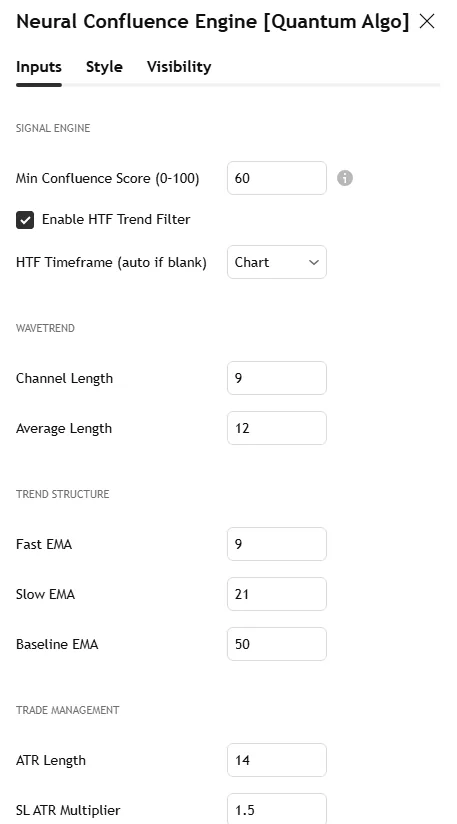
The Bitcoin 2-hour screenshot on this page shows the ribbon, a BUY+ with its trade levels and the factor dashboard; the settings screenshot shows the Inputs tab.
Why it is different
Eight-factor weighted composite, not a single trigger
Dial sensitivity from 20 to 95 without re-tuning eight sub-indicators.
Two-tier signal architecture
Sensitive ribbon flips and gated high-confluence variants from the same engine.
HTF agreement inside the gate
Auto-detected (15m → 1H, 1H → 4H, 4H → D, D → W) or manual; BUY+ / SELL+ are blocked when it disagrees.
Per-factor visibility
Every factor viewable live, so no signal is a black box.
Trailing stop tied to TP hits
Breakeven after TP1, TP1 after TP2, TP2 after TP3, plus 0.5 ATR trailing.
Trade management
Stop at entry minus 1.5 × ATR (multiplier 0.5–10). TP1 at 1R, TP2 at 2R, TP3 at 3R (configurable). When TP1 is reached the stop moves to breakeven and then advances tier by tier, also following price at 0.5 ATR after TP1; the trailing behaviour can be disabled with the "Activate Trailing SL after TP1" toggle.
Settings
| Group | Input | What it does | Where to start |
|---|---|---|---|
| Signals | Min Confluence Score | The + signal gate | 60 |
| HTF Trend Filter, HTF timeframe | Higher-timeframe agreement | on; auto | |
| Risk | SL Multiplier (ATR) | Stop distance | 1.5 (2.0 crypto) |
| TP R:R 1 / 2 / 3 | Targets | 1 / 2 / 3 | |
| Activate Trailing SL after TP1 | Tiered trailing | on | |
| Factors | WaveTrend channel/signal, EMA lengths, RSI, MACD, ADX, volume SMA, squeeze | The engine | defaults |
| Visuals | Ribbon, VWAP, wave background, candle colouring, dashboard | Appearance | — |
Alerts
Eight named conditions: BUY, SELL, BUY+, SELL+, Squeeze breakout, TP1 reached, TP2 reached, TP3 reached.
How to use it
Choose your tier. Standard flips for systematic trend-following; + signals for the most aligned setups; both together for confluence.
Read the factor rows before the signal — a BUY+ with eight of eight is a different event from one that scraped past 60.
Let the trade management run. Stop, three targets, tiered trail — the plan is drawn; follow it.
Use the presets — the score threshold and stop multiplier change by market.
Pair with structure. A + signal at an order block or a swept level is the highest-quality version.
Three ways to trade it
The + signal at the block.
BUY+ printing on the return to a demand block from Order Blocks with Volume with HTF bullish — enter, stop at the drawn SL, targets as drawn.
The squeeze release.
⚡ diamond with the squeeze factor firing and the score climbing through the threshold — the expansion trade, sized from the ATR stop.
The tier disagreement.
A standard SELL without a SELL+ means the ribbon flipped but confluence or HTF disagrees — take profit on longs, do not short.
Recommended settings by market
Forex majors, 1H–4H:
Score 65, HTF on, SL 1.5, R:R 1/2/3, HTF auto.
Crypto perpetuals, 15m–1H:
Score 60, HTF on, SL 2.0, R:R 1/2/3.
Gold, 1H–4H:
Score 70, SL 1.8, R:R 1/2/3.5, HTF Daily.
Indices, 5m–1H:
Score 55, SL 1.2, R:R 1/2/3.
Swing, 4H–daily:
Score 75, SL 2.5, R:R 1.5/3/5, HTF Weekly.
How it compares
Against single-condition indicators: one trigger versus eight weighted factors gated by score and HTF. Against the Smart Money Concepts Engine's Confluence Score: that scores structure — order blocks, gaps, sweeps; this scores momentum, trend, volume and volatility — the two together are the complete confluence read. Against Zeno: Zeno's signals come from institutional structure with multi-timeframe confirmation and a public record; the Neural Confluence Engine is the free composite-momentum layer.
Limitations
Composite scores lag single indicators by construction; the 3-bar smoothing adds a bar. Volume confirmation is less meaningful on low-volume tickers. The trade levels are ATR-scaled geometry, not structure — place them against a level when you can.
Credits
WaveTrend, RSI, MACD, ADX, Bollinger Bands, Keltner Channels and VWAP are standard public-domain tools. The weighted-score aggregation, two-tier signal architecture, ATR-tiered trailing-stop progression and per-factor dashboard are original implementations by Quantum Algo, published open source.
Step-by-step: adding it to your TradingView chart
Open the script page on TradingView (link above) and click Add to favorites, then Use on chart — or on any chart open Indicators, search "Neural Confluence Engine Quantum Algo" and add it. Free on every TradingView plan.
Open the indicator's settings and set the inputs for your market and timeframe from the table above; the defaults are tuned for crypto and forex on 15-minute to 4-hour charts.
In the Style tab, match the colours to your chart theme; the dashboard position and text size are in Inputs.
To set alerts, right-click the chart → Add alert, choose the indicator as the condition and pick the event; set "Once per bar close" so alerts match the closed-bar logic.
Save the layout, and add the other free Quantum Algo tools to it — they are designed to sit together.
To read or reuse the code, click Source code on the script page; republishing is subject to TradingView's house rules.
Inside the code, for developers
Pine Script, open source. Worth reading if you want to modify it: every detection and signal gated on barstate.isconfirmed; state held in capped arrays of drawing objects with explicit create, update and retire functions; where statistics are kept, first-in-first-out arrays with shrinkage and a Wilson bound computed inline; named alertcondition calls so webhooks receive a consistent payload. The Academy's Pine Script tutorials and the TradingView backtesting guide cover strategy conversion.
Using it with the other free indicators
The free tools layer on one chart: the Smart Money Concepts Engine for bias and the Confluence Score; Order Blocks with Volume, Fair Value Gaps + Inversion and Institutional Key Levels for the zone; Liquidity Sweeps, Sessionscope and Liquidation Magnet for the liquidity and the trigger; OTE + Silver Bullet for the time-qualified entry; the Institutional Volume Profile and Pressure Oscillator for whether volume agrees; the trend and volatility family — the Adaptive Trend Sentinel, SuperTrend Engine, Golden Cross Engine, Anchored VWAP Engine, Trendline Architect, Keltner Rings and Volatility Storm Tracker — for regime, direction and room; and the momentum and statistics family — MACD Matrix, the Multi-Oscillator Divergence Scanner, the Event Probability Engine, the Market Bottom Finder, the Neural Confluence Engine, the Adaptive Lorentzian Classification and the Directional Strength Index — for momentum, probability and strength. The free-indicators hub lists every tool; the SMC guide is the method behind the layering.
Common mistakes with this indicator
- Trusting the developing bar — every event waits for the close.
- Trading every marker — the tool gives momentum and context; the entry needs a structure level and a stop beyond it.
- Default lengths on the wrong timeframe — adjust the inputs, as the settings table shows.
- Reading the statistics as promises — they describe this chart's history, shrunk toward neutral on purpose.
- Stacking ten random scripts — the free tools layer because they were built to.
Want the signal, not just the structure?
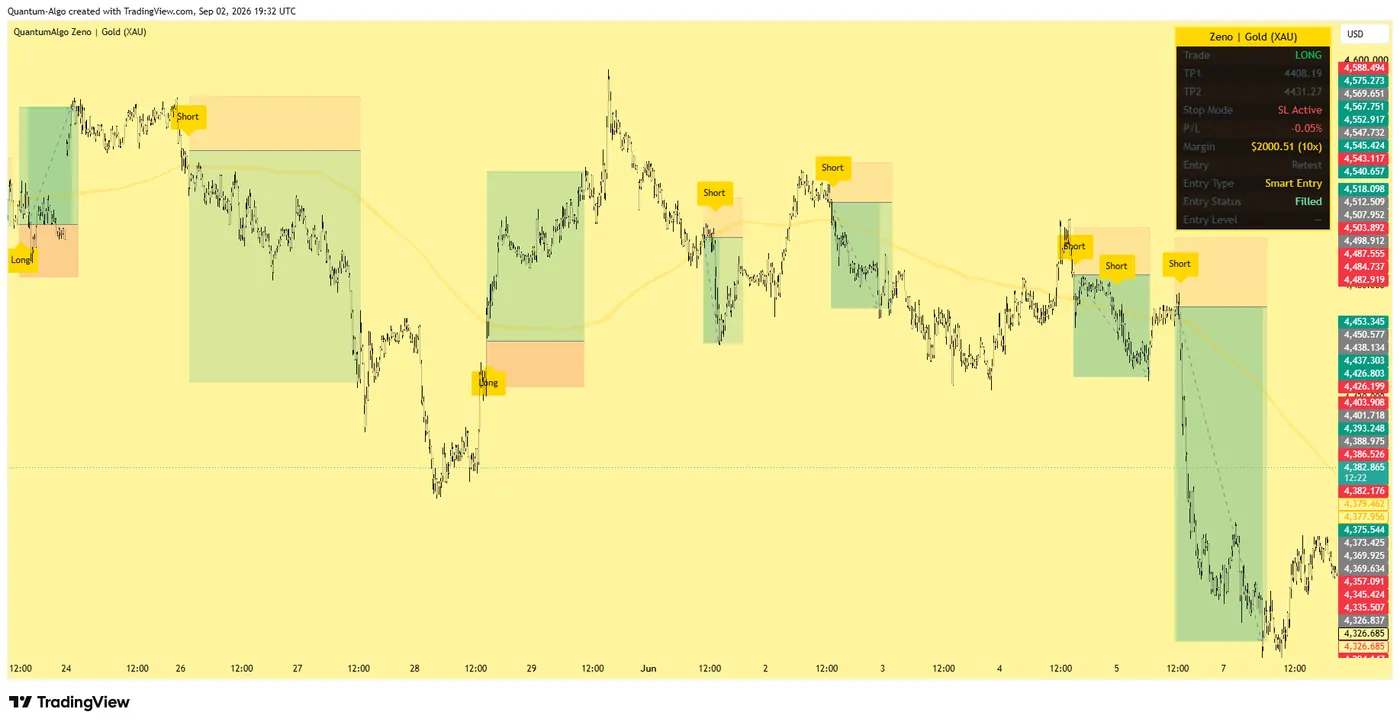
Zeno reads Smart Money structure across timeframes and prints the entry, stop, TP1 and TP2 on your chart — with a public record of 160 posted trades, 120 wins and 40 losses at the stated levels. QuantumBot executes it on Bybit, Binance, OKX, Bitget and Kraken.
Glossary for this indicator
Frequently asked questions
Does the Neural Confluence Engine repaint?
No. BUY, SELL, BUY+, SELL+, squeeze breakouts and TP/SL hits are evaluated on confirmed bar close; higher-timeframe values use lookahead off.
What is the difference between BUY and BUY+?
BUY fires on every bullish ribbon flip; BUY+ requires the flip, a score above your threshold and higher-timeframe agreement — sensitivity versus selectivity from one engine.
What score threshold should I use?
60 for crypto intraday, 65 forex, 70 gold, 55 indices, 75 swing — the presets above. Higher is more selective.
Is it "neural"?
It is a weighted composite with fixed, transparent weights — every factor and weight is visible in the code and the dashboard; there is no hidden model.
Can I feed the alerts to a bot?
Yes — eight named alerts including the TP hits; the drawn levels give a bot the full plan.
How does it relate to Zeno?
Zeno prints structure-based signals with a public record; the engine is the free composite-momentum layer whose + signals often coincide with Zeno entries.
What is the best free buy/sell indicator on TradingView?
One that shows its reasoning. Every BUY+ here lists eight factor states and a score, so you can see why it fired — and every flip carries a drawn stop and targets.
What are the best settings?
Score 60, HTF on, SL 1.5 ATR, targets 1 / 2 / 3R for crypto intraday; the presets section adjusts by market.
Can I feed the alerts to a bot?
Yes — eight named alerts including TP1, TP2 and TP3 reached; the drawn levels give the bot a full plan.
Does the squeeze factor matter?
It carries the second-highest weight (1.2): compression then release with positive momentum is the setup the score rewards most after WaveTrend.
Why did a BUY print but no BUY+?
The ribbon flipped but the score was below your threshold or the higher timeframe disagreed — sensitivity without selectivity; treat it as a take-profit cue, not an entry.
What is the HTF auto rule?
15m → 1H, 1H → 4H, 4H → D, D → W; set a manual timeframe to override.
The momentum and statistics family
Momentum, probability and strength — the reads that sit under the Smart Money layer and beside the trend tools.
Add Neural Confluence Engine to your chart
One click on TradingView, free on every plan, code you can read. Nothing repaints.