Optimal Trade Entry + Silver Bullet [Quantum Algo]
The ICT Optimal Trade Entry and the three Silver Bullet windows, automated: a Fibonacci grid anchored on a confirmed break of structure, the 61.8–79% zone shaded toward the 70.5% sweet spot, and every tap graded A+ to C from four things you can see. Closed bars only.
The short answer
Optimal Trade Entry + Silver Bullet is a free, open-source TradingView indicator that automates the two ICT concepts most traders get wrong by hand: it anchors a Fibonacci retracement to the correct impulse leg only after a confirmed break of structure, highlights the 61.8%–79% Optimal Trade Entry zone as a gradient that intensifies toward the 70.5% sweet spot, and shades the three Silver Bullet windows — London open, New York morning, New York afternoon — as live inputs to a grading engine. Every zone tap is graded A+, A, B or C from four visible conditions (the tap, an active window, a fair value gap on the leg, a liquidity sweep at the origin), and a trade plan with Entry, Stop, Target One and Target Two prints on the chart. Closed bars only; nothing repaints.
61.8–79% of the impulse leg after a break of structure; 70.5% is the sweet spot the gradient intensifies toward.
03:00–04:00, 10:00–11:00, 14:00–15:00 New York time — shaded, and scored, not decorative.
A+ = tap + window + gap on the leg + sweep at the origin. Nothing hidden, nothing repainted.
What the Optimal Trade Entry zone is
The Optimal Trade Entry (OTE) is the Smart Money concept describing where institutional participants complete their entries after a trend has been confirmed: the discount portion of a bullish impulse leg, or the premium portion of a bearish one, defined as the 61.8% to 79% Fibonacci retracement of the most recent impulse, with 70.5% as the statistical sweet spot. Price retracing into that zone after a break of structure offers a defined-risk entry — the stop belongs beyond the origin of the leg, the targets project into the extensions beyond the impulse extreme. Our ICT guides cover the theory; this indicator removes the two errors that ruin it in practice — anchoring the grid to the wrong leg, and entering outside the hours when the model performs.
What the Silver Bullet windows are
The Silver Bullet model restricts trading to three one-hour windows in New York time, when algorithmic price delivery is most likely to seek liquidity and fill fair value gaps:
London Open window
03:00 to 04:00 ET
New York Morning window
10:00 to 11:00 ET
New York Afternoon window
14:00 to 15:00 ET
The indicator shades each window on intraday charts, labels the window open, and — the part that separates it from a decorative session tool — treats window activity as a scoring input: an OTE tap inside an active window grades higher than one outside it. Our Silver Bullet strategy guide covers the model in depth.
What it draws
The Fibonacci grid
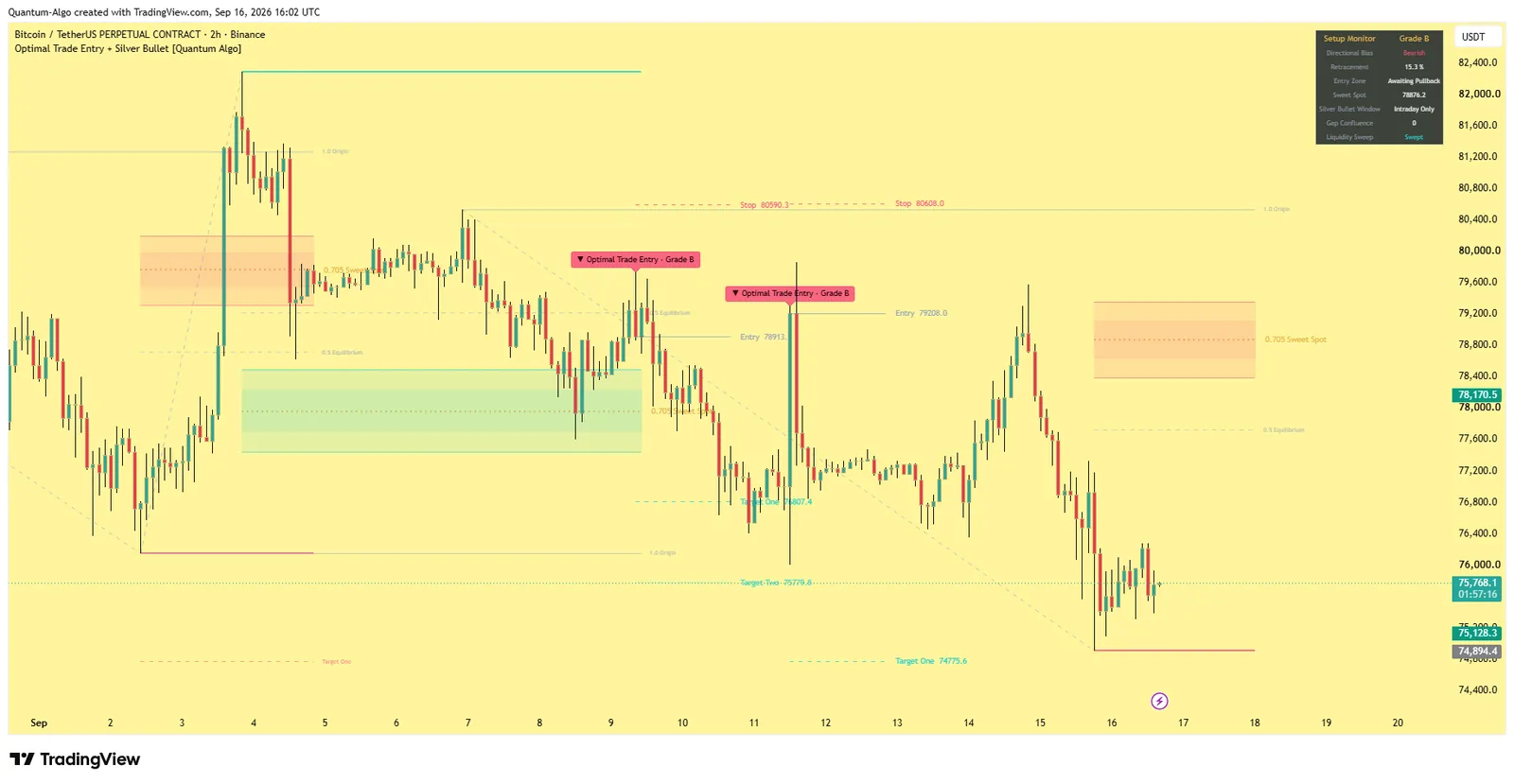
, anchored automatically on each break of structure from the origin pivot to the running extreme: origin (1.0), equilibrium (0.5), the entry zone borders (0.618 and 0.79), the sweet spot (0.705, dotted), the impulse extreme (0.0), and two target extensions (default −0.27 and −0.62).
The entry-zone gradient
Four stacked slices between 0.618 and 0.79 whose opacity increases toward 0.705, an instant read of where the highest-probability fill sits.
Silver Bullet windows
Shaded on intraday charts with the window open labelled.
Fair value gaps
Above a minimum ATR size, boxed — by default only gaps forming inside an active window — greyed out once mitigated.
Liquidity sweep flags
When the anchor pivot of a new leg trades through the pivot before it.
Graded signal markers
(A+, A, B, C) with the trade plan: Entry, Stop (beyond the leg origin with an ATR buffer), Target One and Target Two, each labelled with its exact price.
A dashboard
Directional bias, live retracement percentage, entry-zone status, sweet-spot price, the active window, fair value gap count and sweep status.
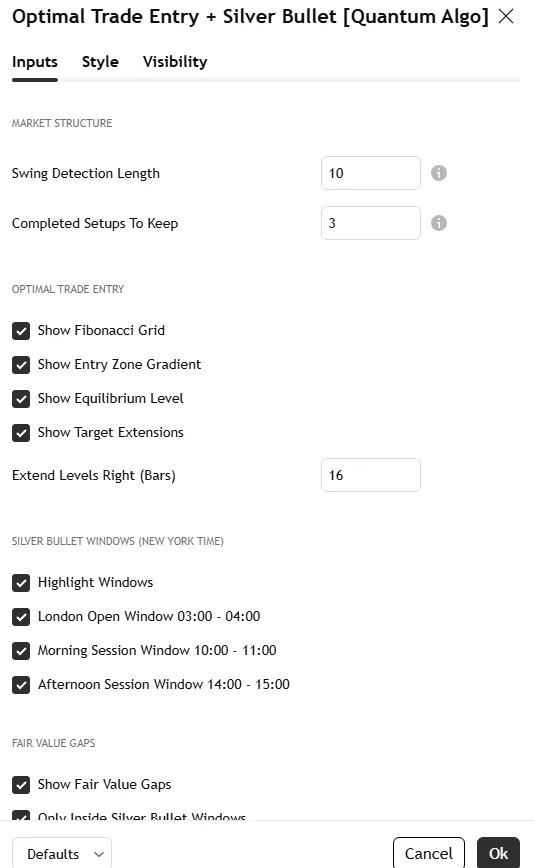
The Bitcoin 2-hour screenshot on this page shows the grid anchored to a live leg with the gradient zone and the dashboard; the settings screenshot shows the Inputs tab.
How it works
Market structure engine. Swing highs and lows are confirmed with a symmetric pivot lookback. A close above the last confirmed swing high shifts the engine bullish; a close below the last confirmed swing low shifts it bearish.
Pivot-and-shift anchoring. The grid appears only after price closes through a confirmed swing point — a genuine break of structure — and anchors to the true origin of the impulse leg. Never a manual anchor, never an arbitrary pivot.
Dynamic leg stretching. While the trend keeps printing new highs or lows, the grid stretches with the market in real time, so the retracement is always measured against the current, complete leg rather than a stale one.
Fair value gap engine. Three-candle imbalances above the size threshold are boxed, by default only inside active windows, and grey out when mitigated.
Liquidity sweep detection. Sell-side liquidity taken before a bullish leg, or buy-side before a bearish leg, flags the setup as a sweep and grades it higher.
Grading. Each signal is a count of four observable conditions — zone tap, active window, directional gap on the leg, sweep at the origin — nothing hidden, nothing curve-fit.
The grade, explained
| Grade | Conditions present | What it means |
|---|---|---|
| A+ | Zone tap + active Silver Bullet window + fair value gap on the leg + liquidity sweep at the origin | The full model — the profile the indicator was built to find |
| A | Three of the four | Strong; usually a tap in a window with one confluence missing |
| B | Two of the four | Tradeable with your own confirmation |
| C | The tap only | Geometry without context — watch, do not trade alone |
The grade is a transparency tool, not a win-rate prediction: it tells you how much of the model is present, so you can see why a signal is what it is.
Settings
| Group | Input | What it does | Where to start |
|---|---|---|---|
| Structure | Swing Detection Length | Pivot lookback controlling structure size; higher tracks larger legs | 10 on 5m–15m; 15 on 1H |
| Signals | Require Active Silver Bullet Window | Only signal inside a window | on for the classic model |
| Require Fair Value Gap Confluence | Only signal with a gap on the leg | on for A/A+ only | |
| Drawings | Completed Setups To Keep, Fair Value Gaps To Keep, Trade Plans To Keep | Caps on historical drawings so the chart stays clean and the scale stays anchored | 3 / 6 / 3 |
| Windows | Independent toggles for each Silver Bullet window | Choose which windows to shade and score | all on |
| Grid | Fibonacci grid, zone gradient, equilibrium, targets, dashboard toggles | What to draw | all on |
| Style | Colours, dashboard position | Appearance | — |
Alerts
Three named conditions: Bullish Optimal Trade Entry (price tapped the bullish zone and passed the active filters), Bearish Optimal Trade Entry, and Silver Bullet Window Opened.
How to use it
Apply it to an intraday chart. One-minute to fifteen-minute timeframes suit the Silver Bullet windows best; the Fibonacci engine alone works on any timeframe.
Wait for the dashboard bias to flip after a break of structure.
Let price retrace. The dashboard shows the live retracement percentage as price approaches the zone.
Take the A+ profile: a tap of the gradient inside an active window after a liquidity sweep, with a fair value gap in the direction of the leg.
Use the printed Entry, Stop and Targets as reference geometry, then apply your own sizing — our stop-loss and position-sizing pages cover the arithmetic.
Tighten or relax the engine with the two signal filters.
Three ways to trade it
The Silver Bullet OTE.
The classic: London open or New York morning window, a sweep of the session low, a bullish break of structure, the retrace into the gradient, entry at the sweet spot, stop beyond the origin, Target One at the extreme, Target Two at the extension.
The higher-timeframe OTE.
Turn the window filter off on a 1-hour or 4-hour chart and use the auto-anchored grid as a swing tool — the retracement zone of the current leg without manual Fibonacci drawing.
The confluence stack.
Run it with the free Liquidity Sweeps and Fair Value Gaps tools: a graded tap that coincides with a marked sweep and an unmitigated gap is the highest-quality version, and the Smart Money Concepts Engine's score usually agrees.
Recommended settings by market
Index futures and CFDs (ES, NQ, NAS100), 1m–5m:
Swing length 8–10, all three windows on, both filters on; the New York morning window is the classic.
Gold and forex majors, 5m–15m:
Swing length 10, London open and New York morning windows, gap filter on; the afternoon window is thinner on forex.
Crypto perpetuals, 15m–1H:
Swing length 12–15; the windows still align with the US session peak; the sweep condition matters most.
Any market, 1H–4H:
Window filter off; use the grid as an automatic retracement tool.
How it compares
Against a manual Fibonacci retracement: the grid is anchored by a confirmed break of structure to the true origin and stretches with the leg — the two things hand-drawn grids get wrong. Against standard session-shading tools: the windows are wired into the signal and grading engine, not background colour. Against the Smart Money Concepts Engine: the engine scores the whole checklist on any timeframe; this tool is the OTE-specific, time-qualified entry model. Against Zeno: Zeno's signals come from multi-timeframe structure with entry, stop and targets; this indicator is the free, single-model version for traders who trade the ICT windows.
Limitations
Pivot confirmation is intentionally delayed by the swing length, so the engine describes confirmed structure rather than predicting it. Retracements can exceed the zone and invalidate the leg during strong counter-moves. Grades measure confluence, not probability of profit. The Silver Bullet windows reference New York time regardless of your chart timezone.
Credits
The Optimal Trade Entry, Silver Bullet, fair value gap and liquidity concepts originate with the Inner Circle Trader (Michael J. Huddleston). The pivot-and-shift anchoring, dynamic leg stretching, time-qualified grading and all code are original work by Quantum Algo, published open source.
Step-by-step: adding it to your TradingView chart
Open the script page on TradingView (link above) and click Add to favorites, then Use on chart — or on any chart open Indicators, search "Optimal Trade Entry + Silver Bullet Quantum Algo" and add it. Free on every TradingView plan.
Open the indicator's settings and set the inputs for your market and timeframe from the table above; the defaults are tuned for crypto and gold.
In the Style tab, match the colours to your chart theme; the dashboard position and text size are in Inputs.
To set alerts, right-click the chart → Add alert, choose the indicator as the condition and pick the event; set "Once per bar close" so alerts match the closed-bar logic.
Save the layout, and add the other free Quantum Algo tools to it — they are designed to sit together.
To read or reuse the code, click Source code on the script page; republishing is subject to TradingView's house rules.
Inside the code, for developers
Pine Script, open source. Worth reading if you want to modify it: pivot confirmation with ta.pivothigh / ta.pivotlow and a symmetric lookback (the source of the deliberate lag); state held in capped arrays of drawing objects with explicit create/update/retire functions; every detection and signal gated on barstate.isconfirmed; named alertcondition calls so webhooks receive a consistent payload. The Academy's Pine Script tutorials and the TradingView backtesting guide cover strategy conversion.
Using it with the other free indicators
The free tools layer on one chart: the Smart Money Concepts Engine for bias and the Confluence Score; Order Blocks with Volume, Fair Value Gaps + Inversion and Institutional Key Levels for the zone; Liquidity Sweeps, Sessionscope and Liquidation Magnet for the liquidity and the trigger; OTE + Silver Bullet for the time-qualified entry; the Institutional Volume Profile and Pressure Oscillator for whether volume agrees. The free-indicators hub lists every tool; the SMC guide is the method behind the layering.
Common mistakes with this indicator
- Trusting the developing bar — every event waits for the close.
- Trading every marker — the tool gives context and location; the entry needs structure confirmation and a stop beyond the level.
- Default lengths on the wrong timeframe — adjust the pivot inputs, as the settings table shows.
- Ignoring volume quality — indicative on CFD tick volume, real on exchanges and futures.
- Stacking ten random scripts — the free tools layer because they were built to.
Want the signal, not just the structure?
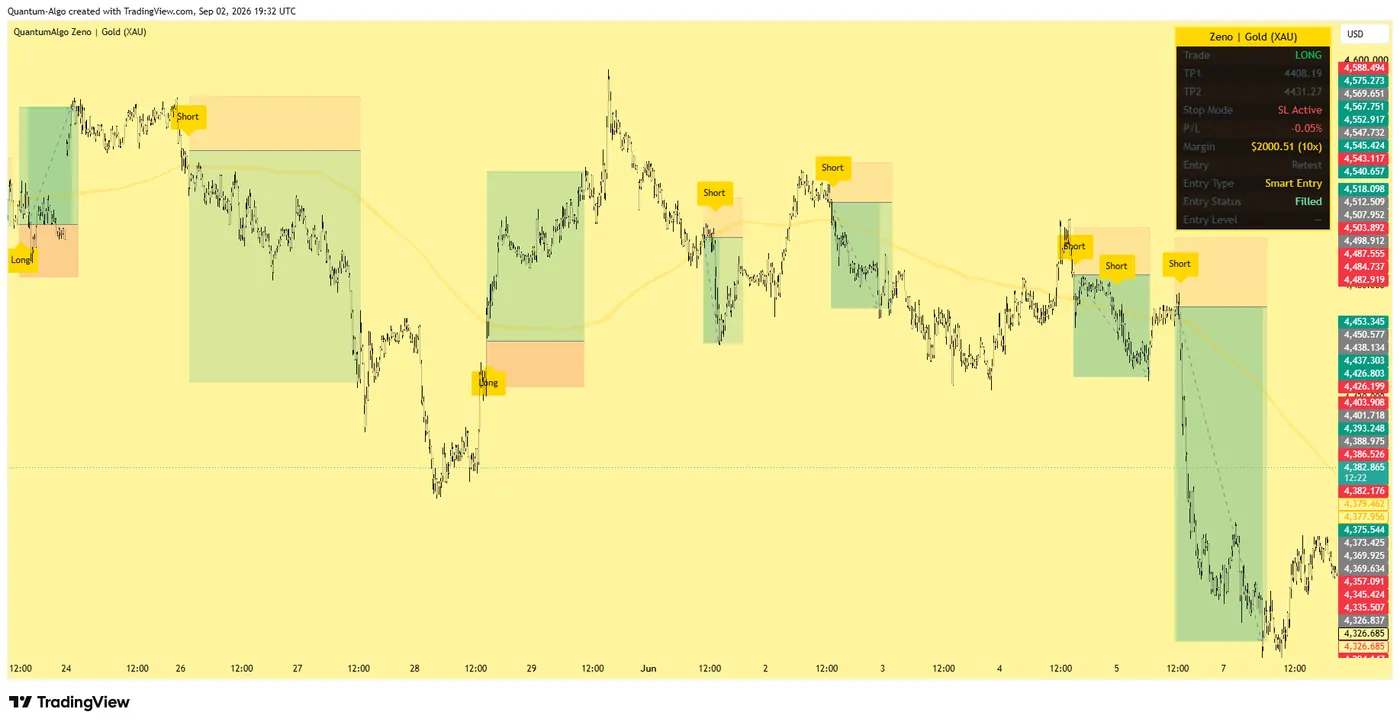
Zeno reads the same Smart Money structure across timeframes and prints the entry, stop, TP1 and TP2 on your chart — with a public record of 160 posted trades, 120 wins and 40 losses at the stated levels. QuantumBot executes it on Bybit, Binance, OKX, Bitget and Kraken.
Glossary for this indicator
Frequently asked questions
Does the OTE indicator repaint?
No. Entries are evaluated on closed bars only; swing pivots require confirmation by design, which introduces intentional lag but keeps historical signals fixed.
What are the exact Silver Bullet times?
03:00–04:00, 10:00–11:00 and 14:00–15:00 New York time. The indicator converts them from America/New_York regardless of your chart timezone, so daylight saving is handled.
What does the A+ grade require?
All four conditions: a tap of the 61.8–79% zone, inside an active Silver Bullet window, with a fair value gap formed on the current leg inside a window, after a liquidity sweep at the leg's origin.
Can I use it without the Silver Bullet windows?
Yes — turn off "Require Active Silver Bullet Window" (and the window shading) and the auto-anchored OTE grid works on any timeframe as a swing tool.
Why 70.5%?
It is the midpoint of the 61.8–79% zone that the ICT community treats as the statistical sweet spot; the gradient intensifies toward it so the eye lands there first.
Which markets does it work on?
Any symbol with candle data — crypto, forex, gold, indices, stocks, futures. The windows are designed around New York-session behaviour, so index futures and forex majors are the classic application.
How does it relate to Zeno?
Zeno prints signals from multi-timeframe structure with entry, stop, TP1 and TP2; this free indicator is the OTE-specific model with time qualification for traders who trade the ICT windows.
Which timeframe is best for the Silver Bullet?
One-minute to fifteen-minute charts inside the windows; the windows require an intraday chart of sixty minutes or below. The OTE grid alone works on higher timeframes.
Why did the grid disappear?
The leg was invalidated — a strong counter-move retraced beyond the zone, or a new break of structure in the other direction re-anchored the engine.
Can I get alerts only for A+ setups?
Use the two signal filters — Require Active Silver Bullet Window and Require Fair Value Gap Confluence — so the OTE alerts fire only when those conditions are present; the sweep is visible in the label.
Does it draw fair value gaps outside the windows?
By default only gaps forming inside an active window are drawn, to keep the chart clean; they grey out once mitigated.
How do I handle timezone?
The windows are defined in America/New_York and converted automatically; your chart timezone does not matter.
How does it relate to Zeno?
Zeno prints multi-timeframe signals with entry, stop, TP1 and TP2; this free indicator is the OTE-specific, time-qualified entry model for traders who trade the ICT windows.
The other free Smart Money indicators
Built to layer on one chart: the engine for bias and the score, the dedicated tools for each element.
Add Optimal Trade Entry + Silver Bullet to your chart
One click on TradingView, free on every plan, code you can read. Nothing repaints.