Fair Value Gaps + Inversion FVG [Quantum Algo]
Every fair value gap tracked through its life — fresh, midline-tested, filled, inverted, retested — with the IFVG retest printed as the signal it is, a volume score on every gap and higher-timeframe gaps overlaid.
The short answer
Fair Value Gaps + Inversion FVG is a free, open-source TradingView indicator that detects fair value gaps — the three-candle imbalances left behind when price moves too fast for two-sided trade — and tracks each one through its whole life: fresh, midline-tested, filled, inverted, retested. The part most FVG indicators stop before is the part this one automates: when price closes through a gap instead of respecting it, the zone flips polarity, and the first retest of that inverted zone (the IFVG) prints an on-chart signal.
Every gap carries a volume strength score and a consequent-encroachment midline, higher-timeframe gaps can be overlaid as dashed boxes, and eight alerts cover the lifecycle. Detection runs on confirmed bars, so nothing repaints. It is the companion to our fair value gap guide and the deep version of the gap layer in the Smart Money Concepts Engine.
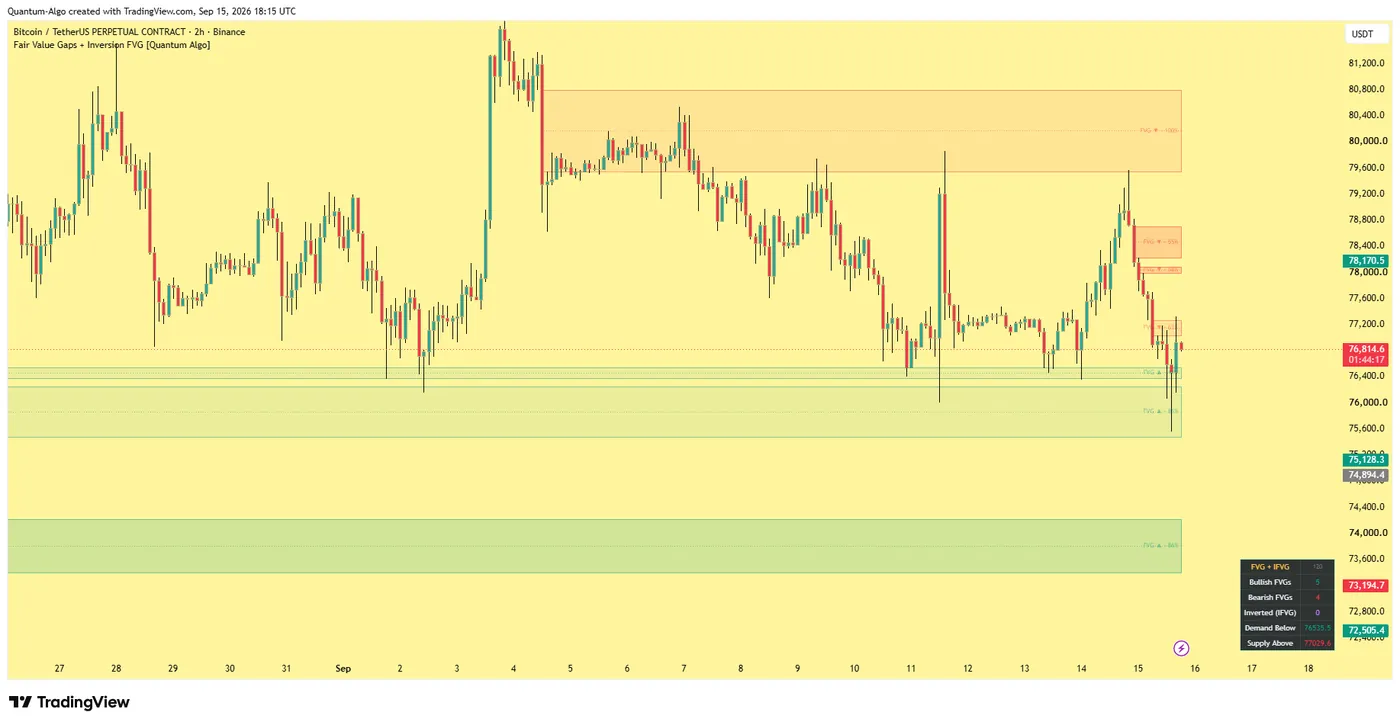
FVG boxes with a volume score and a CE midline; inverted zones when a gap is closed through; IFVG retest signals; HTF gaps as dashed boxes; a dashboard.
Fresh → CE-tested (dimmed) → filled → inverted → retested (signal) → invalidated.
No — gaps and every state change are evaluated on confirmed bars.
What a fair value gap is, and why inversion matters
A bullish fair value gap forms when a bar's low sits entirely above the high from two bars earlier — the void between them is the gap. A bearish gap is the mirror. The gap is an imbalance: one side traded, the other did not, and price frequently returns to fill it. Our fair value gap guide covers the concept and the classic continuation trade.
The inversion is what happens when price does not respect the gap: it closes through. The zone is not dead — it flips. A violated bullish gap becomes resistance; a violated bearish gap becomes support. The first retest of the inverted zone is one of the cleanest entries in the Smart Money framework, because the traders who entered on the original gap are now trapped on the wrong side and their exits fuel the move. This indicator detects, restyles and signals that retest.
What it draws
Bullish and bearish FVG boxes
On confirmed bars, filtered by minimum size (ATR ratio) and, optionally, by displacement.
A volume strength score (0–100)
On every gap, comparing the displacement candle's volume with its 20-bar average.
The consequent encroachment (CE) midline
The 50% of each gap; the first touch dims the gap to separate tested from fresh, and can alert.
Inverted zones
With distinct styling when a gap is closed through, and IFVG retest markers — a long model on inverted bearish gaps, a short model on inverted bullish gaps.
Higher-timeframe gaps
As dashed boxes when multi-timeframe mode is on, built from closed HTF bars only.
A dashboard
With active bullish gaps, bearish gaps, inverted zones, and the nearest demand level below price and supply level above it.
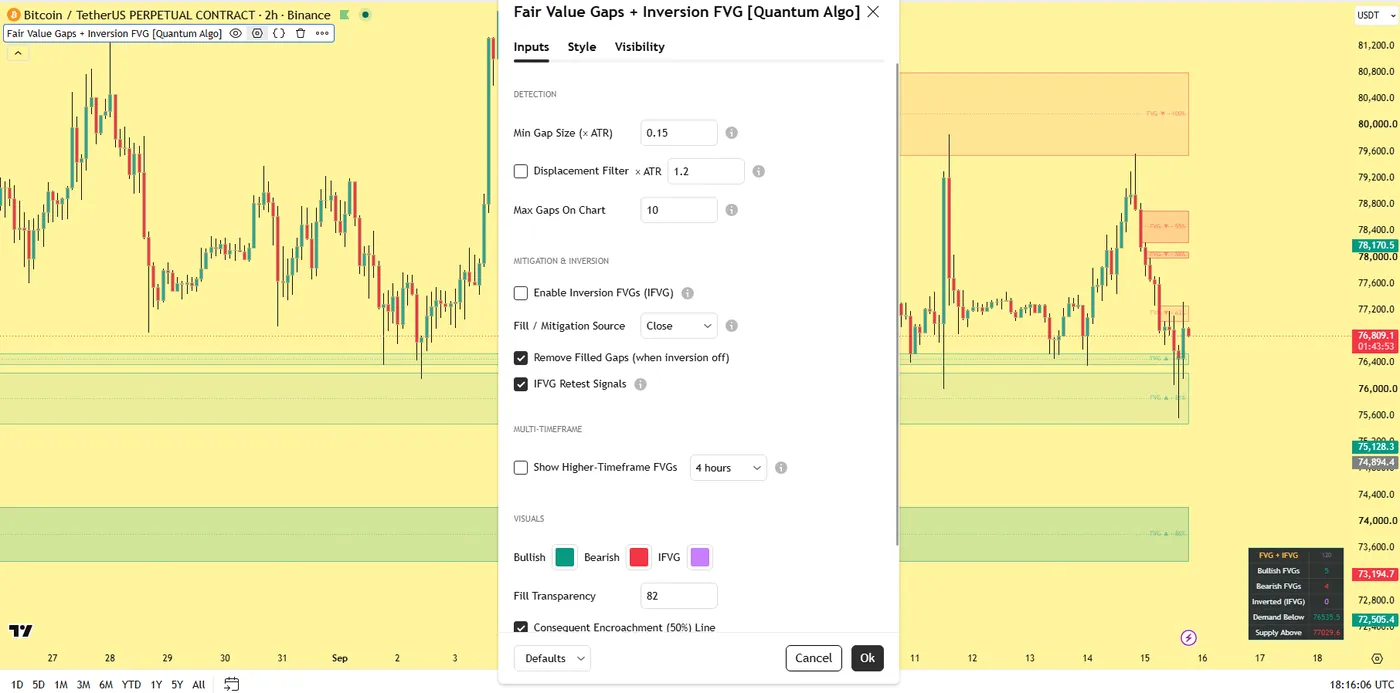
The Bitcoin 2-hour screenshot on this page shows fresh gaps, a dimmed tested gap and an inversion; the settings screenshot shows the detection and inversion groups.
The gap lifecycle
Fresh — detected on bar close, boxed, scored.
Midline-tested — price touches the CE; the box dims; alert available.
Filled — price trades through the gap (wick-fill or close-fill mode). With inversion off, the gap is removed or frozen here.
Inverted — with inversion on, a close through the gap converts it to an inverted zone with new styling.
Retested — the first return to the inverted zone prints the IFVG signal.
Invalidated — a close back through the far side removes the zone.
Every state change is evaluated on confirmed bars; the developing bar can always change until it closes.
Settings
| Group | Input | What it does | Where to start |
|---|---|---|---|
| Detection | Minimum gap size (× ATR) | Removes micro-gaps | 0.15–0.25 |
| Displacement filter, displacement multiple | Require the middle candle to be an expansion bar (range > n × ATR) | on / 1.2 | |
| Max zones kept | Cap on chart | 8 | |
| Mitigation & inversion | Inversion on/off | Flip violated gaps instead of removing them | on |
| Fill source | Close or wick | Close | |
| Remove filled gaps | Delete or freeze when inversion is off | remove | |
| Retest signals | The IFVG markers | on | |
| Multi-timeframe | HTF on/off, timeframe | Overlay a higher timeframe's gaps | 4H on a 15m chart |
| Visuals | Colours (bullish / bearish / inverted), fill transparency, CE line, labels, dimming, dashboard | Appearance | — |
Alerts
Eight conditions: new bullish gap, new bearish gap, CE touch, gap fill, bullish inversion, bearish inversion, long IFVG retest, short IFVG retest. Because the retest alerts fire only on the first return to an inverted zone, they are the ones worth sending to a webhook.
How to use it
Classic continuation. In a trend, wait for price to retrace into a fresh, high-strength gap aligned with the trend; the CE midline is the standard entry refinement; stop beyond the gap; target the next liquidity (the Liquidity Sweeps indicator marks it).
Inversion reversal. When a gap is closed through, stop looking for the old reaction. Wait for the retest of the inverted zone in the new direction — the IFVG marker is exactly that moment — with the stop beyond the inverted zone's far edge.
Multi-timeframe confluence. Turn on HTF mode and prioritise chart-timeframe signals that occur inside a higher-timeframe gap; a 15-minute IFVG inside a 4-hour gap is the highest-quality version.
Situational awareness. The dashboard's nearest demand and supply readout tells you where the next reaction zones sit before you look for a trade.
Reading the volume score
A 90 gap was made by a candle trading far above its average volume — an institutional expansion; a 20 gap was made on thin participation and is more likely to be run through. The score does not change the geometry; it changes how much weight to give the zone. Prefer scores above 60 for continuation entries; treat inversions of high-score gaps as the most significant polarity flips.
Recommended settings by market
Crypto and index futures, 5-minute to 1-hour:
The cleanest gaps; minimum size 0.15, displacement filter on at 1.2, HTF overlay from the 1-hour or 4-hour.
Forex, 15-minute and above:
Gaps are less frequent below 15 minutes; minimum size 0.2; volume score indicative only on CFD feeds.
Gold, 15-minute:
Minimum size 0.2; inversions are frequent around the London and New York opens and are the setup our gold engine reads most.
Daily charts, any market:
Minimum size 0.3; inversions on the daily are swing-trade levels for weeks.
How it compares
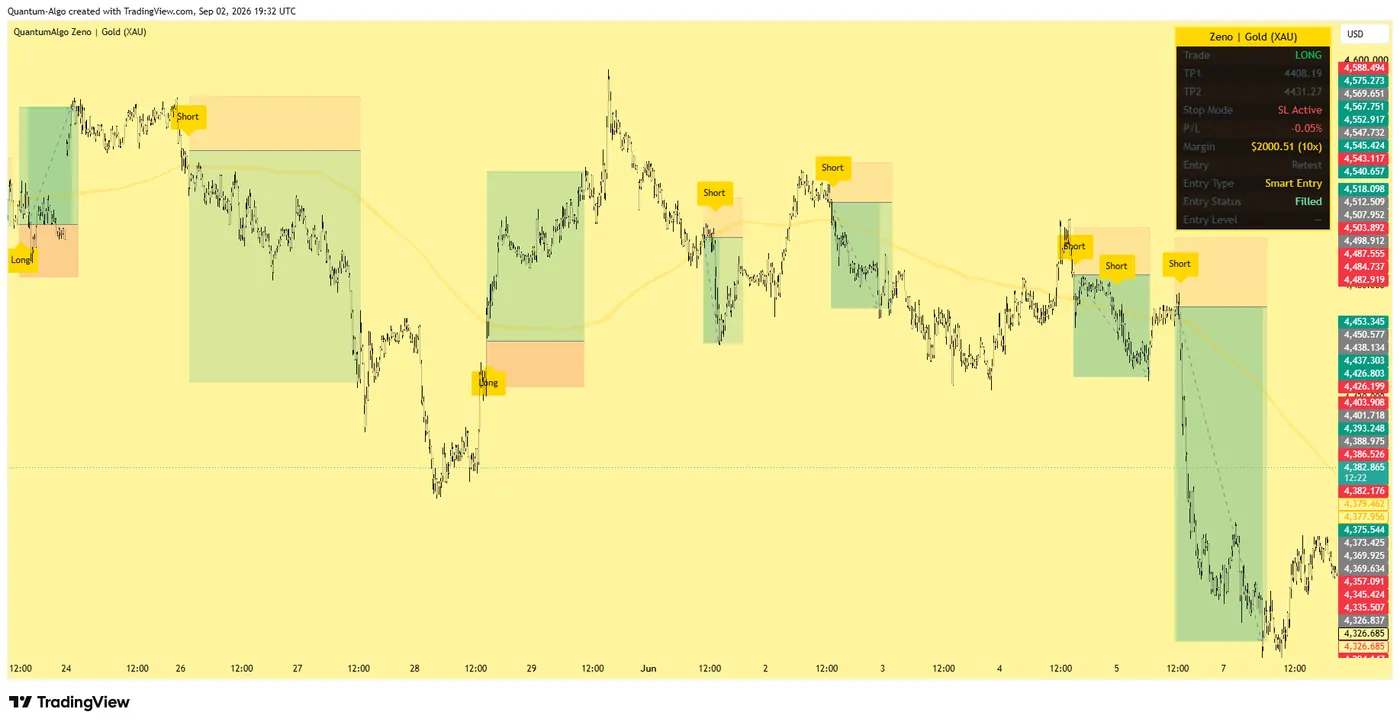
Against the typical free FVG script: those draw boxes and delete them on fill; this one keeps the state machine — CE, score, inversion, retest, invalidation — and adds HTF overlay and eight alerts. Against the Smart Money Concepts Engine: the engine tracks gaps and inversions as one input to the Confluence Score with drawing off by default; this indicator is the full gap tool. Against Zeno: Zeno uses imbalances as one of the confluences behind its signals and adds the entry, stop and targets.
Limitations
All state changes occur on closed bars; the developing bar can change. The volume score depends on real volume — reliable on exchanges and futures, indicative on CFD tick volume. It is an analysis layer for mapping imbalance and inversion zones, meant as confluence within a complete plan, not a standalone buy/sell system.
Step-by-step: adding it to your TradingView chart
Open the script page on TradingView (link above) and click Add to favorites, then Use on chart — or on any chart, open Indicators, search "Fair Value Gaps + Inversion FVG Quantum Algo" and add it. It is free on every TradingView plan, including the free tier.
Open the indicator's settings (the gear icon on its label) and set the inputs for your market and timeframe from the table above; the defaults are tuned for crypto and gold on intraday charts.
In the Style tab, match the colours to your chart theme; the dashboard position and text size are in Inputs.
To set alerts, right-click the chart → Add alert, choose the indicator as the condition and pick the event you want; set the trigger to "Once per bar close" so alerts match the closed-bar logic.
Save the chart layout so the indicator loads with it, and — if you use our other free tools — add them to the same layout; they are designed to sit together without clutter.
To read or reuse the code, click Source code on the script page. Republishing is subject to TradingView's house rules; personal modification is not.
Inside the code, for developers
The script is Pine Script v5, published open source. The pieces worth reading if you want to modify it:
Pivot confirmation
Uses ta.pivothigh / ta.pivotlow with a symmetric lookback, which is why every structural event lags by the pivot length — the deliberate cost of a non-repainting result.
State is held in arrays
Of boxes, lines and labels with explicit life-cycle functions (create, update, retire), capped by the "keep" inputs; TradingView's object limits are respected by design.
Everything evaluates on barstate.isconfirmed
The developing bar is never used for detection or signals.
Alerts
Use named alertcondition calls (or alert() where the message carries data), so webhooks receive a consistent payload.
If you build on it, our Pine Script tutorials in the Academy and the TradingView backtesting guide cover strategy conversion and testing.
Using it with the other free indicators
The five Smart Money tools are built to layer: the Smart Money Concepts Engine for bias and the score; Order Blocks with Volume for the zone and its quality; Fair Value Gaps + Inversion for the imbalance and the polarity flip; Liquidity Sweeps for the trigger; Institutional Key Levels for the ranked map the rest is read against. A full read on one chart: bias from the engine's swing tier → the nearest ranked level → a sweep of the liquidity there → a return to a high-volume block or an inverted gap → entry with the stop beyond the sweep and the target at the next level. The free-indicators hub lists every tool; the SMC guide is the method behind the layering.
Common mistakes with this indicator
- Trusting the developing bar — every event here waits for the close, and so should you.
- Trading every marker — the tool highlights context and locations; the entry needs confirmation from structure and a stop beyond the level.
- Running it on the wrong timeframe with default lengths — adjust the pivot inputs to the chart, as the settings table shows.
- Ignoring volume quality — on CFD tick-volume feeds the volume features are indicative; on exchanges and futures they are real.
- Stacking too many tools — the five free indicators layer; ten random scripts do not.
Want the signal, not just the structure?
Zeno reads the same Smart Money structure across timeframes and prints the entry, stop, TP1 and TP2 on your chart — with a track record of 160 closed signals, 120 wins and 40 losses at the stated levels. QuantumBot executes it on Bybit, Binance, OKX, Bitget and Kraken.
Glossary for this indicator
Frequently asked questions
Does the FVG indicator repaint?
No. Gaps are detected on confirmed bars and never redrawn; lifecycle changes — CE touch, fill, inversion, retest — are evaluated on closed bars.
What is an inversion fair value gap (IFVG)?
A gap that price has closed through, which then acts from the other side: a violated bullish gap becomes resistance, a violated bearish gap becomes support. The first retest is the IFVG entry model.
What is consequent encroachment?
The 50% midline of a gap — the standard refinement for entries in the ICT vocabulary. The indicator marks it, detects its first touch and dims the gap afterwards.
Can I see higher-timeframe gaps on a lower-timeframe chart?
Yes — multi-timeframe mode overlays one higher timeframe's gaps as dashed boxes, built from closed HTF bars so they do not repaint.
Which timeframes produce the best fair value gaps?
Crypto and index futures on 5-minute to 1-hour; forex on 15-minute and above; the daily chart on any market for swing levels.
Is it free?
Yes — open source on TradingView; read and verify the code.
How does it relate to Zeno?
Imbalances are one of the confluences inside Zeno's signals; this indicator is the free, dedicated gap tool for studying and trading them on their own.
Should I turn inversion off?
Only if you trade gaps purely as continuation; with inversion off, filled gaps are removed or frozen and no IFVG signals print. Most Smart Money traders keep it on — the inversion is the higher-quality trade.
Wick fill or close fill?
Close fill is stricter and matches the inversion logic (a close through flips the zone); wick fill treats any touch of the far edge as a fill and suits scalpers who want gaps cleared faster.
Why are some gaps dimmed?
Their 50% midline has been touched — the consequent encroachment — so they are tested rather than fresh. Fresh gaps carry more weight.
Can I overlay daily gaps on a 15-minute chart?
Yes — multi-timeframe mode overlays one higher timeframe's gaps as dashed boxes built from closed HTF bars. A chart-timeframe IFVG inside a daily gap is the highest-quality confluence.
Which alerts should I use?
The two IFVG retest alerts (long and short) fire only on the first return to an inverted zone; they are the ones worth sending to a webhook. New-gap alerts are useful for building a watchlist.
How does it relate to Zeno?
Imbalances are one confluence inside Zeno's signals; this indicator is the free, dedicated gap tool for studying and trading them, with the inversion model the premium engine also uses.
The other free Smart Money indicators
Built to layer on one chart: the engine for bias and the score, the dedicated tools for each element.
Add Fair Value Gaps + Inversion FVG to your chart
One click on TradingView, free on every plan, code you can read. Nothing repaints.