How to Add Robinhood to TradingView: Why There Is No Direct Link and the 4 Ways Traders Connect Them
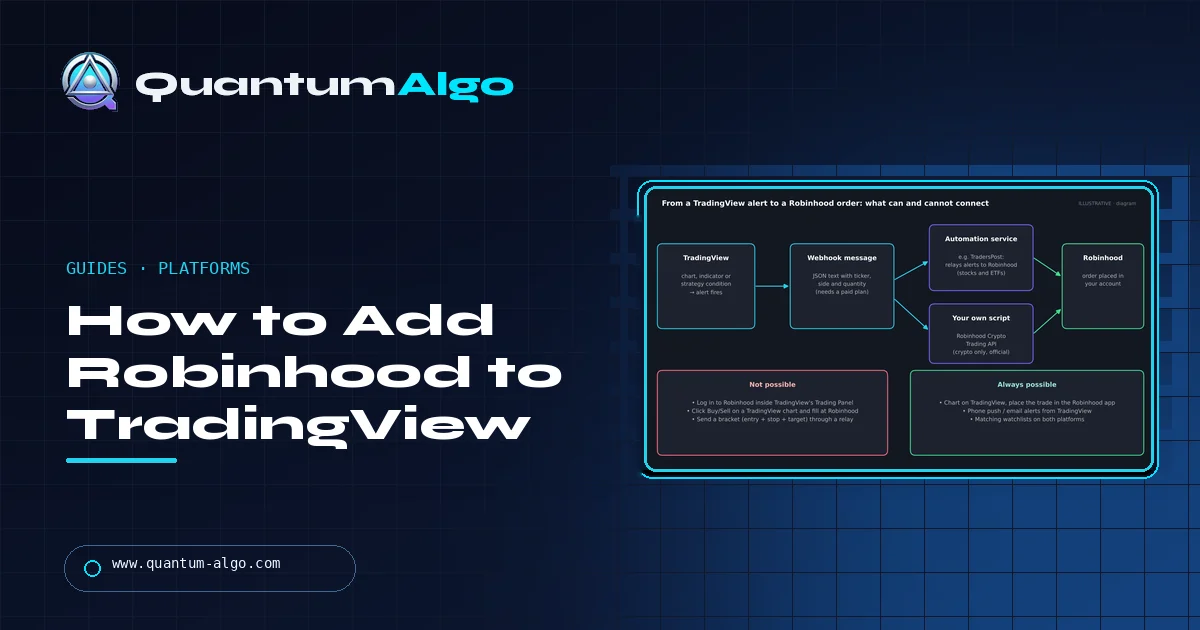
You can't add Robinhood to TradingView directly: Robinhood is not one of TradingView's integrated brokers, so it does not appear in the Trading Panel and you cannot place Robinhood orders from a TradingView chart. What works instead is charting on TradingView and placing orders in the Robinhood app, using TradingView alerts to tell you when to act, sending alerts through a webhook relay such as TradersPost for stocks and ETFs, or writing your own script on Robinhood's official Crypto Trading API.
I chart on TradingView because the tools are better, and plenty of people with a Robinhood account want the same thing. The catch is that the two companies have never built a connection. This guide explains what that means in practice, walks through the four setups traders actually use, shows what each one can and cannot do, and ends with a picker that tells you which one fits how you trade.
Can you connect Robinhood to TradingView?
Not directly. TradingView lets you trade from its charts only with brokers that have built an official integration, and Robinhood is not one of them. Open the Trading Panel at the bottom of a TradingView chart and you will see brokers such as Interactive Brokers, TradeStation, Webull and tastytrade, but no Robinhood login.
That does not mean you cannot use the two together. Thousands of traders do analysis on TradingView and execute in Robinhood. The difference is that the order is placed in Robinhood, by you or by a service acting on an alert, not from a Buy button on the TradingView chart. If you are new to TradingView itself, start with our TradingView platform guide.
Why is Robinhood not a TradingView broker?
A broker integration takes work on both sides: the broker has to expose order entry, positions and account data through an API, and TradingView has to build and maintain the connection. Robinhood has never offered a public API for stock or options trading. It built its own advanced charting instead, in the Robinhood app and in its desktop platform, Robinhood Legend.
For crypto the picture is different. Robinhood publishes an official Crypto Trading API, which is why automated crypto setups are possible while automated stock trading needs a third-party relay. Nothing announced so far changes that, so plan around the workarounds below rather than waiting for a login button.
Method 1: Chart on TradingView, trade in Robinhood
This is the setup most people use, and it costs nothing. Keep TradingView open on a laptop or monitor and the Robinhood app on your phone or in a browser tab. You do the analysis on TradingView, then enter the order in Robinhood.
- Build the same watchlist on both platforms so switching takes seconds.
- Mark your entry, stop and target on the TradingView chart before you touch the order screen.
- In Robinhood, use a limit order for the entry and add a stop order straight after the fill.
- Check that the symbol matches exactly; some tickers mean different instruments on different exchanges.
The weakness is speed. For swing trades on daily charts it does not matter. For fast intraday trades, the few seconds you spend switching screens can cost more than the spread. Our TradingView chart setup guide shows how to keep the chart clean enough to read at a glance.
Method 2: TradingView alerts, then you place the order
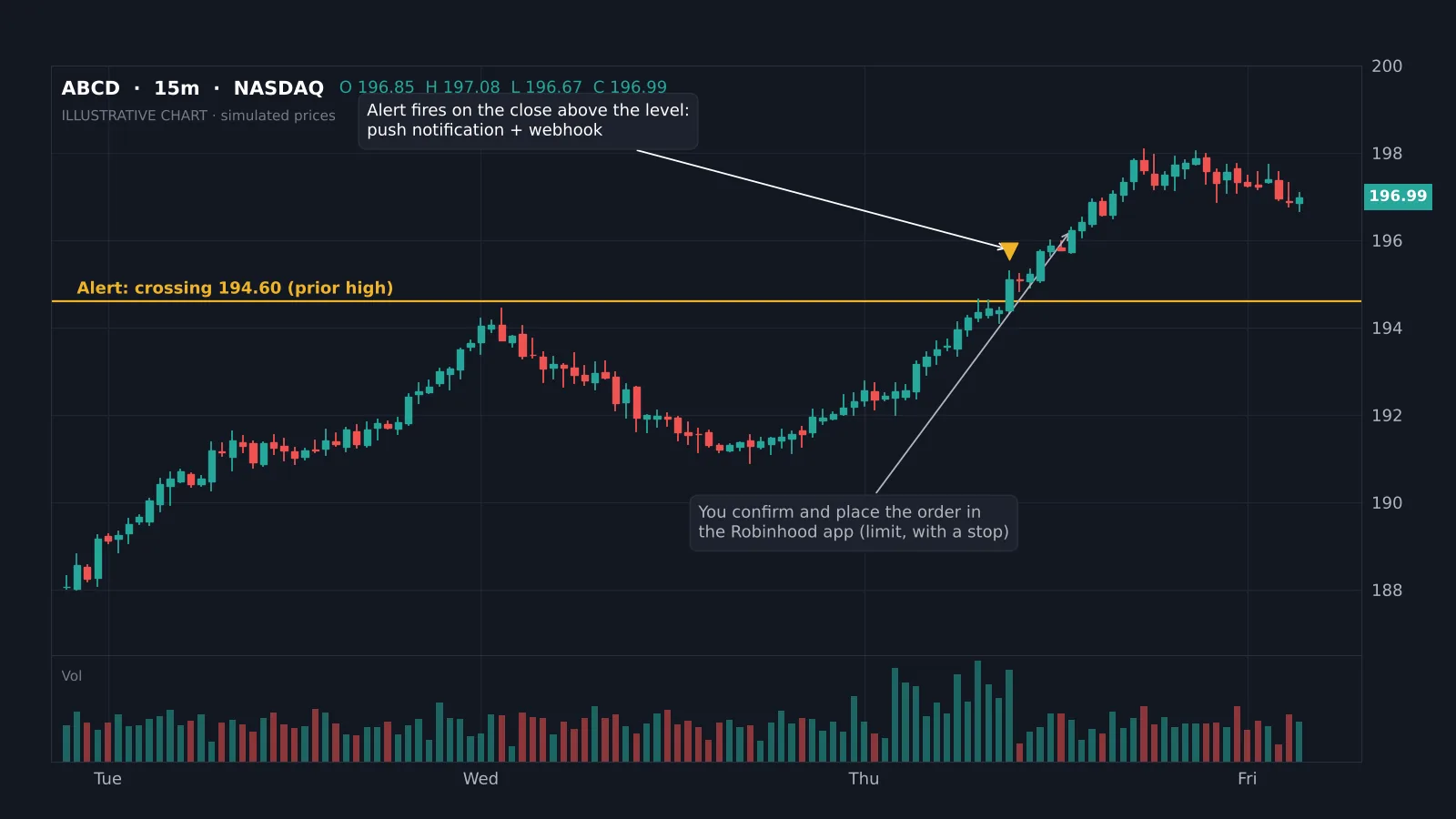
Alerts remove the need to watch the chart. You set an alert on TradingView, get a push notification on your phone when it fires, and place the order in Robinhood yourself.
- Right-click the level on the chart and choose Add alert, or add an alert on an indicator or strategy condition.
- Choose Once per bar close if you only want to act on closes, which avoids alerts on wicks.
- Turn on app notifications so the alert reaches the TradingView app on your phone.
- When it fires, open Robinhood and place a limit order with a stop.
The free Basic plan includes a small number of active alerts; paid plans raise the limit, as our TradingView pricing and sale guide shows. Indicator alerts work with any script that exposes alert conditions, including the free Quantum Algo indicators.
Method 3: Webhook relay to Robinhood (stocks and ETFs)
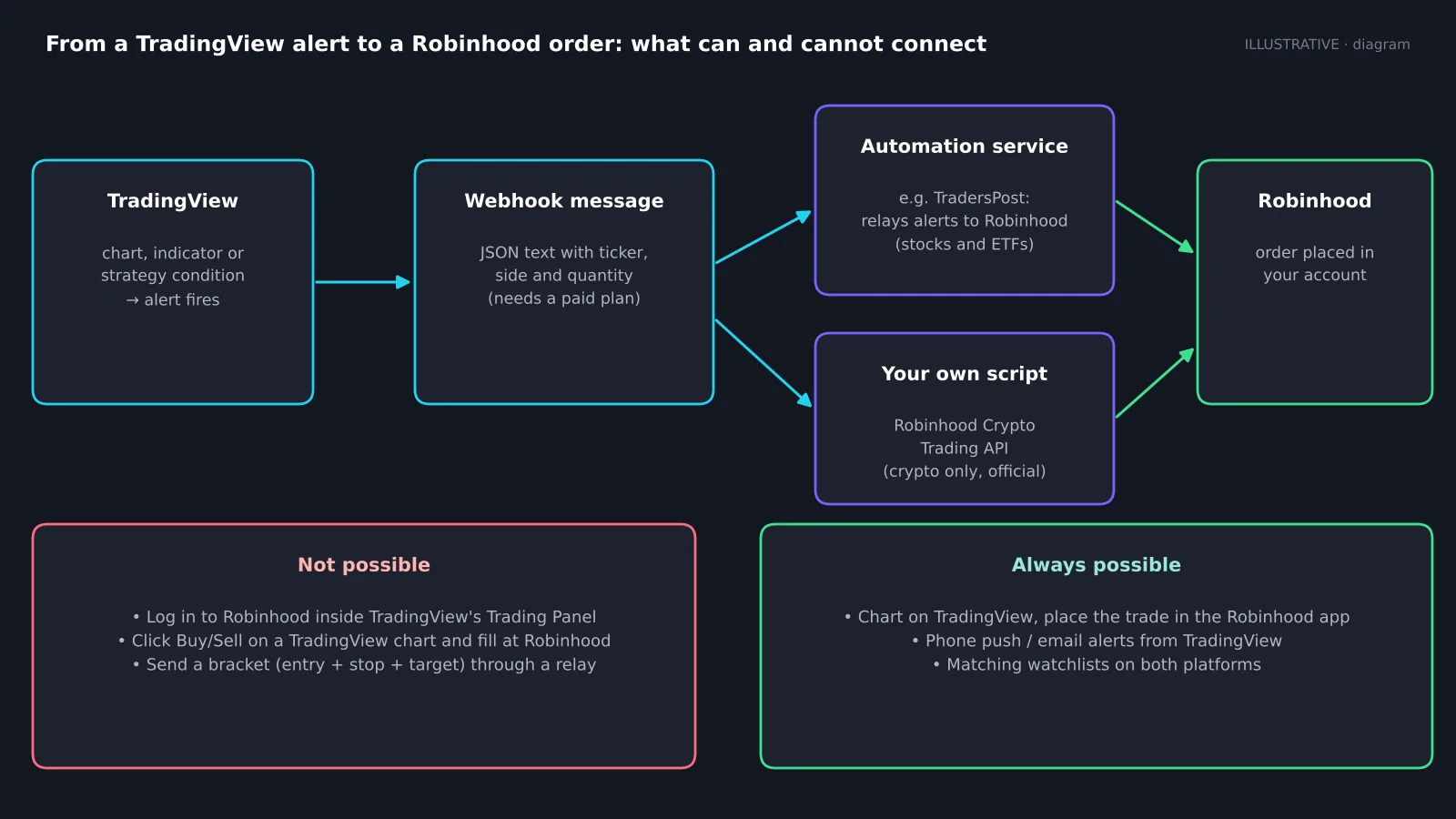
For automation, a relay service receives a TradingView webhook and places the order in your Robinhood account. TradersPost is the best-known option that lists Robinhood support for stocks and ETFs. You connect Robinhood inside the relay, copy its webhook URL into the TradingView alert, and write a short JSON message with the ticker, side and quantity.
Know the limits before you rely on it:
- Webhook alerts need a paid TradingView plan and two-factor authentication turned on.
- Relays to Robinhood send entry orders only; you cannot attach a stop and target bracket to the same order, so protective stops need a separate step.
- There is no paper mode on the Robinhood side, so test with a single share.
- The relay charges a monthly fee and becomes one more thing that can fail.
Automation does not fix a weak strategy. Read do trading bots work before you let any alert trade real money.
Method 4: Robinhood Crypto Trading API and your own script
If you trade crypto on Robinhood and can write code, the official Crypto Trading API lets you place orders programmatically. A small server receives your TradingView webhook, checks it, and calls the API. You create API credentials in your Robinhood account settings and keep them on your server, never inside the alert message.
This route is not available for stocks or options. You will find unofficial libraries online that log in to Robinhood with your username and password to trade stocks; they break without warning, may conflict with Robinhood's terms, and put your login details in someone else's code. I would not use them for real money.
Which way should you connect them?
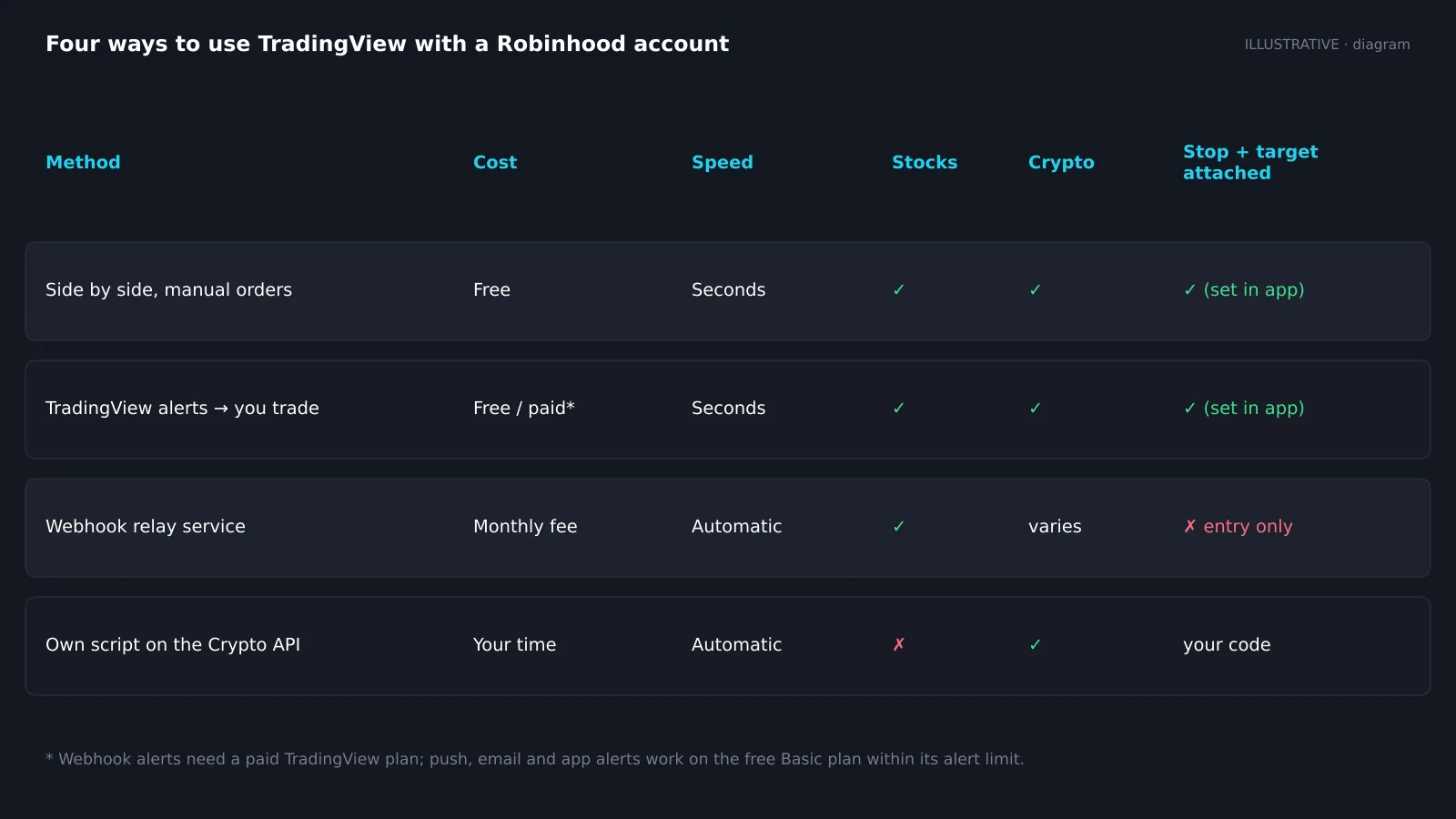
Here is how the four methods compare on the things that matter day to day:
| Method | Cost | Stocks / options | Crypto | Stop |
|---|---|---|---|---|
| Side by side | Free | Yes / yes | Yes | Yes (app) |
| Alerts + manual | Free / paid | Yes / yes | Yes | Yes (app) |
| Webhook relay | Paid + relay | Yes / check | Varies | No |
| Own script | Your time | No / no | Yes (API) | Your code |
For most people the answer is Method 1 or 2. They are free, they work for stocks, options and crypto, and you keep full control of the stop. Methods 3 and 4 make sense only once you have a rule-based strategy that you have tested, ideally with TradingView backtesting and a stretch of paper trading.
Robinhood charts vs TradingView charts
Before you build a workaround, check whether Robinhood's own charts are enough. The app's advanced charts and the desktop platform Robinhood Legend include common indicators, drawing tools and multiple chart layouts, and orders can be placed straight from them. Drawings sync between Legend and the app.
TradingView still wins on depth: a huge library of community and custom indicators, Pine Script, server-side alerts, multi-timeframe layouts, replay and backtesting. If you rely on a specific indicator or script, TradingView is the only option, and the workaround is worth it. If you mostly use moving averages, volume and trendlines, Robinhood's charts may save you a step.
Mistakes to avoid when using TradingView with Robinhood
- Trusting a chart from the wrong session. Robinhood offers extended and overnight hours; make sure your TradingView chart shows the same session or your levels will not match.
- Market orders in thin hours. Spreads widen before and after the regular session. Use limit orders, as explained in order types explained.
- Alerts that fire on every tick. Use bar-close alerts unless you need intrabar speed.
- Automating without a stop. A relay that only sends entries leaves you naked until you add the stop.
- Handing out your password. Only connect Robinhood through services that use its official sign-in flow.
Reference data
| Item | Value |
|---|---|
| Robinhood in TradingView Trading Panel | No |
| Official Robinhood API | Crypto Trading API only |
| Webhook alerts on TradingView | Paid plans |
| Relay support for Robinhood | Stocks and ETFs, entry orders |
| Bracket orders through a relay | Not supported |
| Robinhood's own advanced charts | App advanced charts and Robinhood Legend |
| Integrated US brokers on TradingView (examples) | Interactive Brokers, TradeStation, Webull, tastytrade |
Find your Robinhood + TradingView setup
Choose what you trade and how hands-off you want to be. The picker suggests the setup and the main thing to watch.
Want to trade from the TradingView chart?
If clicking Buy and Sell on the TradingView chart matters more to you than staying with Robinhood, open an account with a broker that integrates. In the US that includes firms such as Interactive Brokers, TradeStation, Webull and tastytrade; the list changes by country, so check TradingView's broker page for yours. With an integrated broker you can drag stops and targets on the chart and see positions in the Trading Panel.
Plenty of traders keep both: Robinhood for long-term holdings and a TradingView-integrated broker for active trades. Our review of Interactive Brokers for day trading and the TradeStation review are good places to compare.
The bottom line
There is no way to log in to Robinhood from TradingView, and there may never be. For most traders that is fine: chart and set alerts on TradingView, then place the order in Robinhood with a limit entry and a stop. Add a webhook relay only when you have a tested, rule-based strategy and accept that the stop needs separate handling. For crypto, the official API is the clean route if you can code.
Whichever way you connect them, the edge comes from the chart, not the plumbing. Start with clear structure and levels, which the free Quantum Algo indicators mark for you on TradingView.
Robinhood is not an integrated TradingView broker, so you cannot place Robinhood orders from a TradingView chart. The workable setups are charting side by side, alerts with manual orders, a webhook relay for stocks and ETFs (entry orders only, paid TradingView plan) and the official Robinhood Crypto Trading API for crypto. Avoid unofficial stock API wrappers. If chart trading matters, use a broker that integrates with TradingView.
◆ Interactive check
Can you set up TradingView with Robinhood?
Questions traders ask about Robinhood and TradingView
No. Robinhood is not an integrated broker on TradingView, so it does not appear in the Trading Panel and you cannot trade it from TradingView charts.
Nothing has been announced. Robinhood has focused on its own charts in the app and Robinhood Legend, so plan around the workarounds.
Only through a third-party webhook relay for stocks and ETFs, or your own code on Robinhood's Crypto Trading API for crypto. Alerts cannot reach Robinhood directly.
It connects through Robinhood's sign-in rather than storing your password in an alert, but it adds a monthly fee and a point of failure. Test with one share first.
No. Webhook alerts are available on paid plans, starting with the lowest paid tier. The free Basic plan does not send webhooks.
No. Options orders have to be placed in Robinhood. You can still use TradingView for charting and alerts on the underlying.
Close but not always identical, because data feeds and sessions differ. Check that both show the same session before you trust a level.
Integrated brokers vary by country. In the US they include Interactive Brokers, TradeStation, Webull and tastytrade. Check TradingView's broker page for the current list.
References & Related Guides
Read next
- TradingView Platform Guide
- TradersPost Review
- TradingView Black Friday
- TradingView Chart Setup
- Interactive Brokers for Day Trading
- TradeStation Review
- Best MetaTrader Alternatives
- Order Types Explained
- Do Trading Bots Work?
- How to Read Stock Charts