TradingView Black Friday Sale: When It Starts, How Much You Save on Each Plan, and Which Plan to Buy
TradingView's Black Friday sale is its biggest discount of the year. It usually opens in the week before US Thanksgiving and runs through Cyber Monday, with up to 80% off annual plans; the deepest cut is on Ultimate and smaller cuts apply to Essential and Plus. Buying on the TradingView website rather than in the mobile app has also included an extra free month. Existing subscribers can buy too: unused time carries over.
If you pay for TradingView, November is the month to do it. I have bought my plan in the Black Friday sale for years, and the difference against paying monthly is large enough to cover a few trading fees. This guide sets out the usual timing, the regular prices I checked this month, what last year's sale prices looked like, which plan is worth it for different traders, and a calculator so you can see your own saving before the sale page goes live.
When is the TradingView Black Friday sale?
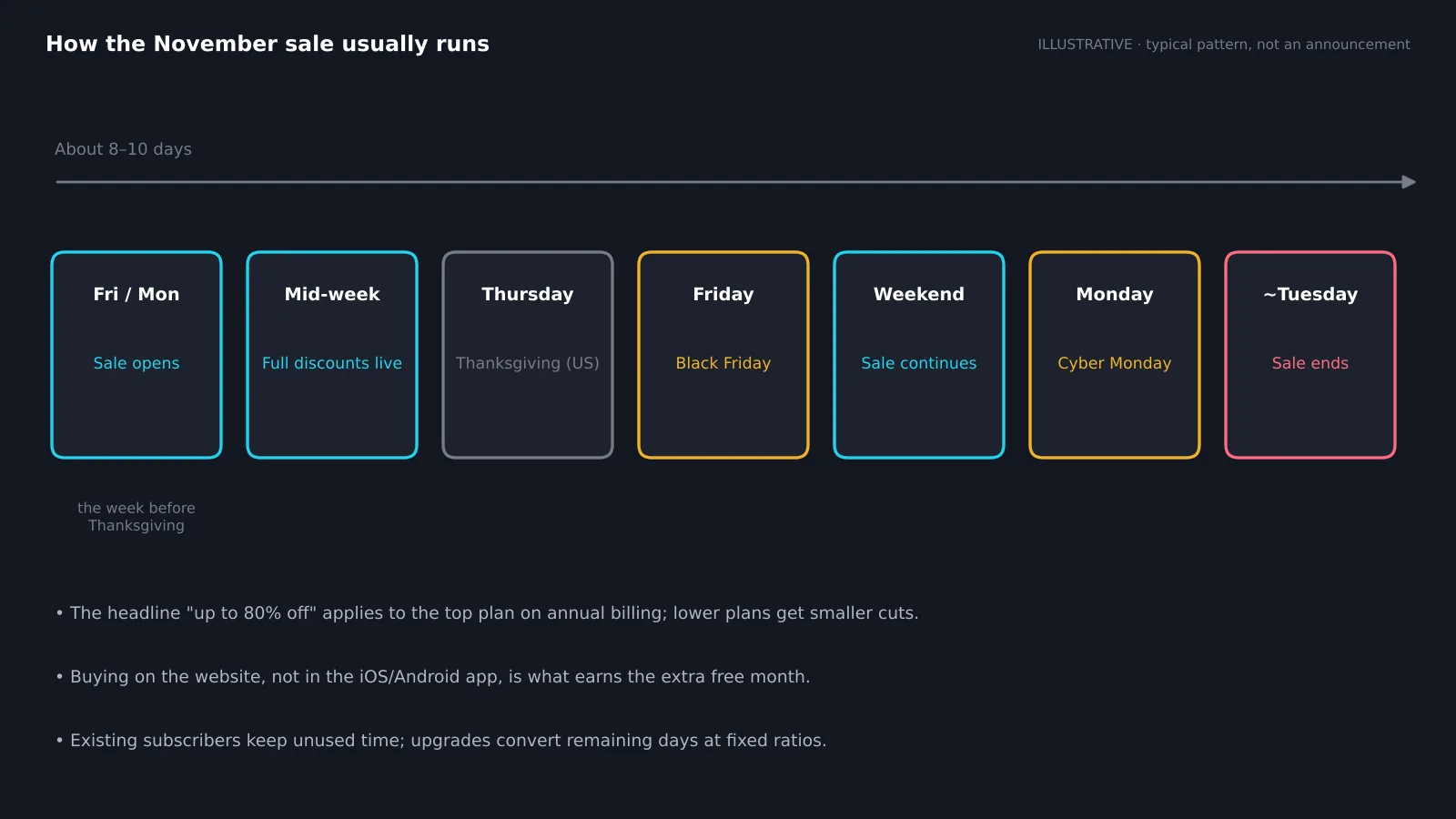
TradingView does not publish a fixed date in advance, but the pattern has been steady. The sale opens on a Friday or Monday in the week before US Thanksgiving, reaches its full discounts within a day or two, runs through Black Friday and the weekend, and closes around the Tuesday after Cyber Monday. Last year it opened on 21 November.
Checked 13 Nov 2026: TradingView had not announced this year's dates. Several affiliate partners report that the sale will start around 23 November. Treat that as a guide, not a promise; the banner on tradingview.com is the only confirmation that counts.
Set a reminder for the Monday of Thanksgiving week and check the pricing page each morning. The discounts do not usually grow during the sale, so there is little reason to wait for Black Friday itself once the banner is live.
How much does TradingView cost normally?
TradingView has one free plan and four paid plans. Paying annually is already cheaper than paying monthly. These are the US list prices I checked this month:
| Plan | Monthly billing | Annual billing (per month) | Annual total |
|---|---|---|---|
| Basic | Free | Free | $0 |
| Essential | $14.95 | $12.95 | $155.40 |
| Plus | $34.95 | $29.95 | $359.40 |
| Premium | $69.95 | $59.95 | $719.40 |
| Ultimate | $239.95 | $199.95 | $2,399.40 |
Prices vary by country and currency, and local sales tax may be added at checkout. Professional plans for market data redistribution are separate. If you are new to the platform, our TradingView platform guide explains what each feature does.
How much can you save in the Black Friday sale?
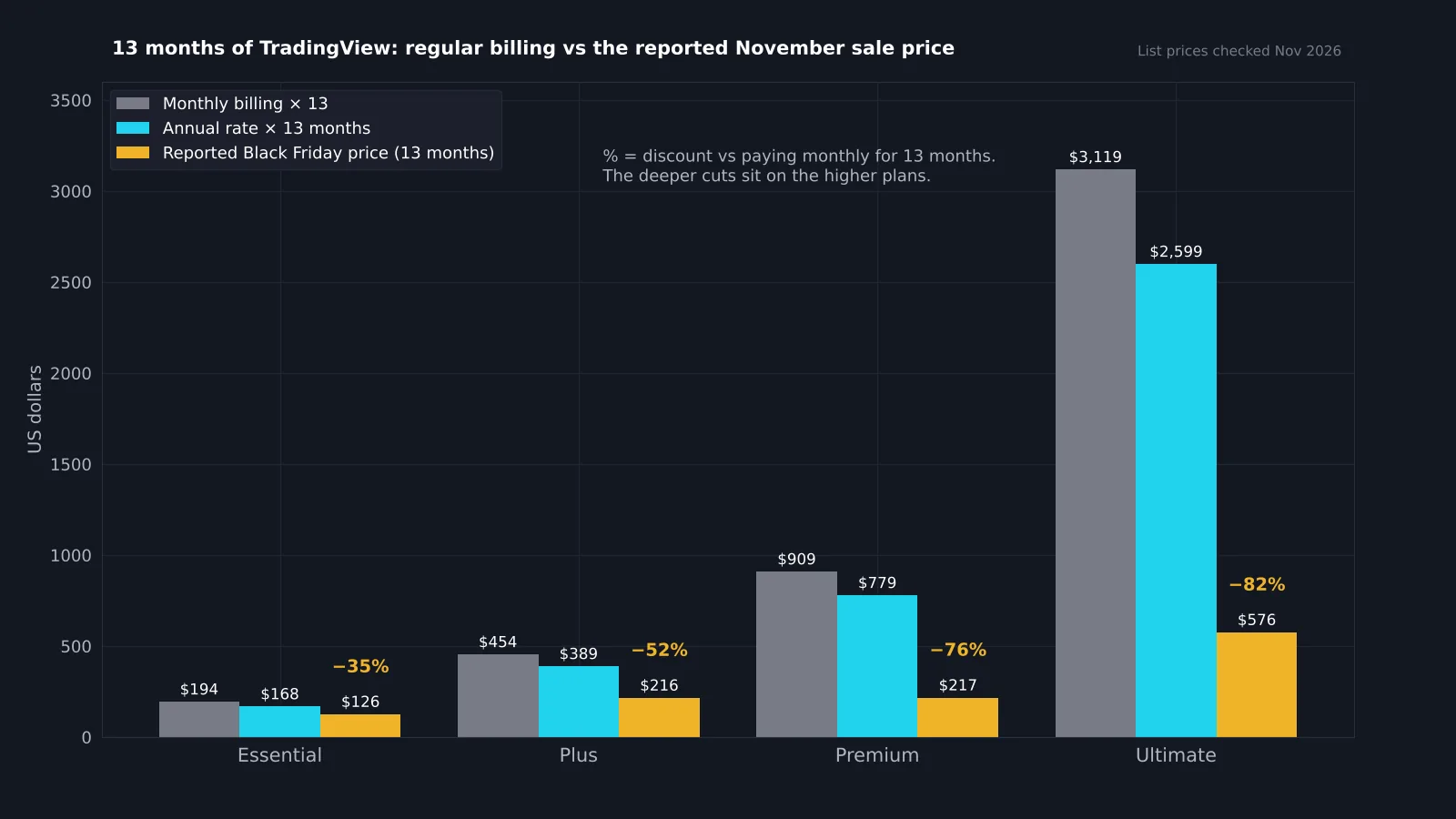
The headline says "up to 80% off", and that applies to the top plan on annual billing. Lower plans get smaller percentage cuts. Here are last November's reported sale prices for 13 months (12 months plus the bonus month) compared with paying the regular price for the same 13 months:
| Plan | Monthly × 13 | Annual rate × 13 | Reported sale (13 months) | Saving vs monthly |
|---|---|---|---|---|
| Essential | $194 | $168 | $126 | about 35% |
| Plus | $454 | $389 | $216 | about 52% |
| Premium | $909 | $779 | $217 | about 76% |
| Ultimate | $3,119 | $2,599 | $576 | about 82% |
The pattern is what matters: the more expensive the plan, the deeper the cut. Last year Premium cost almost the same as Plus in the sale, which made Premium the obvious upgrade for anyone on Plus. Final prices depend on your region and appear on the checkout page; use the calculator below with the price you actually see.
Which TradingView plan should you buy on sale?
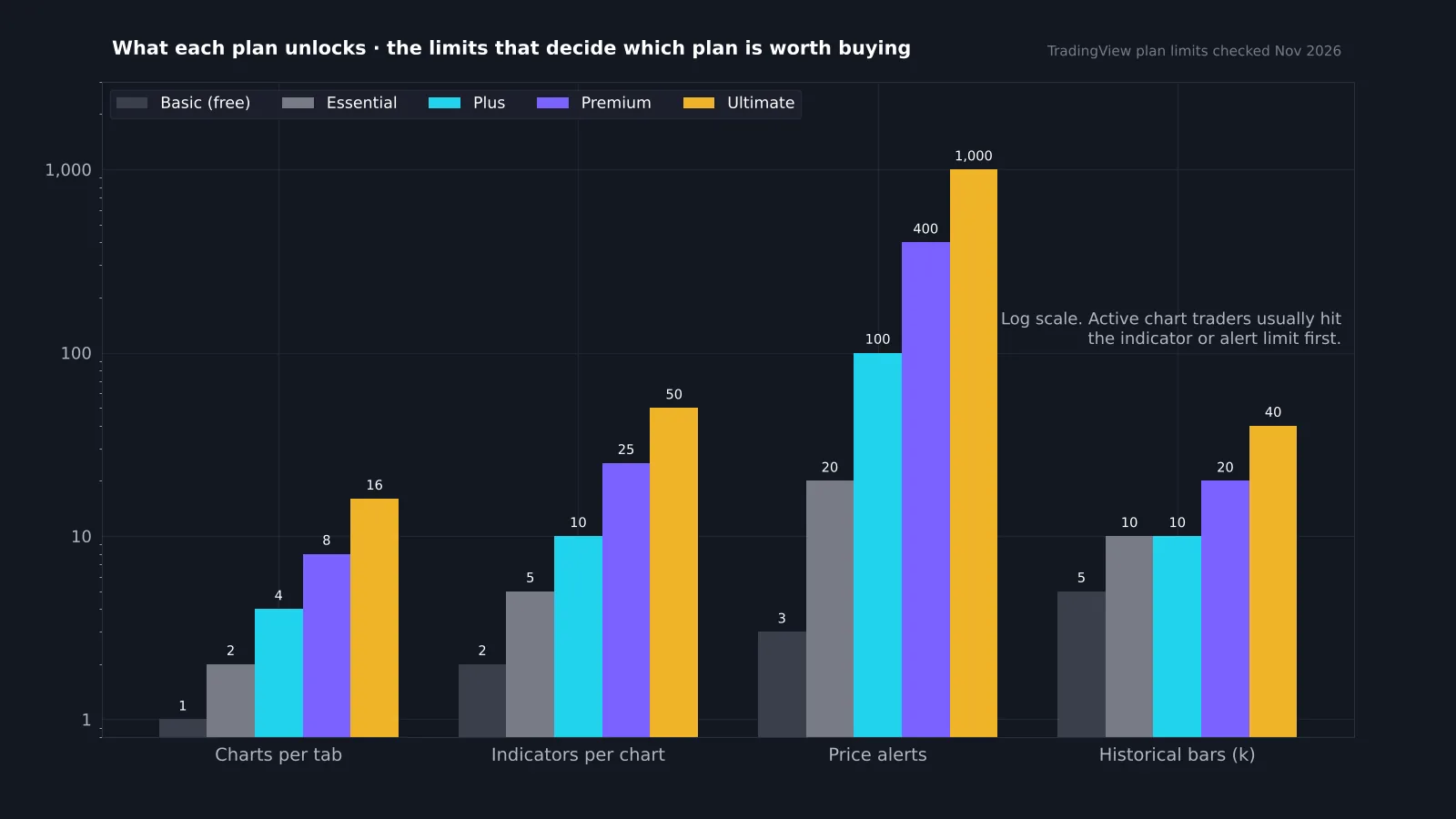
Buy the plan whose limits you actually hit. For most traders, the limit that bites first is indicators per chart or active alerts, not historical bars.
- Essential: 2 charts per layout, 5 indicators per chart, 20 price alerts. Enough for a swing trader with a simple setup.
- Plus: 4 charts, 10 indicators, 100 alerts. Good for multi-timeframe work.
- Premium: 8 charts, 25 indicators, 400 alerts, second-based intervals and more history. Often priced close to Plus in the sale, which makes it the best value.
- Ultimate: 16 charts, 50 indicators, 1,000 alerts. Only worth it for heavy alert users and multi-screen setups.
If you run several indicators together, such as structure, volume and a trend filter, five per chart fills up fast. The best TradingView indicators guide helps you trim the list so you do not overbuy.
How do you get the best TradingView Black Friday deal?
- Buy on the website. The bonus month has applied to purchases on tradingview.com, not in the iOS or Android app, and app store prices can be higher.
- Choose annual billing. The deep discounts apply to annual plans; monthly billing gets little or nothing.
- Log in first. Prices on the pricing page reflect your account, region and any existing subscription.
- Compare the final checkout price. Tax is added at the end; compare like with like.
- Note the renewal date. The plan renews at the regular price unless you change it, so put a reminder in your calendar a week before.
Ignore "coupon code" websites. TradingView's sale price shows directly on its own pricing page; you do not need a code.
Can existing subscribers use the Black Friday sale?
Yes. If you already pay for a plan, buying in the sale does not waste the time you have left. TradingView carries unused days over: when you upgrade, the remaining time on your current plan is converted into time on the new plan at a fixed ratio based on the price difference, roughly two days of Essential for one day of Plus, two of Plus for one of Premium, four of Essential for one of Premium and four of Premium for one of Ultimate. You can stack up to three years. One catch: an upgrade cannot be reversed, and if your plan has four days or fewer left before renewal, you cannot upgrade without an extra charge.
If you buy the same plan again, the new year is added after your current period ends. In practice that means you can lock in the sale price even if your subscription still has months to run.
Is TradingView worth paying for at all?
Not for everyone. The free Basic plan gives you 1 chart per layout, 2 indicators per chart and a handful of alerts, with ads. If you check a few charts a week and place long-term trades, that may be all you need.
A paid plan pays for itself when you trade actively and the limits slow you down: switching indicators on and off, missing moves because you ran out of alerts, or needing webhooks to connect a broker or service. Webhooks, for example, need a paid plan, which matters if you want alerts to reach a relay as in our guide on connecting Robinhood to TradingView. If you are comparing platforms first, see our TradingView alternatives.
Is Black Friday the only time TradingView has a sale?
No, but it has been the best one. TradingView runs smaller promotions at other points in the year, and new users sometimes see a trial or an introductory discount. None of those has matched the November sale on the higher plans.
If your subscription renews in spring or summer, it can still make sense to buy in November and let the unused time carry over. The only case for waiting is if you are not sure you need a paid plan yet; in that case use the free plan or a trial first and decide with real usage.
How to get more out of the free plan while you wait
- Use multi-output indicators. One script that marks structure, levels and volume zones counts as one indicator. The free Quantum Algo indicators are built that way.
- Save layouts. Keep one layout per market rather than redrawing.
- Use price alerts sparingly. Put alerts only on the levels that would change your plan.
- Practise with replay. Bar replay helps you learn setups before you pay; see TradingView backtesting.
Reference data
| Item | Value (checked 13 Nov 2026) |
|---|---|
| Usual sale window | Week before US Thanksgiving to the Tuesday after Cyber Monday |
| Headline discount | Up to 80% off annual plans |
| Bonus month | Website purchases, not mobile app stores |
| Essential limits | 2 charts · 5 indicators · 20 alerts · 10K bars |
| Plus limits | 4 charts · 10 indicators · 100 alerts · 10K bars |
| Premium limits | 8 charts · 25 indicators · 400 alerts · 20K bars |
| Ultimate limits | 16 charts · 50 indicators · 1,000 alerts · 40K bars |
| Upgrade conversion | Unused days convert at fixed ratios; stack up to 3 years |
What should you set up after upgrading?
A bigger plan only helps if you use it. The first hour after upgrading is worth spending on setup:
- Multi-chart layouts: build one layout per market with the higher and lower timeframe side by side.
- Alerts on structure, not noise: move from a handful of price alerts to alerts on the indicator conditions you trade.
- Webhooks: if you use a relay or bot, connect it now and test with the smallest size.
- Indicator templates: save your favourite combination so every new chart opens ready to read.
Our TradingView chart setup guide walks through a clean layout step by step, and the prop firms that use TradingView list helps if you plan to trade an evaluation from the same charts.
TradingView Black Friday savings calculator
Pick a plan and enter the sale price you see on TradingView's checkout page. The calculator compares it with paying monthly or annually at the regular price for the same number of months.
Should you buy TradingView on Black Friday?
If you already pay for TradingView or know you will, yes. The November sale has consistently been the cheapest time to buy, the discount grows with the plan, and existing time carries over. Buy on the website, choose annual billing, pick the plan whose limits you hit, and set a reminder before it renews at full price.
If you are not sure yet, use the free plan until the sale and find out which limit annoys you first. That tells you exactly which plan to buy.
TradingView's November sale usually runs from the week before US Thanksgiving to Cyber Monday, with up to 80% off annual plans and the deepest cuts on Premium and Ultimate. Buy on the website for the bonus month, choose annual billing, and note the full-price renewal date. Existing subscribers can buy too, because unused days carry over or convert on upgrade.
◆ Interactive check
Are you ready for the TradingView sale?
Questions traders ask about TradingView's Black Friday sale
It usually opens in the week before US Thanksgiving and runs through Cyber Monday. TradingView confirms the dates only when the sale banner goes live.
Discounts reach up to 80% on annual plans, with the deepest cuts on Premium and Ultimate. Exact prices depend on your region and show at checkout.
The same sale covers both, and prices have not usually changed during it. Buying early in the sale gives the same price.
Yes. Unused days carry over, and if you upgrade they convert to the new plan at a fixed ratio.
No. The sale price appears on TradingView's own pricing page. Avoid sites that claim to sell codes.
App store purchases have not included the bonus month and can cost more. Buy on the website for the full deal.
No. The plan renews at the regular price unless you change or cancel it before the renewal date.
Usually Premium, because its sale price has been close to Plus while giving far higher limits.
References & Related Guides
Read next
- TradingView Platform Guide
- Best TradingView Indicators
- TradingView Chart Setup
- TradingView Backtesting
- TradingView Alternatives
- Robinhood and TradingView
- Prop Firms That Use TradingView
- Best MetaTrader Alternatives
- Free TradingView Indicators
- How to Read Stock Charts