Benzinga Pro Review: Plans, Real Costs and Who It's For
Benzinga Pro is worth it for active US stock day traders who trade news catalysts and will use the audio squawk, Signals and scanner, which come together only on the Essential plan ($197 a month or $1,997 a year). Basic at $37 a month covers real-time news for swing traders. Futures, forex and long-term investors can skip it.
Benzinga Pro sells one thing: hearing about a catalyst before most retail traders do. Whether that is worth $37 or $197 a month depends almost entirely on how often a headline actually starts your trades. Quantum Algo went through the current pricing and checkout pages, Benzinga's help-center rules on trials, refunds and squawk, and the feature claims, then turned it all into a per-trading-day cost you can compare against your own activity. We also flag what we could not verify, starting with the speed claims.
Indicators that prove themselves in public.
One engine, four precision tools — the Gold (XAU) Scalper, the institutional Gravity Zone, the Zeno momentum Oscillator, and Zeno Stocks for equities.
Benzinga Pro is a strong news terminal for US stock day traders who trade catalysts, and its audio squawk is the feature that justifies the price. The catch is that the useful toolkit only comes together on Essential at $197 a month, and the speed claims are Benzinga's own.
Pros
- Real-time newsfeed on every paid plan, from $37 a month
- Audio squawk from 6 a.m. to 6 p.m. ET with a transcript
- More than 15 event calendars covering earnings, FDA, Fed and IPOs
- Signals for unusual options activity and block trades
- Scanner covering 3,000+ stocks on Essential
- 14-day trial with full feature access
- 7-day full refund window on annual payments
Cons
- Scanner, Signals, AI and full chat only on the $197 Essential plan
- Streamlined costs 75% of Essential but omits the scanner and Signals
- No refund window on monthly charges; all plans auto-renew
- Speed claims are not independently verified
- High Beta Squawk is an extra purchase
- Little value for futures, forex or crypto traders
Best for: Active US stock day traders who trade news-driven movers and earnings several times a week
Not for: Futures, forex and crypto traders, long-term investors, and purely technical traders
Prices and rules checked October 2026.
The short version: who should pay for Benzinga Pro
Benzinga Pro is a news terminal for people who trade catalysts: earnings surprises, FDA decisions, analyst upgrades, offerings, halts and the headlines that move small and mid caps in the first minutes after they hit. If that is not how you trade, most of what you pay for will sit unused.
Our verdict after going through the current plans, the help-center rules and the feature set:
- Worth it for active US stock day traders who trade news-driven movers several times a week and will actually keep the newsfeed and squawk running during the session. For them, the Essential tier is the only plan that includes the full toolkit.
- Maybe for swing traders who mainly want a fast, filtered newsfeed and earnings calendar. Basic at $37 a month is a reasonable test, but Streamlined at $147 is a hard sell because it leaves out the scanner and signals.
- Not worth it for futures, forex or crypto traders, for long-term investors, and for anyone whose strategy is purely technical. Free news sources plus a good chart are enough for those styles.
The rest of this review covers what each plan includes, the real annual cost, how the trial and refund rules work, the parts we could not verify, and how Benzinga Pro compares with the scanners, screeners and flow tools people usually weigh against it.
What is Benzinga Pro, feature by feature?
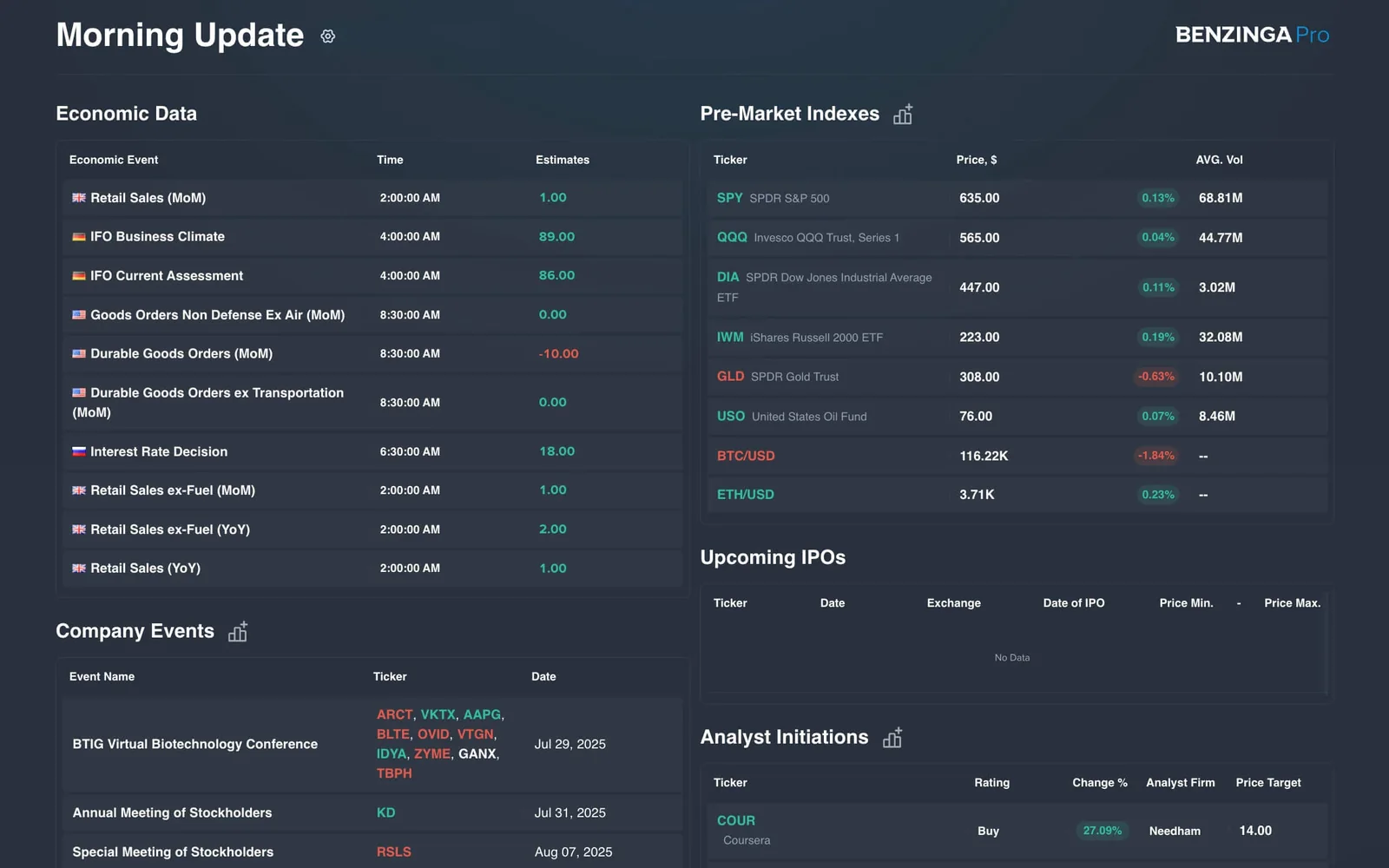
Benzinga Pro is a browser-based workspace. You arrange widgets (newsfeed, watchlist, chart, scanner, calendar, chat) on a dashboard, and Benzinga says watchlists and alerts sync across devices. These are the parts that matter:
Newsfeed
The core product. Headlines from Benzinga's own newsdesk plus press releases and filings, filterable by ticker, sector, keyword and category. On every plan, the pricing page claims news arrives "5–15 minutes" before mainstream sources, and the trial landing page uses a "14 minutes earlier" example. Those are Benzinga's claims, not independent measurements. The "Why Is It Moving" (WIIM) tags, short notes on why a stock is jumping, are the most practical part for a day trader scanning premarket gappers.
Audio squawk
A live audio stream where Benzinga's newsdesk reads market-moving headlines. The help center describes two channels: Squawk Equity, running 6 a.m. to 6 p.m. Eastern, and High Beta Squawk, market open to close, which is an add-on purchase and reserved for the biggest stock-moving items. The trial page adds that squawk comes with a timestamped transcript. Hearing a headline while your eyes are on a chart is the single best reason to pay for Pro.
Signals
Automated alerts for unusual activity. Benzinga's trial page says Signals flag unusual options activity and block trades. Third-party reviews also list price spikes, halts and gaps. One recent third-party review reports options-activity signals as a separate add-on, so if options flow is why you are buying, confirm what your plan shows during the trial.
Scanner, calendars, AI and research
- Real-Time Scanner: screens more than 3,000 stocks against criteria you set, per the pricing FAQ.
- Calendar suite: more than 15 event calendars, including earnings, FDA, Fed, IPOs, dividends and economic data.
- Benzinga AI: a research assistant that Benzinga says is exclusive to Essential.
- Benzinga Edge: Benzinga's research and stock-ranking content, also bundled with Essential.
- Chat rooms: the pricing FAQ lists full access to 7 community rooms on Essential.
What about an API?
Benzinga Pro is a terminal, not a data feed. Benzinga does sell news, market and squawk APIs, but those are a separate business product with their own documentation and no public price list. If you want headlines piped into your own trading bot, budget for that conversation separately.
Benzinga Pro pricing: what each plan costs
Prices and rules checked October 2026 on Benzinga's pricing and checkout pages. There are three paid plans (the page also references a free tier without describing it). Annual billing is shown as a discounted monthly rate.
| Plan | Monthly billing | Annual billing | Annual total | What it adds |
|---|---|---|---|---|
| Basic | $37/mo ($444/yr) | $30.58/mo | about $367 | Real-time news and basic tools |
| Streamlined | $147/mo ($1,764/yr) | $124.75/mo | about $1,497 | Advanced newsfeed filtering; no AI or scanner |
| Essential | $197/mo ($2,364/yr) | $166.42/mo | $1,997 (per FAQ) | Everything: AI, scanner, Signals, calendars, squawk, all 7 chat rooms, Edge research |
The math behind the "save up to 17%" banner: annual saves about $77 (17%) on Basic, $267 (15%) on Streamlined and $367 (16%) on Essential. Benzinga labels the Essential discount as 16%, though the two figures work out to 15.5%.
Three things worth knowing before you choose:
- The break-even on annual is about 10 to 11 months. Essential annual costs as much as 10.1 months of monthly billing, so annual only pays if you are confident you will still be using it next autumn.
- Streamlined is the awkward middle. It costs 75% of Essential but leaves out the scanner, Signals and AI. One third-party review lists equity squawk on Streamlined, while Benzinga's own FAQ lists squawk under Essential. Check the plan card at checkout if squawk is the reason you want Streamlined.
- Older reviews are out of date. You will still find articles quoting a $27 Basic plan, a $99 or $117 tier, or an options mentorship bundle as part of Pro. None of that matches the current pricing page.
Trial, refund and cancellation rules
| Rule | What Benzinga says | What it means for you |
|---|---|---|
| Free trial | 14 days, "full feature access," annual plans also include it | Enough time to test squawk and the feed through a full earnings week |
| Auto-renewal | All Pro accounts are set to auto-renew | Put the trial end date in your calendar |
| Annual refund | Full refund if you terminate within the first 7 days after payment, including renewals | The window is short and does not cover discounted intro pricing |
| Monthly refund | The 7-day window does not apply to monthly charges | Cancel before the next billing date |
| How to cancel | Email support or use the help-center chat; billing section of your account | Keep the confirmation email |
| Upgrades | Any time through support | Start on Basic and move up if you miss squawk |
What does Benzinga Pro cost per trading day?
Subscription prices look different once you divide them by how often you actually use the product. A US market year has about 252 trading days.
| Plan | Per trading day, monthly billing | Per trading day, annual billing |
|---|---|---|
| Basic | $1.76 | $1.46 |
| Streamlined | $7.00 | $5.94 |
| Essential | $9.38 | $7.92 |
A worked example. A day trader with a $25,000 account takes about 40 trades a month and pays for Essential annually. That is $1,997 a year, or $4.16 per trade over 480 trades, and 8% of the account before a single trade is placed. To cover it, the subscription has to improve results by roughly $4 per trade. On a 100-share position that is four cents of better entries or exits per trade, which a well-timed headline can easily deliver on a news mover and will never deliver on a quiet mega-cap.
Now the same plan for a trader who only trades three days a week and takes a month off in summer: roughly 140 trading days. The cost per day jumps to $14.26 on the annual plan. If your schedule looks like that, monthly billing on the months you trade actively is often cheaper, and the calculator below lets you test both.
This is also why the trial matters. Track, during those 14 days, how many trades started with a Benzinga headline or squawk read. If the answer is two, the real cost per useful alert is far higher than the table suggests.
Is Benzinga Pro's news actually faster?
Speed is what Benzinga sells, so it deserves a straight answer: we could not find an independent, published measurement of Benzinga Pro's latency against Bloomberg, Dow Jones, Reuters or the free feeds. The "5–15 minutes earlier" figure on the pricing FAQ and the "14 minutes earlier" example on the trial page are Benzinga's own claims.
That does not make them false. Benzinga runs a newsdesk that reads press releases and filings as they cross, and for small-cap catalysts the free sites often lag. But speed advantages differ by story type:
- Company press releases (earnings, FDA approvals, contracts) hit the wire services at the same instant for everyone. Benzinga's edge here is filtering and the squawk read, not exclusive access.
- SEC filings such as 8-Ks and offerings appear on EDGAR first. A terminal saves you the work of watching EDGAR.
- Newsdesk-sourced items such as analyst actions, rumors and conference comments are where a dedicated desk can genuinely beat free aggregators.
A practical speed test during the trial: pick five premarket gappers with a press release catalyst, note the timestamp on the Benzinga headline, and compare it with the timestamp on the company's investor-relations page and on a free aggregator. Repeat for an analyst upgrade. Ten data points will tell you more than any review, ours included.
Keep the other side of the trade in mind too. When a headline hits, the algorithms reading machine-readable feeds react in milliseconds. A human hearing squawk is still slower than that, so the edge is in being early relative to other retail traders and in context, not in beating institutions to the first print. Our guide to bull and bear traps covers what happens to late chasers on news spikes.
What a trading day with Benzinga Pro looks like
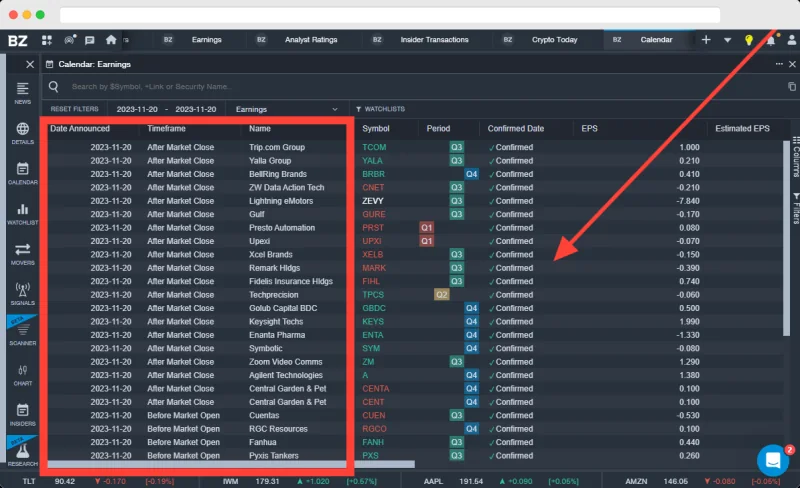
Feature lists do not tell you how a tool fits into a morning. Here is how a small-cap momentum trader would typically use Essential, start to finish, and where each piece earns or wastes its keep.
7:00 to 9:00 a.m. ET: building the list
Squawk Equity is already running from 6 a.m., so overnight earnings, offerings and FDA news get read out while you make coffee. The newsfeed, filtered to stocks gapping more than a few percent on real volume, becomes your watchlist source. For each gapper, the WIIM note or the headline answers the first question any momentum trader asks: is there a real catalyst, or is this a low-float stock moving on nothing? Stocks with a fresh, specific catalyst go on the list. Stocks without one usually get skipped. The earnings and economic calendars tell you whether a CPI print or a Fed speaker at 8:30 or 10:00 could swamp everything else.
9:30 to 11:00 a.m.: the active window
This is where the subscription pays or does not. Squawk keeps reading new items while you watch charts, Signals flag halts, block trades and unusual options activity in names you may not have on your list, and the scanner catches stocks breaking out that were quiet premarket. A realistic expectation: on a busy day, two or three ideas that you would otherwise have missed or seen late. On a slow day, none.
Midday and afternoon
Most momentum traders reduce activity after 11:00. The feed is still useful for mid-session analyst notes, trading halts and the occasional afternoon offering that knocks a morning runner down. Squawk Equity keeps running until 6 p.m., which covers after-hours earnings, the second big catalyst window of the day.
What to turn off
Too many alerts is the fastest way to stop reading any of them. Limit Signals to your watchlist plus a price and volume floor, mute chat during the open unless you trade with a specific room, and resist adding every widget. The traders who get the most from Pro usually run the smallest workspace.
If you trade the index rather than single names, the routine is shorter: the calendar for scheduled releases, squawk for surprises, and the chart for everything else.
Which plan fits which trader?
| Trader type | Plan we would pick | Why |
|---|---|---|
| Small-cap momentum day trader | Essential, monthly first | Squawk, Signals and the scanner are the tools that matter for gappers |
| Earnings and event swing trader | Basic | Real-time news and calendars cover most needs; upgrade if you miss filters |
| Options trader focused on flow | Trial Essential, compare with a flow tool | Confirm options-activity signals are included; a dedicated flow tool may fit better |
| Futures, forex or crypto trader | Skip | The product is built around US equities |
| Long-term investor | Skip | Minute-level speed adds nothing to a multi-year holding |
If you trade the index rather than single stocks, breadth tools such as the NYSE TICK index usually tell you more about the next 15 minutes than a headline feed does. And if most of your edge comes from reading the tape, Level 2 and time and sales will matter more than news speed.
How to run the 14-day trial so you know by day 10
Fourteen days goes fast. Set it up so that by day 10 you have data, not impressions.
- Start the trial on a Monday of an earnings-heavy week. That gives the newsfeed, calendars and squawk real work to do.
- Build one workspace and stop tinkering. Newsfeed filtered to your watchlist plus gappers, squawk on, a Signals widget and the earnings calendar.
- Keep a tally sheet. For every trade, note whether a Benzinga item started it, changed it, or played no role. Log the time you first saw the item.
- Run the speed test described above on at least five stories.
- Use squawk during the open. If you find yourself muting it after two days, Essential is not for you.
- Test the cancellation path. Find the billing page and the support chat before day 12, not on day 14.
- Decide on day 10. If fewer than one in five trades involved a Benzinga item, cancel or drop to Basic.
Before you enter card details for a paid plan, check these on the plan card and in your account, because reviews (including this one) can lag the product:
- Whether squawk is listed on the plan you are buying, and whether High Beta Squawk shows as a separate line item.
- Whether Signals on your plan include unusual options activity or show it as an add-on.
- The renewal date and amount, and whether the price is an introductory rate. Discounted intro pricing is excluded from the 7-day annual refund.
- Whether the annual figure at checkout matches the pricing page ($1,997 for Essential at the time of our check).
Pair the trial with a journal so the tally is not just memory. Our reviews of TradeZella and Tradervue cover journals that let you tag trades by catalyst. If you want to practice news trading without real money first, paper trading works for this too: the headlines are real even if the fills are not.
Benzinga Pro alternatives and how they compare
No single tool replaces Benzinga Pro, because few competitors combine a newsdesk, squawk and scanner. Most traders compare it with tools that cover one slice of that job.
| Tool | Main strength | Where it beats Benzinga Pro | Where Benzinga wins |
|---|---|---|---|
| Trade Ideas | Real-time scanning and AI trade ideas | Far deeper scanner and backtesting | News, squawk, catalyst context |
| Unusual Whales | Options flow and dark pool data | Options flow depth and filtering | Headline speed and newsdesk coverage |
| Finviz | Screener, heat maps, aggregated news | Cheaper; strong free tier for screening | Real-time newsdesk and audio |
| Koyfin | Fundamental research and dashboards | Financial data, charts of fundamentals, investor workflows | Intraday news and alerts |
| thinkorswim | Broker platform with built-in news and scans | No extra cost for Schwab clients; execution in the same app | Squawk, curated WIIM notes, faster catalyst filtering |
A few notes on choosing between them. If your trades start with a scan rather than a headline, Trade Ideas or a broker scanner fits better, and Benzinga Basic can sit beside it as the news source. If your trades start with options flow, a dedicated flow tool gives you far more filtering than a Signals widget. If you mainly need fundamentals and charts of financial data for swing or position trades, Koyfin covers that and Benzinga's speed adds little. And if you already have a Schwab account, thinkorswim's built-in news and scans cost nothing extra, which makes it the fair baseline to beat during your trial.
The common combinations we see: Finviz or thinkorswim for free screening plus Benzinga Basic for real-time news, or Trade Ideas for scanning plus Benzinga Essential for squawk. If you are still choosing the platform you execute on, start with our roundup of the best trading platforms; the news terminal comes second. Charting itself is better handled on a dedicated platform, and our TradingView guide covers that side.
Where Benzinga Pro falls short
Every subscription has a list like this. These are the ones that would change our decision:
- The full toolkit is only on the top plan. Scanner, Signals, AI and the full chat rooms all sit in Essential at $197 a month. Basic is cheap but thin; Streamlined is expensive for what it adds.
- Speed claims are unaudited. Benzinga's own figures are all we have. Run your own test.
- Short refund window, and none on monthly. Annual gets 7 days from payment. Monthly gets none, and accounts auto-renew.
- Cancellation goes through support. The help article directs you to email or chat. It works, but a self-serve button would be better.
- Add-ons on top. High Beta Squawk is a separate purchase per the help center, and options-activity coverage may need confirming on your plan.
- US equities focus. Futures, forex and crypto traders get little from it.
- News is not a strategy. The most common mistake is buying Pro and then chasing every headline. Most news spikes fade; a feed only helps if you already have rules for which catalysts you trade and how you enter.
None of these is a scandal. They are the normal trade-offs of a premium data product, and the 14-day trial is long enough to find out which of them matter to you.
Benzinga Pro and Quantum Algo
News tells you why something might move. It does not tell you where to enter, where you are wrong, or where to take profit. That gap is where chart-based tools come in, and it is how we would combine Benzinga Pro with Quantum Algo.
- Use news as the filter, the chart for timing. A Benzinga headline puts a stock or index on your radar. Zeno's buy and sell signals, with their built-in stop and targets, then decide whether the price action supports a trade. Zeno Stocks covers NAS100 and SPX500, so on macro-news days it gives index traders a defined plan instead of a reaction.
- Stand aside around scheduled events. Benzinga's calendars show CPI, FOMC and earnings times. Many traders skip new signals in the minutes around those releases, and that is a simple rule to test.
- Free tools for the levels. The free open-source indicators at QuantumAlgo free indicators, such as Institutional Key Levels, mark the levels where news-driven spikes often stall.
Our public track record shows how Zeno signals have played out, and you can compare plans on the pricing page. Whatever you choose, pay for a news terminal only if you can name the catalysts you trade.
◆ Interactive check
How well do you know Benzinga Pro?
Questions traders ask about Benzinga Pro
Basic is $37 a month, Streamlined $147 and Essential $197 on monthly billing. Annual billing drops them to $30.58, $124.75 and $166.42 a month; Essential is billed at $1,997 a year. Prices as listed on Benzinga's pricing page; confirm at checkout.
Yes. Benzinga offers a 14-day free trial with full feature access, and annual plans also include it. Accounts are set to auto-renew, so note the end date and cancel through support if you do not want to continue.
It can be for US stock day traders who trade news catalysts and use squawk and Signals, which means the Essential plan. For purely technical traders or index futures traders, the cost is hard to justify.
Annual subscriptions can be refunded in full if you terminate within 7 days of payment, including renewals but not discounted intro pricing. The help center says that window does not apply to monthly charges.
Benzinga's help center says to email the support team or use the chat bubble on the help site. Cancel before the next billing cycle to avoid another charge, and keep the confirmation.
It is a live audio stream where Benzinga's newsdesk reads market-moving headlines. Squawk Equity runs 6 a.m. to 6 p.m. ET, and High Beta Squawk, an add-on, runs from the open to the close.
Benzinga's trial page says Signals flag unusual options activity and block trades. Some reviewers describe options-activity coverage as an add-on, so confirm what your plan shows during the trial. For deep options flow, compare with our Unusual Whales review.
They do different jobs. Trade Ideas is a scanner and idea generator, while Benzinga Pro is a news and squawk terminal. Many active traders use one of each; see our Trade Ideas review.
No. Pro is a web terminal. Benzinga sells news, market and squawk APIs separately as a business product, without a public price list.
For screening and aggregated news, Finviz and broker platforms such as thinkorswim cost less or nothing. They lack Benzinga's newsdesk and audio squawk, which is what you are really paying for.
References & Related Guides
Read next
- Trade Ideas Review
- Unusual Whales Review
- Finviz Review
- Koyfin Review
- thinkorswim Review
- Best Trading Platforms
- Bull Trap and Bear Trap
- NYSE TICK Index
- How to Read Level 2
- TradeZella Review
- Free TradingView indicators
- Zeno — the premium engine
Primary sources
- Benzinga — Benzinga Pro pricing
- Benzinga — Benzinga Pro checkout and plan FAQ
- Benzinga — Benzinga Pro free trial page
- Benzinga Help Center — What is the Benzinga Pro refund policy?
- Benzinga Help Center — How do I cancel Benzinga Pro?
- Benzinga Help Center — What is squawk and how do I use it?
- Benzinga APIs — Benzinga Squawk streaming audio