◆ The short answer
The best NinjaTrader indicators for most futures traders are the ones already inside the platform: the six Order Flow+ tools. Buy an add-on only for a job those cannot do.
NinjaTrader sells you less than most traders think, because its strongest indicators come with a funded account. Third-party add-ons are worth paying for when they solve one specific problem. The picks, by job:
- Where volume traded: Volume profile (Order Flow+). Shows the price levels the market accepted and rejected.
- Who was aggressive: Volumetric bars and cumulative delta (Order Flow+). Bid and ask volume inside each bar, and the running total.
- Fair price for the session: Order flow VWAP (Order Flow+), with deviation bands.
- Resting orders: Market depth map (Order Flow+). The limit order book over time.
- A single paid tool: the NinjaTrader Ecosystem. The official directory lists over 1,000 third-party apps, some of them free.
Quantum Algo (QuantumAlgo) does not make NinjaTrader indicators. Our indicators run on TradingView, and we say where that matters below. Prices come from the vendors' own pages, listed under References.
- Order Flow+ tools
- 6Included with a funded account
- Platform plans
- $0 · $99 · $1,499Free, Monthly, Lifetime
- Sim+ without an account
- $35/moIncludes Order Flow+
- Ecosystem directory
- 1,000+ appsThird-party, some free
- Typical one-time add-on
- $29–$79Affordable Indicators
What NinjaTrader indicators are
A NinjaTrader indicator is a program written in NinjaScript, the platform's C# framework, that draws on a NinjaTrader 8 chart. The platform ships with a standard library, and third-party indicators are imported from the Control Center under Tools, Import, NinjaScript Add-On.
Indicators are tied to the platform. A NinjaTrader add-on does not run on TradingView, MetaTrader or thinkorswim, and a tool from those platforms does not run on NinjaTrader. Our NinjaTrader review covers the platform itself.
The best built-in NinjaTrader indicators
NinjaTrader's order flow set is the reason most futures traders choose the platform. NinjaTrader lists six tools in Order Flow+:
| Tool | What it shows | Use it to |
|---|---|---|
| Volume profile | Volume traded at each price over a chosen range | Find support, resistance and the value area |
| Volumetric bars | Buying and selling volume at each price inside a bar (a footprint chart) | See who was aggressive at a level |
| Order flow VWAP | Volume-weighted average price with deviation bands | Judge whether price is stretched from fair value |
| Cumulative delta | The running difference between buyer and seller volume | Spot a move that volume does not support |
| Trade detector | Markers for large trades on the chart | Notice size entering the market |
| Market depth map | The limit order book, past and present | See where resting orders sit and pull |
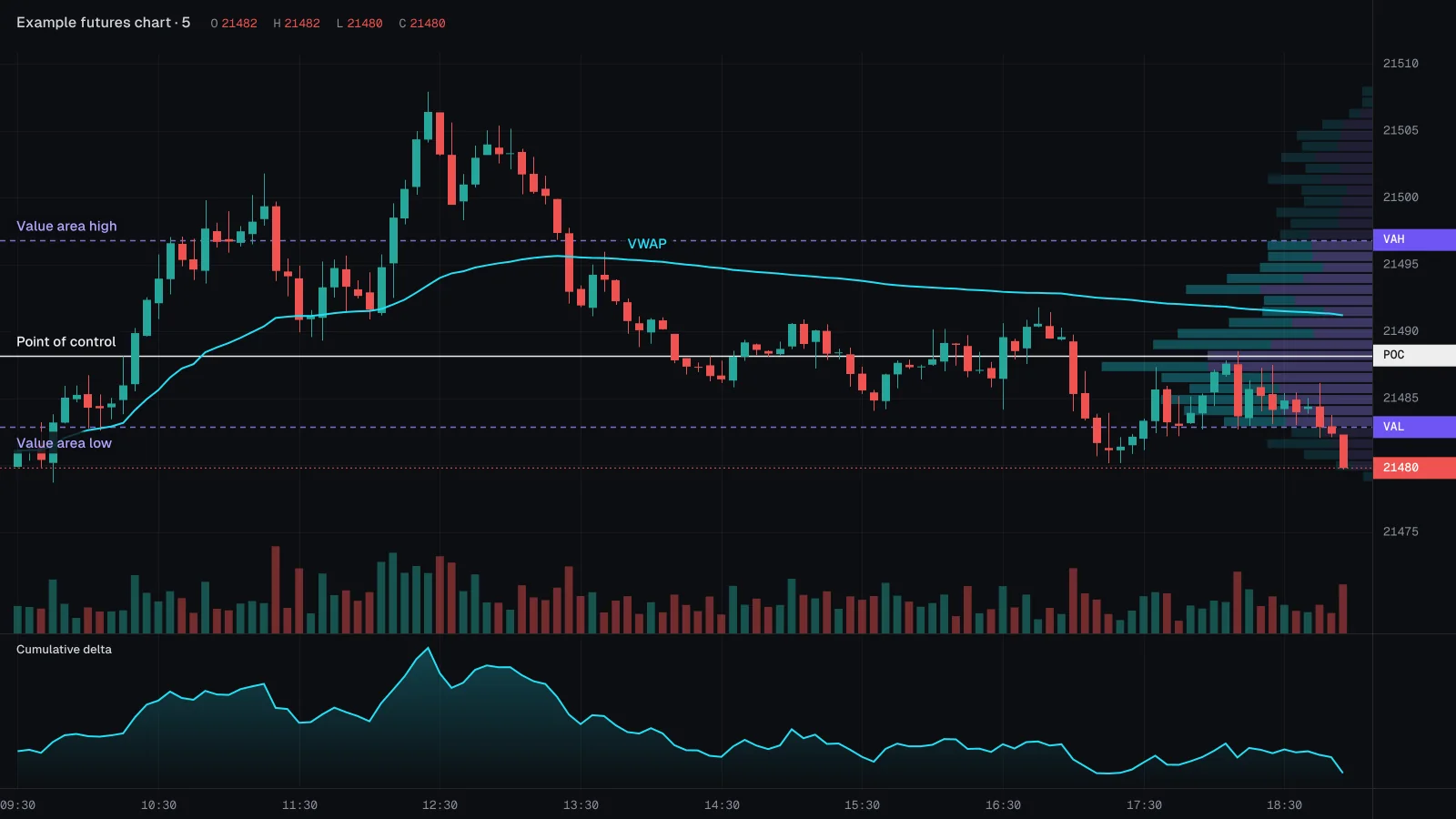
If these are new to you, start with our guides to order flow trading, footprint charts, cumulative volume delta, volume profile and VWAP. The standard library also covers the basics that every platform has, such as moving averages, RSI, MACD and ATR.
How to get Order Flow+
According to NinjaTrader's own cost guide, a funded NinjaTrader brokerage account gets Order Flow+ at no extra charge. US residents without a live account can subscribe to Sim+ for $35 a month, which includes Order Flow+, Market Replay and Level 1 data.
The platform plans are separate from the tools. NinjaTrader lists three: Free with no monthly fee, Monthly at $99, and Lifetime at a one-time $1,499. The plans change your commission per contract. The same guide notes a $35 fee on Free-plan accounts that log in but place no live trade in 30 days, so read the fee list before opening one.
Paid NinjaTrader indicators compared
Paid add-ons come from independent vendors, and prices run from a few dollars to several thousand. Compare the source and the price model before the features.
| Source | Price | What it is |
|---|---|---|
| Built-in and Order Flow+ | Included with a funded account, or $35 a month through Sim+ | NinjaTrader's own indicators and order flow tools |
| NinjaTrader Ecosystem | Set by each vendor. A "Free to Use" filter is available | The official directory of over 1,000 third-party apps. Vendors are independent of NinjaTrader |
| Affordable Indicators | One-time purchases, most between $29 and $79 | Indicators and trade tools built for NinjaTrader 8 only |
| Quantum Algo Zeno | $79 a month or $709 a year | Signal indicators for TradingView, not NinjaTrader. Listed for traders who chart on TradingView and execute elsewhere |
A listing in the Ecosystem directory is not an endorsement. NinjaTrader states that vendors and their products are independent and unaffiliated, so the checks below still apply.
Buy and sell signal indicators, and repainting
Many paid NinjaTrader indicators print buy and sell arrows. The question to ask is when the arrow is fixed. In NinjaScript, an indicator set to calculate on each tick can show an arrow that disappears before the bar closes. One set to calculate on bar close prints after the close and stays.
Test it with Market Replay. Play a past session forward at speed, note every arrow as it appears, then compare with the finished chart. Any arrow that moved or vanished repaints. Our guide to non-repainting indicators explains the mechanics.
Five checks before you buy an add-on
- A trial or a replay test. Run it on Market Replay or in simulation before paying.
- The data it needs. Order flow add-ons need tick data, and some need Order Flow+ or Level 2. Add those costs to the price.
- The licence terms. Check how many machines it covers and whether updates are included.
- Your connection. Confirm it works with the data feed your broker or prop firm gives you. See Rithmic vs Tradovate if you trade a funded account.
- A record, if it sells signals. Ask for calls published before the outcome. Screenshots of winning arrows prove nothing.
NinjaTrader or TradingView for indicators
NinjaTrader is stronger for order flow, because it reads tick and depth data natively. TradingView is stronger for signal indicators and for sharing scripts, and many futures traders chart on TradingView while placing orders on NinjaTrader or Tradovate.
Quantum Algo sits on the TradingView side. Our free indicators and the Zeno signal indicators run there, and Zeno calls are publicly verifiable on the track record page. For the wider picture, see the best indicators for futures trading and the best futures trading platform.
FAQs
What are the best indicators to buy for NinjaTrader 8?
Start with what you do not have to buy. The six Order Flow+ tools, including volume profile, volumetric bars and cumulative delta, come with a funded NinjaTrader account. Buy a third-party indicator only for a job those do not cover, and test it on Market Replay first.
Which NinjaTrader indicators are worth paying for when trading futures?
The ones that solve a problem you have already met. That may be an order flow display the built-in tools lack, or a trade management tool. An indicator that only promises accurate arrows, with no record of calls published in advance, is rarely worth the money.
Where can I buy reliable NinjaTrader 8 indicators?
The NinjaTrader Ecosystem is the official directory, with over 1,000 third-party apps and a filter for free ones. Vendors there are independent of NinjaTrader, so check trial terms, licence terms and data requirements yourself.
What are the best order flow indicators for NinjaTrader 8?
Volumetric bars, cumulative delta, volume profile, order flow VWAP and the market depth map, all part of NinjaTrader's own Order Flow+ set. Third-party order flow packages add different displays, and they still depend on the same tick data.
Is there a buy and sell signal indicator for NinjaTrader that does not repaint?
Yes, any indicator that calculates on bar close and does not redraw past signals. A sales page cannot prove that, so test it: replay a session, note each signal as it prints, and compare with the finished chart.
References
Quantum Algo resources
Method: we read NinjaTrader's Order Flow+ page, its cost guide and the vendor pages named above on 24 November 2026. NinjaTrader's cost guide states its rates as of 14 August 2026. We did not buy or run the third-party add-ons or rank them by profit.
Zeno: signals with the record attached
Zeno is the Quantum Algo premium tier on TradingView: five indicators, dedicated to each market. They give buy and sell signals with built-in risk management, and their calls are publicly verifiable on TradingView and on the track record page.
Read next
- NinjaTrader reviewPlatform
- Best indicators for futures tradingFutures
- Best MT4 and MT5 indicatorsMetaTrader
Trading involves substantial risk of loss. Nothing on this page is financial advice. An indicator, signal or bot is a tool and does not guarantee results. Past performance does not guarantee future results. Product names belong to their owners, and Quantum Algo is not affiliated with the other companies named here.