◆ The short answer
The best MT4 and MT5 indicators are the built-in ones you already have, 30 on MT4 and 38 on MT5, plus at most one paid tool that you have tested in the Strategy Tester first.
MetaTrader has thousands of paid indicators, and most traders need none of them to start. The platform ships with the standard set, and the MQL5 Market lets you test a paid one before buying. The picks, by job:
- Trend: Moving Average. A 50 and a 200 EMA show direction on any pair.
- Momentum: RSI or MACD. RSI 14 for stretch, MACD 12, 26, 9 for shifts.
- Volatility: ATR and Bollinger Bands. ATR 14 sets stop distance, Bands 20, 2 show squeeze and expansion.
- All in one view: Ichimoku at 9, 26, 52.
- One paid tool, if you need it: from the MQL5 Market, after a free demo run in the Strategy Tester.
Quantum Algo (QuantumAlgo) does not sell MetaTrader indicators. Our indicators run on TradingView, and the last section explains when that matters. Platform facts come from MetaQuotes, the maker of MetaTrader, and are listed under References.
- Built into MT4
- 30Indicators, 9 timeframes
- Built into MT5
- 38Indicators, 21 timeframes
- Activations per purchase
- 5 or moreTied to the computer
- Free demo
- Tester onlyNot on a live chart
- MQL4 on MT5?
- NoThe two are not compatible
What MT4 and MT5 indicators are
An MT4 or MT5 indicator is a program that calculates values from price and draws them on a MetaTrader chart. MT4 indicators are written in MQL4 and MT5 indicators in MQL5. The two languages are different, so an MT4 indicator file does not run on MT5.
Indicators come from three places: the set built into the platform, the free Code Base, and the paid MQL5 Market. All three are reached from inside the terminal.
The best built-in indicators by job
Pick one indicator per job. Two that measure the same thing add clutter and no information.
| Job | Indicator | Starting settings | What to read |
|---|---|---|---|
| Trend | Moving Average | EMA 50 and EMA 200 | Price above both is an uptrend, below both a downtrend |
| Momentum | RSI | 14 | Divergence, and the 50 line as a trend filter |
| Momentum shift | MACD | 12, 26, 9 | Crosses and histogram turning |
| Volatility | ATR | 14 | Stop distance, for example 1.5 times ATR |
| Range and squeeze | Bollinger Bands | 20, 2 | Narrow bands before a move, band walks in a trend |
| Timing | Stochastic | 5, 3, 3 | Turns from the extremes in the trend's direction |
| Whole picture | Ichimoku | 9, 26, 52 | Price against the cloud, and the cloud's colour |
Volume on a forex or gold CFD chart is tick volume, a count of price changes from your broker and not traded size. Treat volume indicators there as a rough guide.
MT4 vs MT5 for indicators
MetaQuotes lists the differences itself. MT5 has more of everything that matters for analysis, and it is where MetaQuotes adds new features.
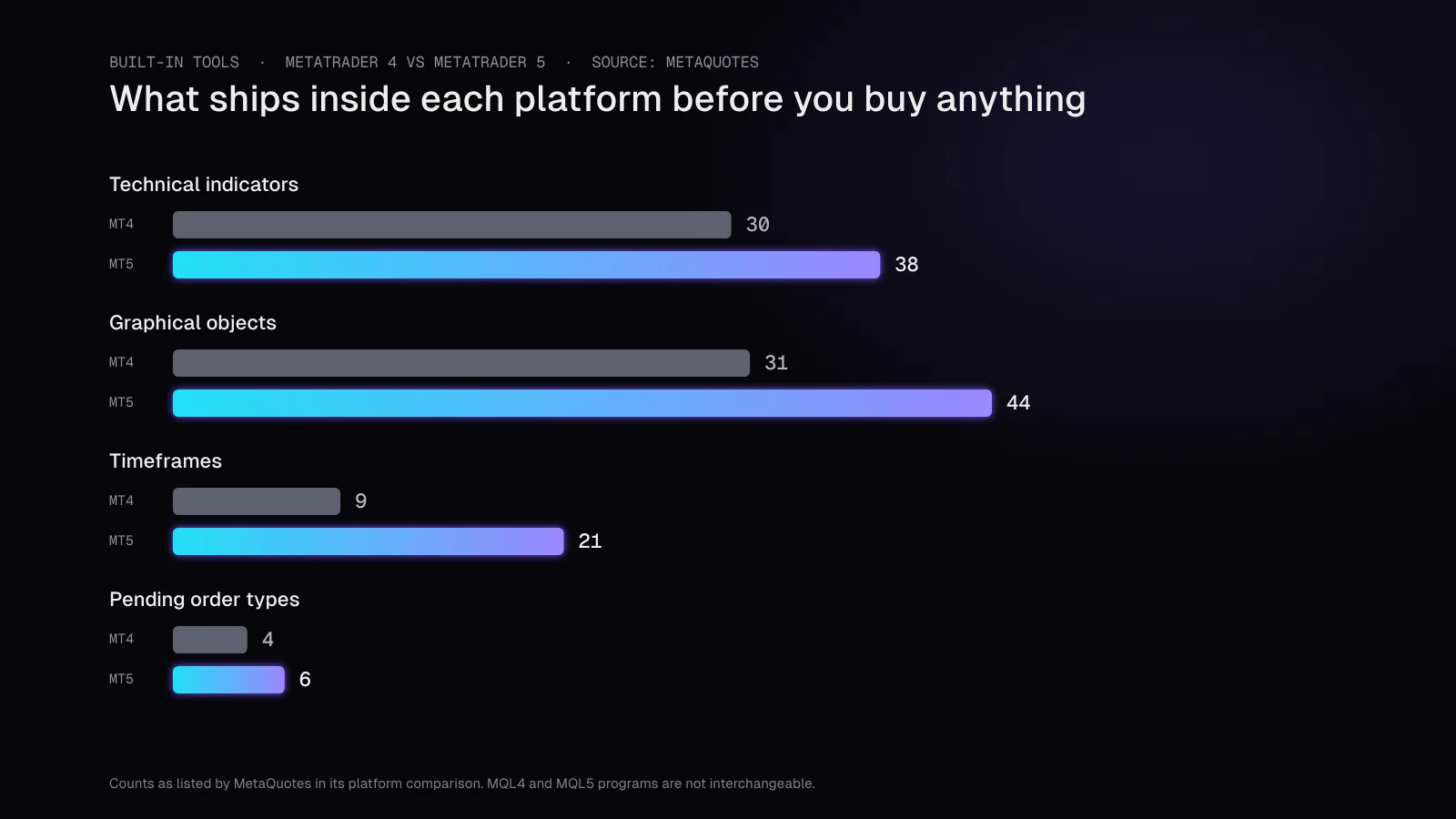
MT4 remains common because many brokers and older indicators still use it. If you are starting now, choose MT5 unless a tool you depend on exists only for MT4. Our guide to the best MetaTrader alternatives covers the other platforms.
How buying on the MQL5 Market works
The rules are set by MetaQuotes and apply to every product. Its help page describes them:
- You need an MQL5 account, set in the terminal under Tools, Options, Community. Payment goes through that account.
- Each purchase comes with at least five activations. An activation ties the product to one computer's hardware and operating system, not to a broker or a trading account.
- Activations are not returned when you remove the product from a machine. A new computer uses another one.
- The free demo runs only in the Strategy Tester. An indicator demo cannot be placed on a live chart, and can be watched in the tester's visual mode.
- Many products can be rented. The author sets the periods and the fee for each.
Buy inside the terminal or on the MQL5 website only. An indicator file sent over a chat app has no licence, no updates and no checks on what it does to your terminal.
How to test a paid indicator for repainting
A repainting indicator changes its past signals, so its history looks better than what you would have seen live. The free demo is enough to catch it.
- Download the demo from the product page with Free Download.
- Open the Strategy Tester, select the indicator and switch on visual mode.
- Run a few weeks of data at slow speed and pause each time a signal prints. Note the bar and the price.
- Let the test finish and compare your notes with the final chart. A signal that moved or vanished repaints.
For the full explanation, see our guide to non-repainting indicators.
MT4 and MT5 indicators for gold
The same built-in indicators work on gold, with two differences. Gold moves further per day than most currency pairs, so ATR matters more for stop distance. And brokers name and size the contract differently (XAUUSD, GOLD, different digits), so check the contract specification before copying anyone's settings in pips.
Our guide to the best indicator for XAUUSD covers the chart side, and the lot size calculator for forex and gold handles the sizing. If a prop firm account is the goal, see prop firms that use MT4.
MT5 or TradingView indicators
You do not have to choose one. MetaTrader is where many forex and gold brokers execute. TradingView is where most new indicators are published and shared. A common setup is to read the chart on TradingView and place the order in MT5.
Quantum Algo works that way. Our free indicators and the Zeno signal indicators run on TradingView, the calls are publicly verifiable on the track record page, and QuantumBot can place Zeno signals on MetaTrader 5 brokers. See also the best forex indicator.
FAQs
What are the best paid MT5 indicators for forex and gold?
There is no single best one, and the built-in set covers trend, momentum and volatility for free. If you buy, choose a product on the MQL5 Market whose free demo you have run in the Strategy Tester on the pair you trade, and check that its past signals do not change.
Which MT4 indicator is worth buying?
One that does a job the built-in indicators cannot, such as a session or multi-timeframe display you would use daily. An indicator sold on the promise of accurate arrows is worth buying only after the repaint test above.
What is the best MT4 buy and sell signal indicator that is not a scam?
A sales page cannot tell you. Use the checks: sold on the MQL5 Market, a free demo you can run in the tester, signals that do not move after the bar closes, and no promise of a win rate. If a seller refuses a test, do not buy.
Should I use MT5 indicators or switch to TradingView indicators?
Use both if your broker is on MetaTrader. Keep executing in MT5 and read charts on TradingView, where most new indicators are published. You only need to switch platforms if your broker offers TradingView trading directly.
Do MT4 indicators work on MT5?
No. MT4 indicators are written in MQL4 and MT5 indicators in MQL5, and the files are not interchangeable. Many popular indicators exist in both versions, so look for the MT5 edition by name.
References
Quantum Algo resources
Method: we read the MetaQuotes platform comparison and Market help pages on 24 November 2026. Starting settings are common defaults, not optimised values. We did not buy or rank paid Market products.
Zeno: signals with the record attached
Zeno is the Quantum Algo premium tier on TradingView: five indicators, dedicated to each market. They give buy and sell signals with built-in risk management, and their calls are publicly verifiable on TradingView and on the track record page.
Read next
- Best forex indicatorForex
- Best MetaTrader alternativesPlatforms
- Best NinjaTrader indicatorsNinjaTrader
Trading involves substantial risk of loss. Nothing on this page is financial advice. An indicator, signal or bot is a tool and does not guarantee results. Past performance does not guarantee future results. Product names belong to their owners, and Quantum Algo is not affiliated with the other companies named here.